119
7000056136-0
EN
Fault diagnosis
1
Ext. Temp. Sensor
defective
Heater Heater
1
1 Fault diagnosis
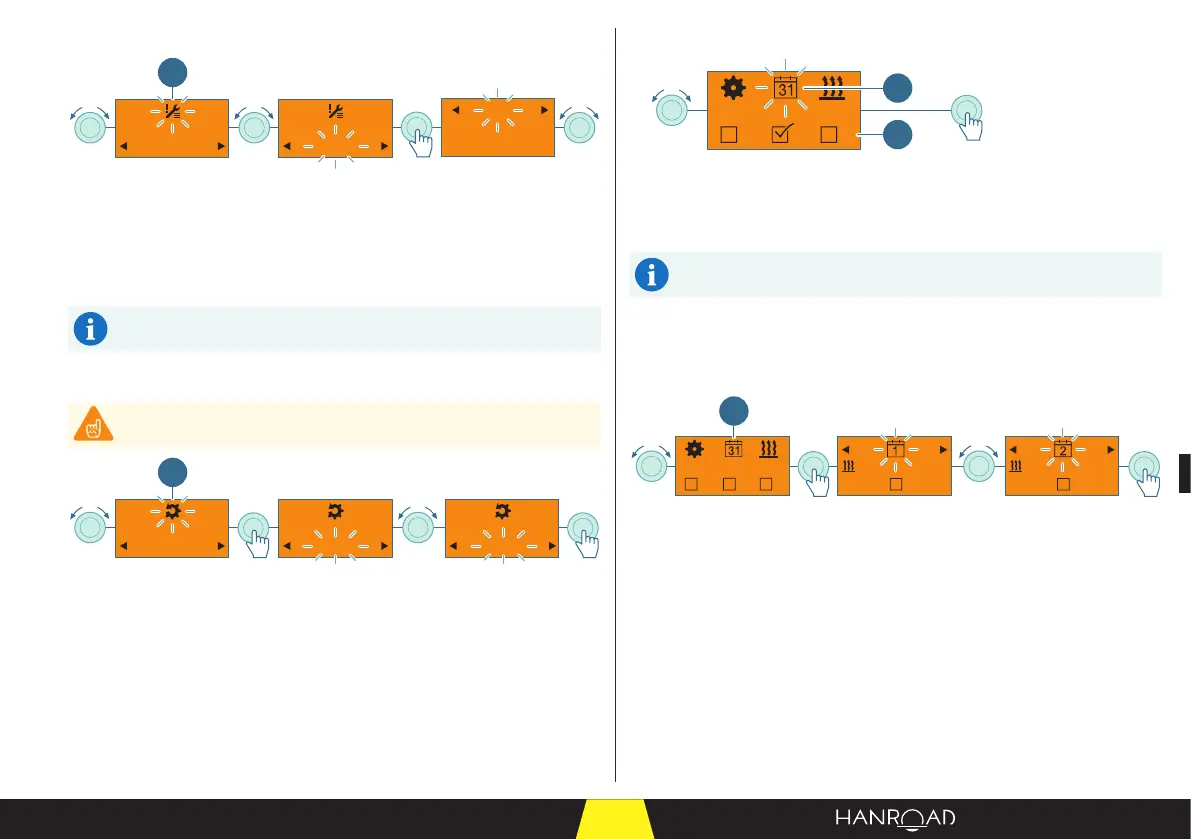
■ Select the fault diagnosis function by turning the control knob.
■ Press the control knob to conrm.
■ Select and conrm the connected heater or control unit.
■ The faults are displayed in the order in which they occur.
For heater fault messages, see page 135.
Resetting the user parameters
Please note that this function resets all stored settings.
Non Non Oui
1
1 Resetting the parameters
■ Select the user parameter reset by turning the control knob.
■ Press the control knob to conrm.
■ Select "Yes" to reset the user parameters.
■ Select "No" to keep the current user settings.
■ Press the control knob to conrm.
5.6.8 - Programming the timer
1 2 3
1
2
1 "Timer programming" mode
2 Timer (T1, T2, T3)
It is possible to program 3 timers.
If a timer is active, a tick is displayed (example T2).
■ Select the "Timer programming" mode by turning the control knob.
■ Press the control knob to conrm.
Timer selection
07:00
Mo-Fr
30min
19°
07:00
Mo-Fr
30min
19°
1 2 3
1
1 Timer (T1, T2, T3)
■ Select the timer by turning the control knob.
■ Press the control knob to conrm.



 To Next Page