84
7000056136-0
EN
3.11 - Roof rack
1
2
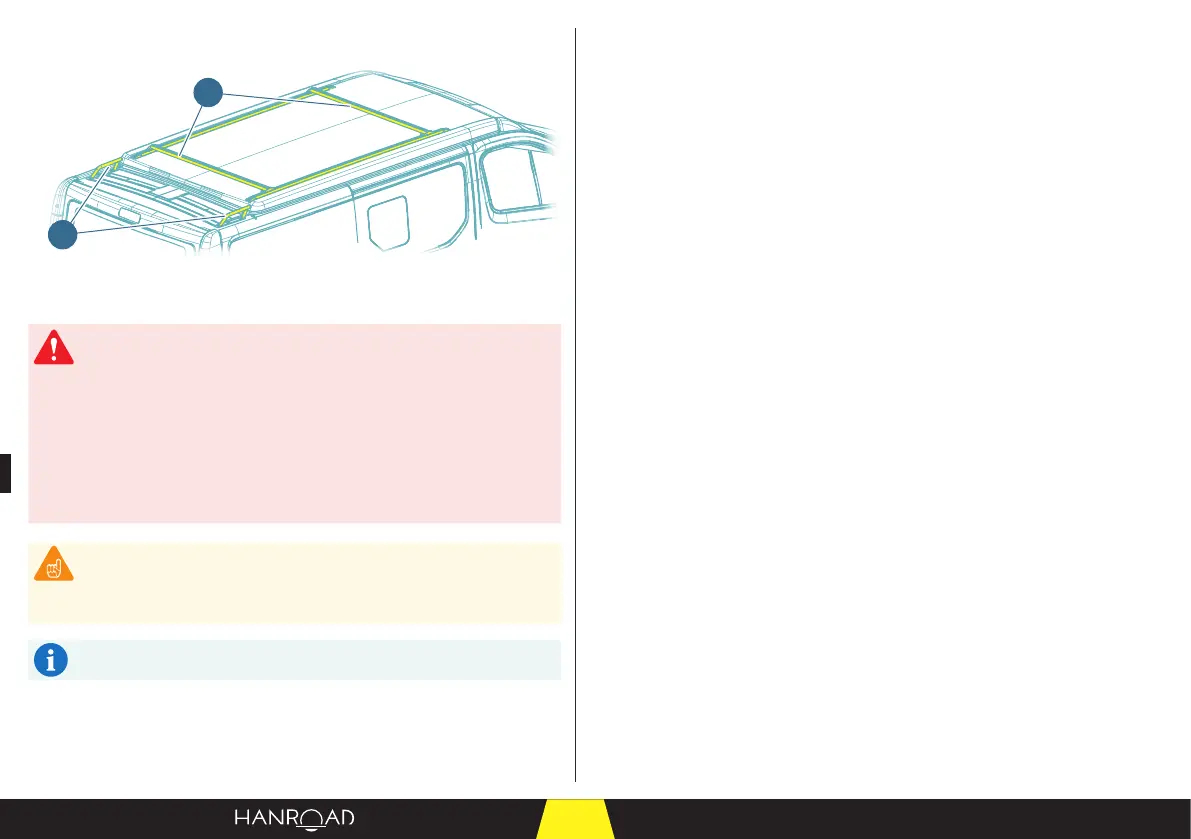
1 Roof rack
2 Small roof rack
The load must be placed and rested on the bars of the roof rack (1).
The load must not touch the van roof.
The load must be well secured and must not cause any
deformation of the pop-up roof.
Do not place a load on the roof rack (1) that is likely to have a
strong wind load.
Carrying a load on the roof rack (1) changes the centre of gravity
and the driving behaviour of the van (road holding, acceleration,
braking, etc.).
The roof rack (1) can support a maximum weight of 15 kg (roof
closed).
The small roof rack (2) is for aesthetic purposes only. Do not use it to
carry a load or as a point to attach a strap.
The small roof rack (2) is only available on models 4XL, 5XL, 5+XL.
3.12 - Electrical power supply
3.12.1 - Powering the equipment
The electrical power supply for the equipment in the cabin (refrigerator, interior
and exterior lighting, battery, charger, water pump, etc.) is managed via the
instrumentation and control panel.
This interface contains several instrumentation, control, and alarm features for
the components of your vehicle.
Instrumentation
– Checking the battery voltage (see page 87).
– Checking the lling of the fresh water tank (see page 89).
– Checking the ll level in the fresh water tank (see page 124).
Control
– Switching on the lighting, refrigerator, and socket outlets (see page 85).
– Putting the water pump in service (see page 124).
Alarm
– Fresh water tank level alarm (see page 124).
– Waste water tank ll alarm (see page 127).
– Cabin and engine battery alarm (see page 110).
– Interior and exterior temperature alarm (see page 109).
– Setting the acoustic alarms (see page 108).
– Setting the alarm thresholds (see page 108).
In addition, this interface displays temperatures and is personalisable.
– Personalising the interface (see page 107).
– Inside and outside temperature alarm display (see page 109).


 To Next Page