107
7000056136-0
EN
5.5 - Electrical power supply
5.5.1 - Setting the alarm thresholds and personalisation
12V
PC210
5
25
ext.
T
1
1 Instrumentation and control panel
See the description on page 85.
User programming
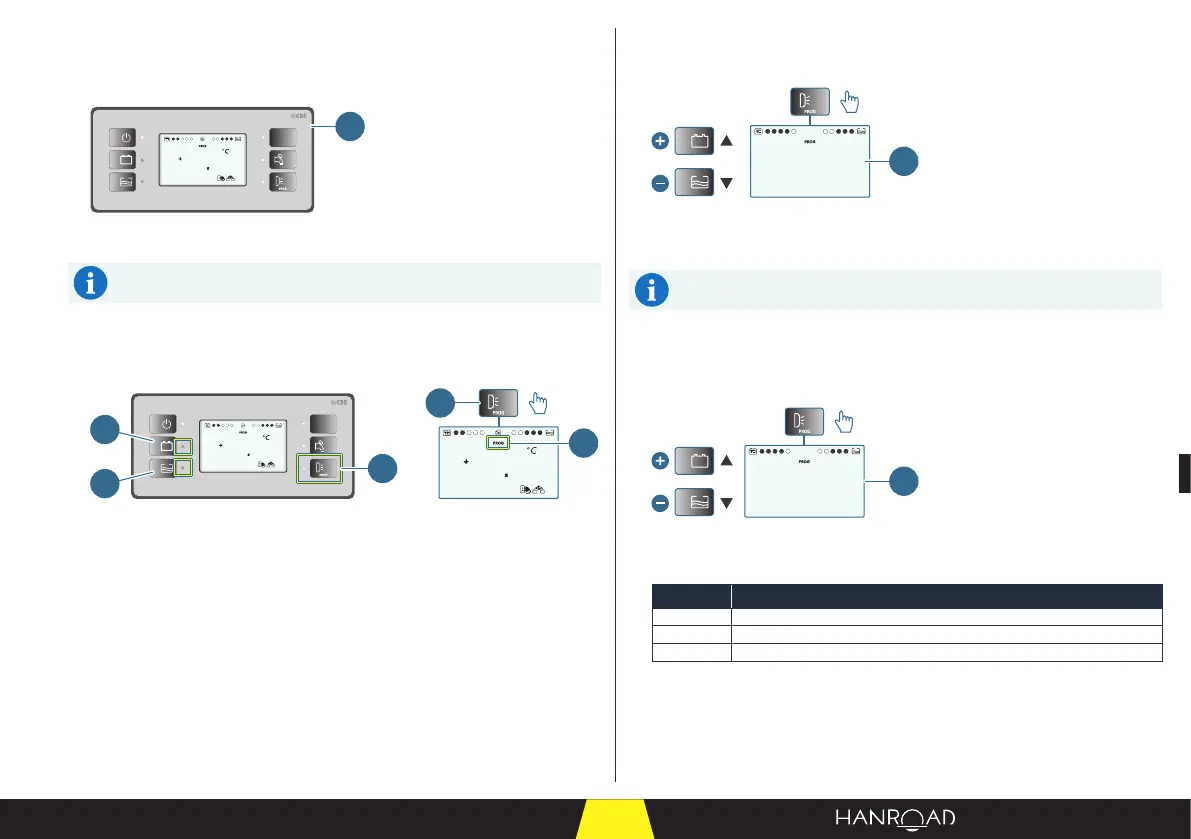
This menu is used to personalise the interface and set the various alarms.
5
25
ext.
T
12V
PC210
5
25
ext.
T
1
3
4
>2s
2
1
1 User programming button
2 User programming mode
3 Setting adjustment button (▲)
4 Setting adjustment button (▼)
■ Press the user programming button (1) and hold for more than two seconds
to enter user programming mode.
"Backlight colour" menu
■ Press the user programming button to display the "Backlight colour" menu.
C7
1
1 "Backlight colour" menu
■ Change the backlight colour of the screen using the (▲) and (▼) keys.
There are 12 dierent lighting ambiances (C1 to C12).
"LED brightness" menu
■ Press the user programming button again to display the "LED brightness"
menu.
L 3
1
1 "LED brightness" menu
■ Change the value using the (▲) and (▼) keys.
Value Description
L1 Minimum brightness
L2 Medium brightness
L3 Maximum brightness



 To Next Page