89
7000056136-0
EN
Filling
Take care not to confuse the fresh water ll port with the fuel tank
ll port.
In case of error, the fresh water circuit must be completely drained
and cleaned.
The fresh water tank is equipped with an overow system.
1
1
B
A
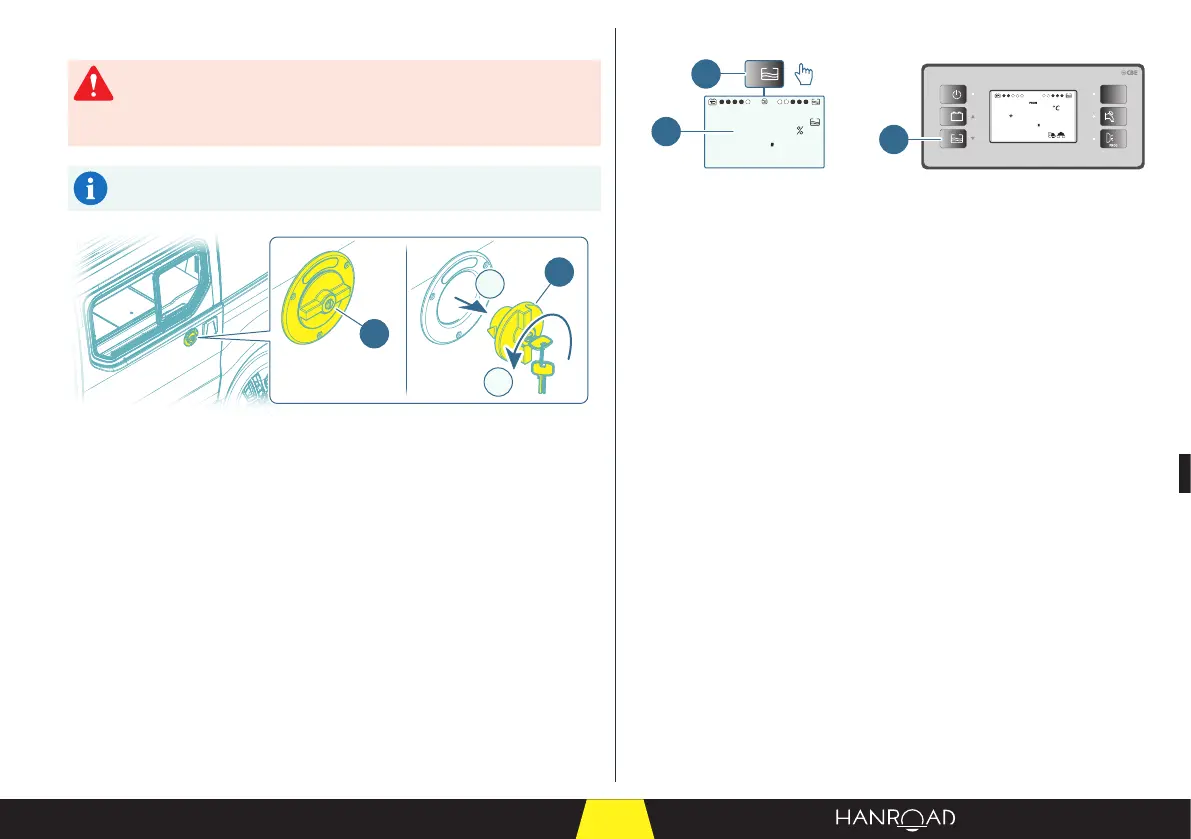
1 Fresh water ll port
The tank is lled from the outside via the port located on the le-hand side of
the vehicle.
■ Use the special key to unlock the cap.
■ Remove the cap.
■ Insert the water supply hose.
■ Fill the tank with fresh water.
Checking the ll level
12V
PC210
5
25
ext.
T
0
60
1
1
2
>4s
1 Fresh water tank ll monitoring button
2 Fresh water tank level (%)
■ On the control panel, press the fresh water tank ll monitoring button and
hold for at least four seconds to enable the function.
– The "Filling" screen is displayed.
– An audible signal indicates that lling can begin.
As lling progresses, there are beeps to indicate the level in the tank:
– 75% full: one short beep.
– 85% full: two short beeps.
– 95% full: one long beep.
■ When the tank is full, press the fresh water tank ll monitoring button to quit
the function.
■ Remove the water supply hose.
■ Reposition the cap and lock it.
3.14 - Waste water
■ Check that the waste water tank is empty before you leave. If not, empty it
(see page 140).



 To Next Page