123
7000056136-0
EN
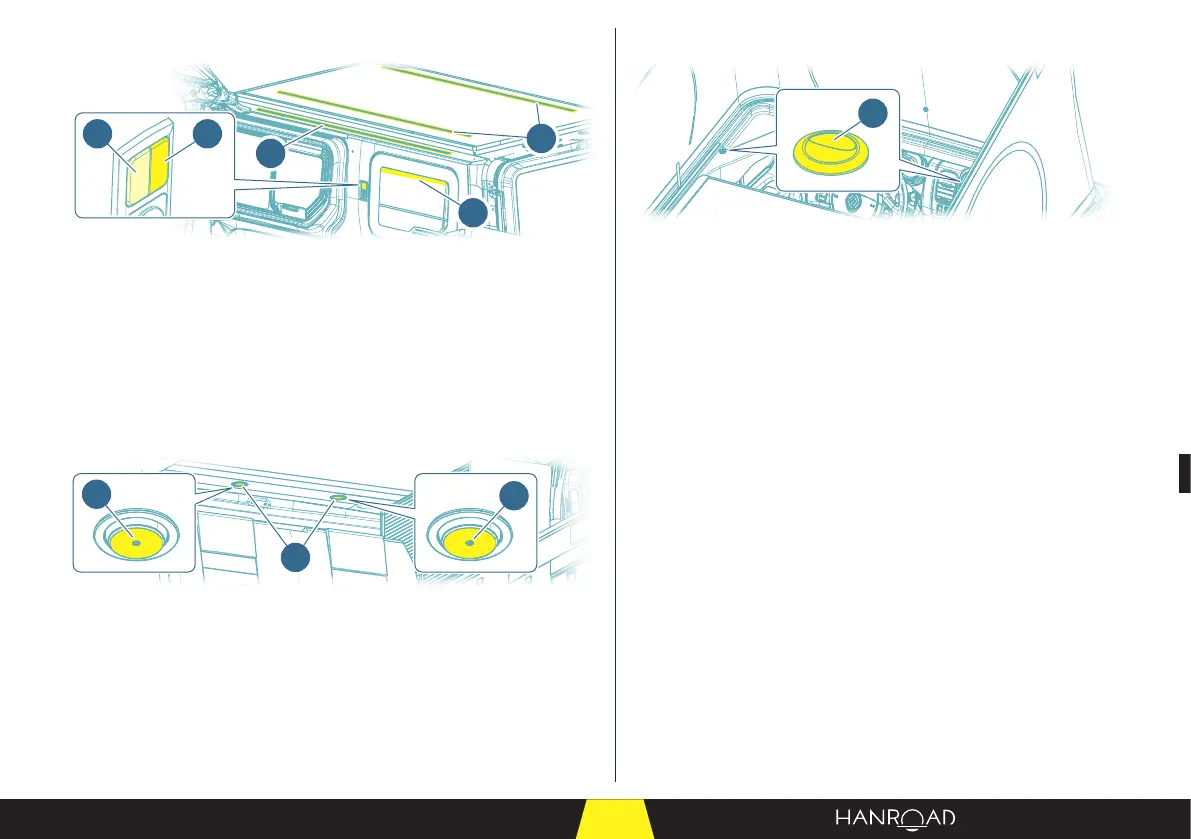
5.8.3 - Magazine rack side
4
3
3
1 2
1 LED panel switch
2 Magazine rack lighting and reading light switch
3 LED panel
4 Magazine rack lighting
A double switch located beside the sliding door lights up:
– In one case, the magazine rack.
– In the other case, the panels of LEDs at roof level.
5.8.4 - Rear of the vehicle
2
2
1
1 Reading light
2 Switch
Two reading lights (1) are located on the upper crossbar of the boot.
■ Press the logo in the centre of the switch (2) to switch the reading light (1) on
or o.
5.8.5 - Pop-up roof
1
1 Switch
Panels of LEDs are installed on either side of the pop-up roof.
■ Use the right-hand switch to switch on the LED panel on the right.
■ Use the le-hand switch to switch on the LED panel on the le.
5.8.6 - Other lighting
Time-delay lamps are located under the bench and in the boot.
They light up when the boot is opened and switch o when it is closed.


 To Next Page