117
7000056136-0
EN
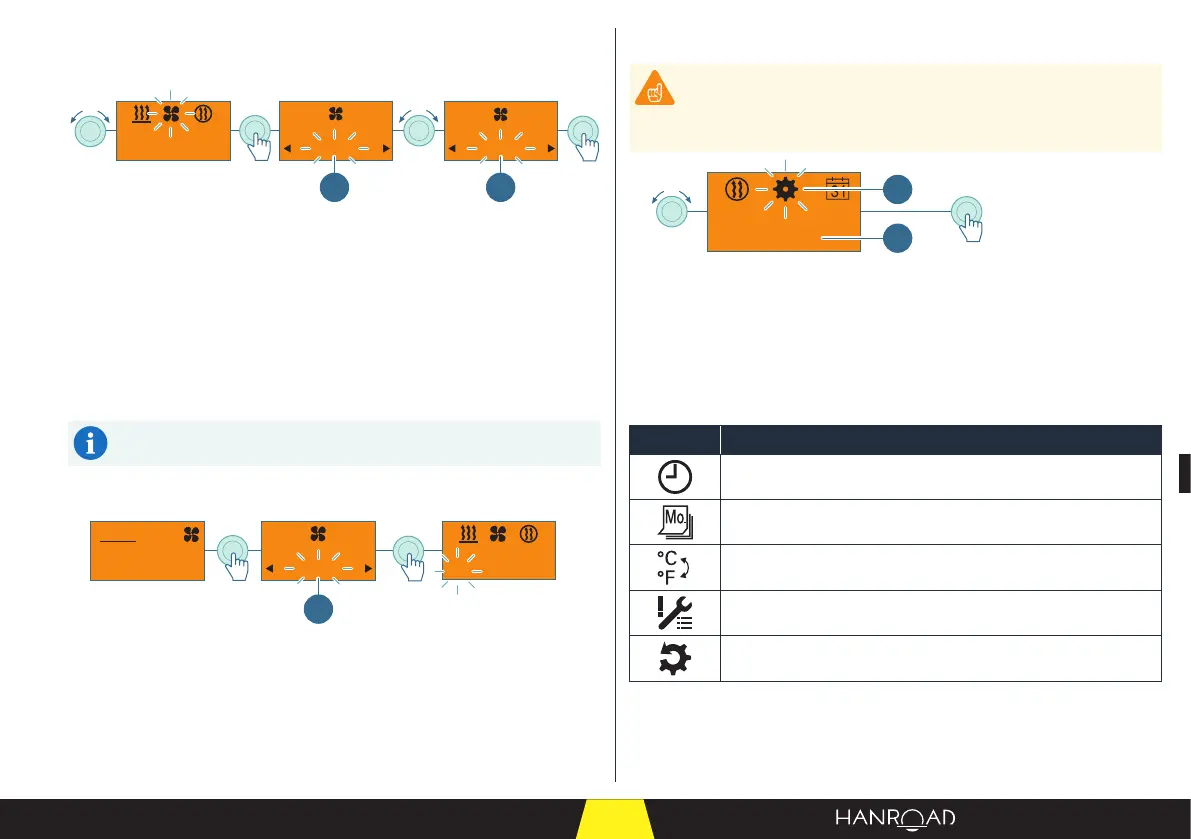
5.6.6 - Ventilation
Switching on
off
20min 30min
1 1
1 Ventilation operating time
■ Select the "Ventilation" mode by turning the control knob.
■ Press the control knob to conrm.
■ Set the operating time by turning the control knob.
■ Press the control knob to conrm.
The ventilation starts with the set operating time.
The light ring lights up blue.
The remaining ventilation time is displayed.
The ventilation stops at the end of the set operating time.
Stop
off
30min
Heater
off
1
1 Stopping ventilation
■ During ventilation, press the control knob.
■ "O" ashes in the input eld.
■ Press the control knob to conrm.
Ventilation is stopped. The light ring goes out.
5.6.7 - Settings
The heating control is set by your dealer before delivery. The
adjustment procedure is given as a guide.
Contact your nearest authorised dealer for the adjustment of the
heating control.
Th 10:15
2
1
1 "Setting" mode
2 Day of the week and current time
■ Select the "Settings" mode by turning the control knob.
■ Press the control knob to conrm.
The day of the week and the current time are displayed in the status bar.
Meaning of the symbols
Symbol Description
Setting the hours
Setting the day of the week
Setting the temperature format
Fault diagnosis
Resetting the user parameters



 To Next Page