124
7000056136-0
EN
5.9 - Water supply
5.9.1 - Checking the fresh water level
5
25
ext.
T
1
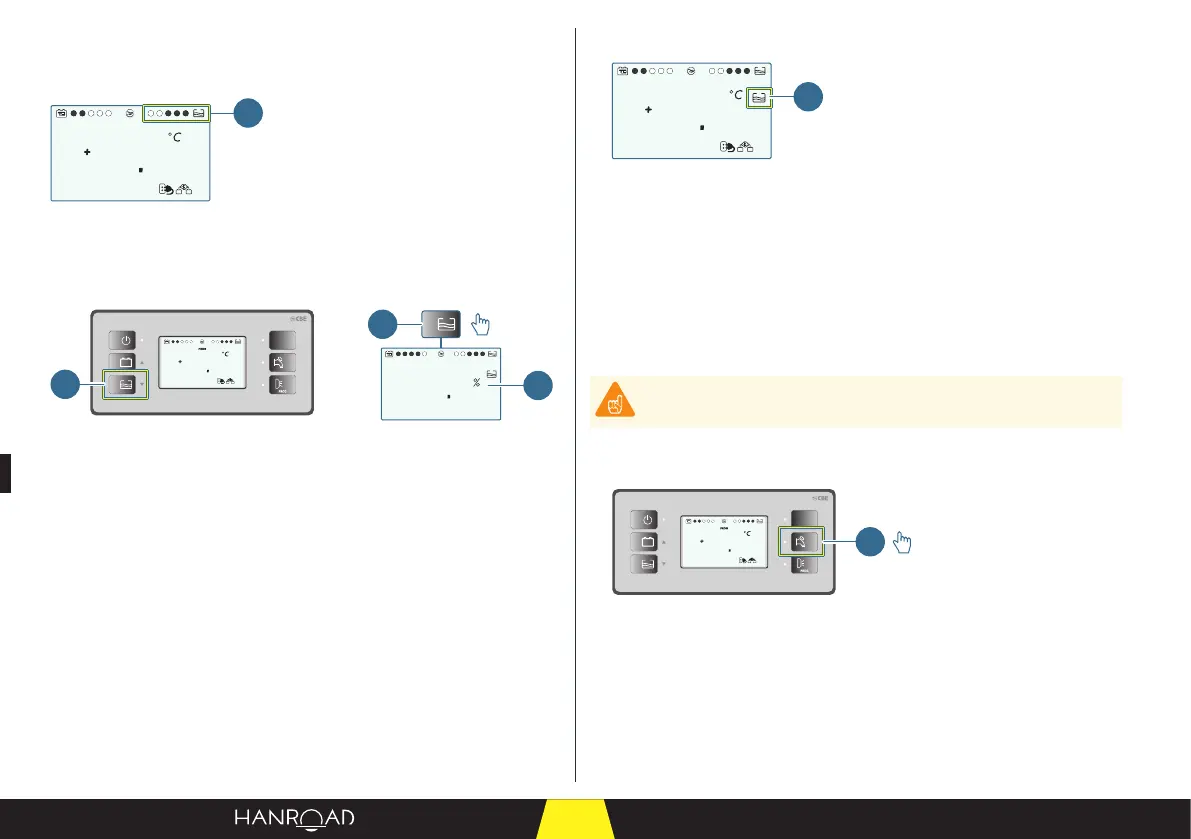
1 "Fresh water tank level" bar graph
The bar graph on the controller screen indicates the fresh water level in the
tank. It is displayed on a level from 1 to 5 (example 3 out of 5).
0
60
12V
PC210
5
25
ext.
T
1
2
1
1 Fresh water tank ll monitoring button
2 Fresh water tank level (%)
■ Press the fresh water tank level check button to display the quantity of fresh
water in the tank.
This indicator shows the ll level (as a %) in the fresh water tank.
5.9.2 - Fresh water tank level alarm
5
25
ext.
T
1
1 "Fresh water tank empty" indicator
This alarm appears when the level in the fresh water tank is below 10%.
The alarm is indicated by:
– The ashing of the "Fresh water tank empty" indicator.
– A sound (only when the engine is o).
This alarm disappears when the level in the fresh water tank is above 20%.
5.9.3 - Putting the fresh water pump in service
Never run the water pump when the fresh water tank is empty.
To put the fresh water circuit in service and therefore under pressure, you must
activate the fresh water pump.
12V
PC210
5
25
ext.
T
1
1 Water pump control button
■ Press the water pump control button (1) to operate the fresh water tank
pump.



 To Next Page