125
7000056136-0
EN
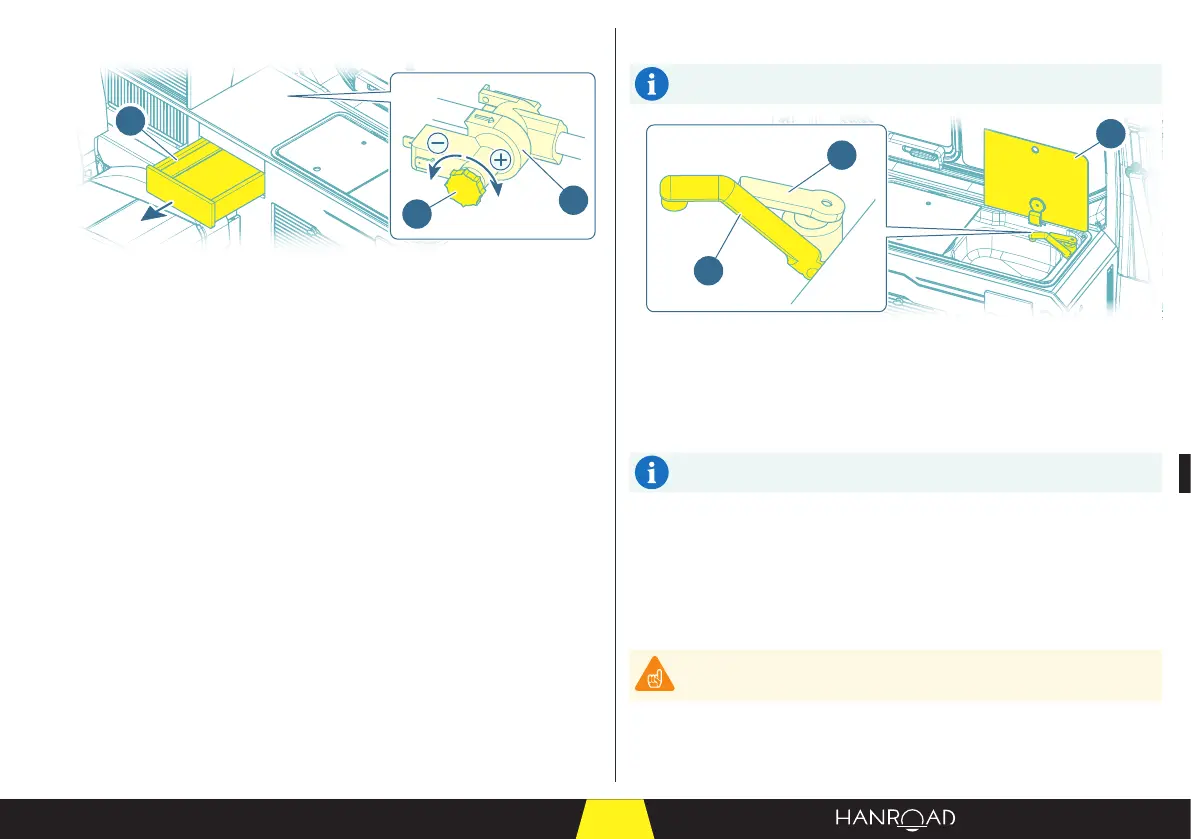
5.9.4 - Setting the water pressure
1
3
2
1 Pressure switch
2 Pressure adjustment knob
3 Drawer
The pressure switch is installed under the drawer (3). It is used to adjust the
water pressure in the fresh water circuit.
■ Remove the drawer (3) to gain access to the pressure switch (1).
■ Turn the adjustment knob (2) to adjust the pressure:
– Clockwise to increase the water pressure in the circuit.
– Anticlockwise to decrease the water pressure in the circuit.
5.9.5 - Mixer tap and sink
To obtain water from the tap, rst check on the control panel that the
water pump is in service (see page 124).
2
1
3
1 Tap
2 Lever
3 Sink protection plate
The mixer tap installed in the sink of the kitchen unit provides warm water
according to the setting chosen.
To obtain hot water, the hot water package option must be installed,
and the water must be pre-heated.
■ Open the sink protection plate (3).
■ Li the tap (1).
■ To adjust the water temperature, turn the lever (2).
■ Li the lever (2) to run the water.
■ Lower the lever (2) to shut o the water.
Aer use, return the installation to its initial state.
Do not leave stains from acidic or alkaline substances (vinegar, salt,
lemon juice, etc.) in the sink. Rinse promptly aer the stains appear.
■ Collapse the tap (1) all the way down.
■ Close the sink protection plate (3).



 To Next Page