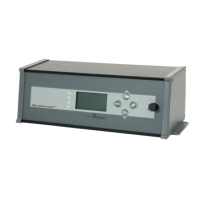
1.1 Display and control elements
Display 1: Shows the operation mode of the wood boiler – when lit “Boiler ON”.
Display 2: Refuel signal. Displays when additional fuel can be added. Only in operation mode “Boiler OFF”.
Display 3: Error indicator “red” – illuminates when an error occurs, which prevents heating.
Follow the displayed instructions.
Display 4: Error and note indicator “amber” – illuminates in case of an error or if a note is displayed. Leaves boiler
operation possible. Follow the displayed instructions.
Display 5: Illuminated text display. If the boiler is switched off and there is no error or note, the screen will automatically
go dark after 15 minutes (power saving function). Press any button to deactivate the power saving function.
After deactivating this function all buttons will function normally.
Button 6 ▲: This button has multiple functions: navigating through the menus, changing set values, deactivating the KLA
function.
Button 7 ▼: This button has multiple functions: navigating through the menus, changing set values, activating the KLA
function (KLA function is not available for all boiler types).
In “Boiler OFF”, Button 7 (▼) is also used to call up or end the service program (“Service small/large”).
Please take notice of the note “Service” displayed.
If the firing process is started after a successful service, it is possible to change directly into the firing program
by pressing Button 9 (►) without ending the service function first. However, the service interval will not be
reset in that case.
Safety Shutdown: Pressing Button 7 (▼) twice, in “Boiler ON” mode, shuts off the boiler.
Please note: This shutdown is for emergency situations only, not a general operating function!
Please note text instructions.
Button 8 ◄: To enter the menu “Selection” and select a menu item or value. The buttons 6 (▲) and 7 (▼) are used to query
information and/or settings can be changed (button 6: up in the menu, button 7: down in the menu). To
confirm changed settings, press button 8 (◄).
Button 9 ►: To fire (in “Boiler OFF“) or to refuel (in “Boiler ON“). Button 9 (►) is also used to leave a menu or to switch
to the next higher menu.
Fire: Press the button once to leave the power saving mode. Press it twice to activate the flue gas fan and enter
the safety program for “Open door(s)”. After the refuel program starts.
Please follow the displayed instructions.
If the refuel program was activated by mistake, press button 9 (►) to deactivate it.
Once the required flue gas temperature is reached an audible alert sounds to indicate that the door(s)
need to be closed. Then “Display 1”illuminates – “Boiler ON”.
Please follow the displayed instructions.
Refuel: Is the “Boiler ON” and button 9 (►) is pressed the safety program for “Open door(s)” is entered and the
refuel program starts. The fuel must be added quickly. Then the fuel door must be closed immediately.
Please follow the displayed instructions.
“Refuel” is displayed for about 5 minutes – regardless of the actually required time to refuel.
Button 10: Reset button of the electronic safety temperature limiter (STB). If the STB was set off due to a too high
boiler temperature and that temperature then dropped 86°C or lower, button 10 can be used to reset STB
manually.
Please follow the instructions displayed.
After pressing button 10 the error display will be deleted automatically.


 To Next Page