Chapter 3
3.2. Configuration of the Heska Element COAG
™
Analyzer
4.
Touch
Yes
in the dialog box when asked to confirm that you want to upgrade,
otherwise, touch No.
5.
Wait for the Analyzer to apply the upgrade and reboot. When the instrument starts
up anew, the upgrade has been applied and the new software version will be
printed in the Current Software version text field.
i
Software upgrade requires that you obtain a USB memory stick containing an
installer for the new software from Heska Corporation or from your Distributor.
3.2.3. Copy Data from the Analyzer
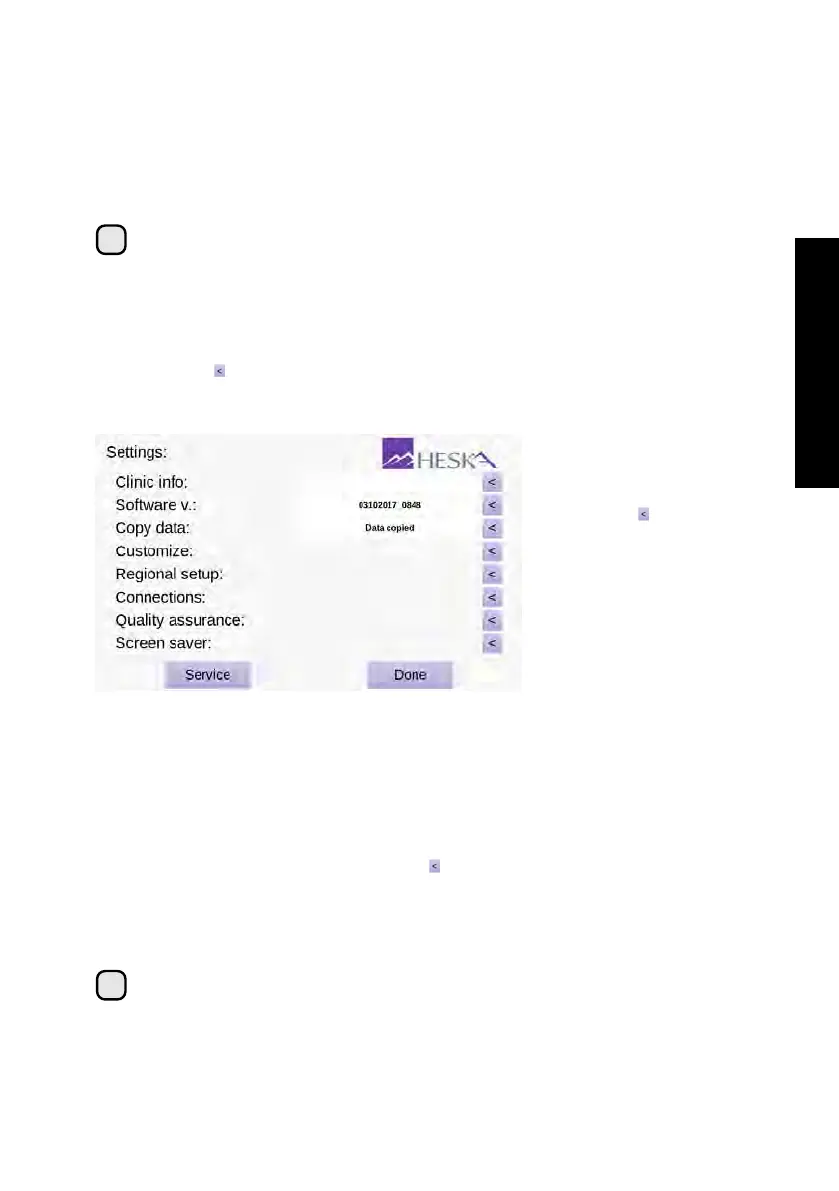
All test data and results stored in the Analyzer can be copied to a USB memory stick
by touching the to the right of the Copy data category in the Settings Menu, see
Figure 3.5.
Figure 3.5:
Measurement
data can be copied
from the instrument
by touching to the
right of the Copy data
category in the Settings
Menu. When the data
transfer is complete,
Data copied will be
printed in the text field
next to the Copy data
category.
To copy data from the Analyzer to a USB stick:
1.
Unplug any device that may be plugged into the USB port at the back of the
Analyzer.
2.
Insert a USB memory stick into the USB port and wait 10 seconds for the Analyzer
to register the memory stick.
3.
From the Settings Menu touch the purple to the right of the Copy data category.
The data transfer will begin and Copying data. . . will appear in the status text field.
4.
When the data transfer is complete Data copied will appear in the status text field.
5. Remove the USB stick and reconnect any device that was unplugged.
i
If a USB error message appears, check if the USB memory stick is properly
inserted into the USB port and assure that the USB stick is not defective.
17



 To Next Page