3. Configuring the Heska Element COAG
™
Analyzer
3.2.4. Customize
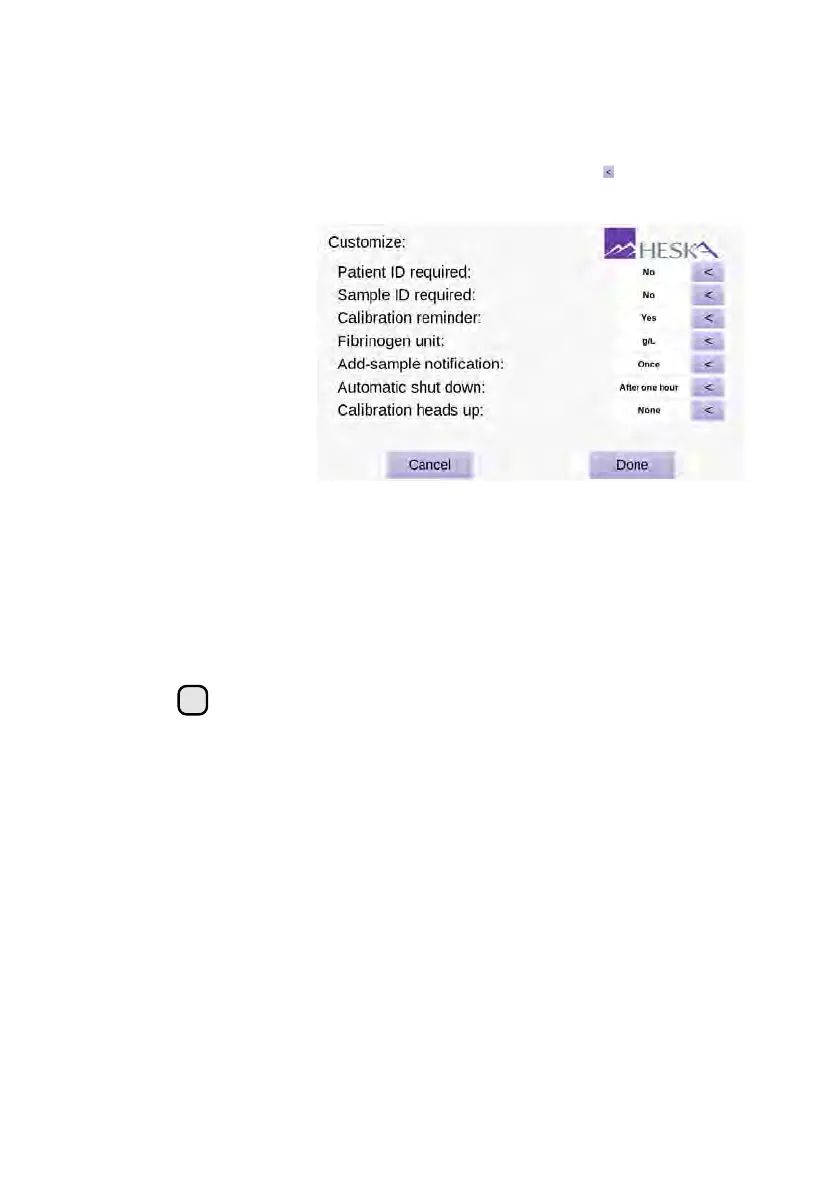
The Customize screen is shown in
Figure 3.6
. To enter the Customize screen touch
the
Setup
button on the Analyzer’s Home Screen and touch the to the right of the
Customize category in the Settings Menu.
Figure 3.6:
Customize.
From the Customize
screen it is possible
to customize whether
or not Patient and
Sample ID must be
supplied during the
test sequence, the unit
for test results and
frequency between
notifications.
In the Customize menu, you can change the defaults for the following settings in the
Heska Element COAG
™
Analyzer:
Patient ID Required
By default, this feature is deactivated but should be activated when
used together with LIS as this field is used by many LIS systems to identify the
test result for a particular patient. When Patient ID required is set to Yes, it is
not possible to continue a test sequence without supplying information about the
Patient ID.
i
Requiring Patient ID is highly recommended when using Heska Element
COAG
™
with a LIS, since editing the Patient ID is no longer possible after
testing. For LIS users, please note that the Patient ID field is used as a
unique identifier denoted as Practice Assigned ID (See
Section 3.2.6.2
).
Sample ID Required
By default, this feature is deactivated but can be activated if the
clinic wishes to have information in the Sample ID field in the results history (can
be used to search for a particular result). When Sample ID required is set to Yes it
is not possible to continue a test sequence without supplying information about
the Sample ID.
Calibration Reminder
By default is set to no, and does not remind you when the next
Fibrinogen calibration is due. Should an analyzer require fibrinogen calibration,
please contact Heska Technical Services.
Fibrinogen Unit
Includes a selection of available units that is used for the Fibrinogen
Test results. Possible choices are: grams per liter (g/L), milligrams per deciliter
18



 To Next Page