Chapter 3
3.2. Configuration of the Heska Element COAG
™
Analyzer
6. Touch Done to confirm and return to the Settings Menu.
i
Touching
Cancel
clears any undesired change(s) and touching
Done
confirms
the change(s).
i
As the instrument uses an embedded operating system, it has no physical
means of adding new custom printers. If the available printers do not match
your preference, it is recommended to use Heska Element COAG
™
Auto-printer
instead. Heska Element COAG
™
Auto-printer is a free, standalone network
based utility program, supplied by Heska Corporation that enables the Analyzer
to print to any printer, connected directly or indirectly to a local network. Contact
your Distributor regarding Auto-printer.
3.2.6.2. Network
This section discusses prerequisites and guidelines relevant to LIS technicians and the
options that are available regarding data transmission from the Heska Element COAG
™
Analyzer to a media within your data exchange network.
!
If your laboratory does not have a Laboratory Information System setup, leave
the Data Export setting at off (the default) and disregard the remainder of this
section.
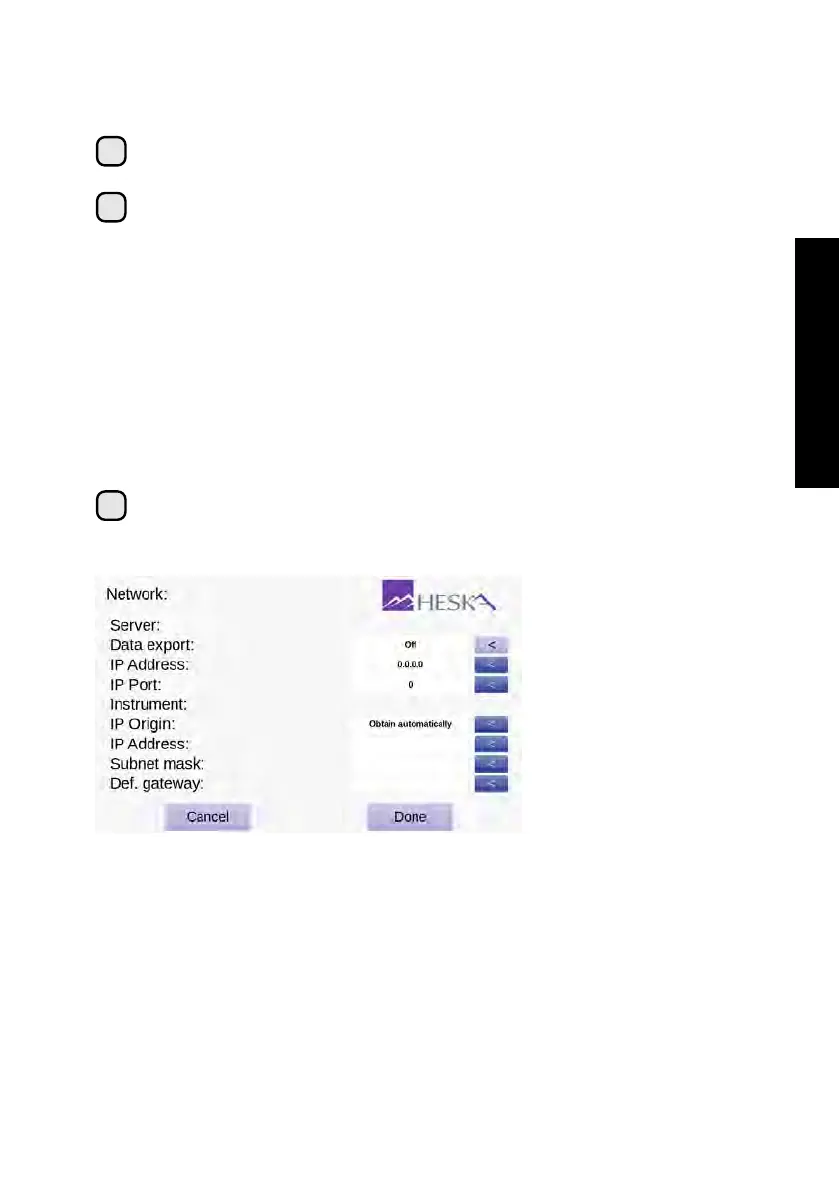
Figure 3.15:
Network
Screen. From the
Network Screen it is
possible to configure
the Heska Element
COAG
™
Analyzer for
use with a LIS.
Prerequisites
The Heska Element COAG
™
Analyzer transmits data via TCP/IP, hence
an IP address and port number of your LIS are required in order to set up the data
export.
The Heska Element COAG
™
Analyzer should be connected to the network where a
connection to your LIS can be achieved through an Ethernet port located at the back of
your Heska Element COAG
™
Analyzer.
29



 To Next Page