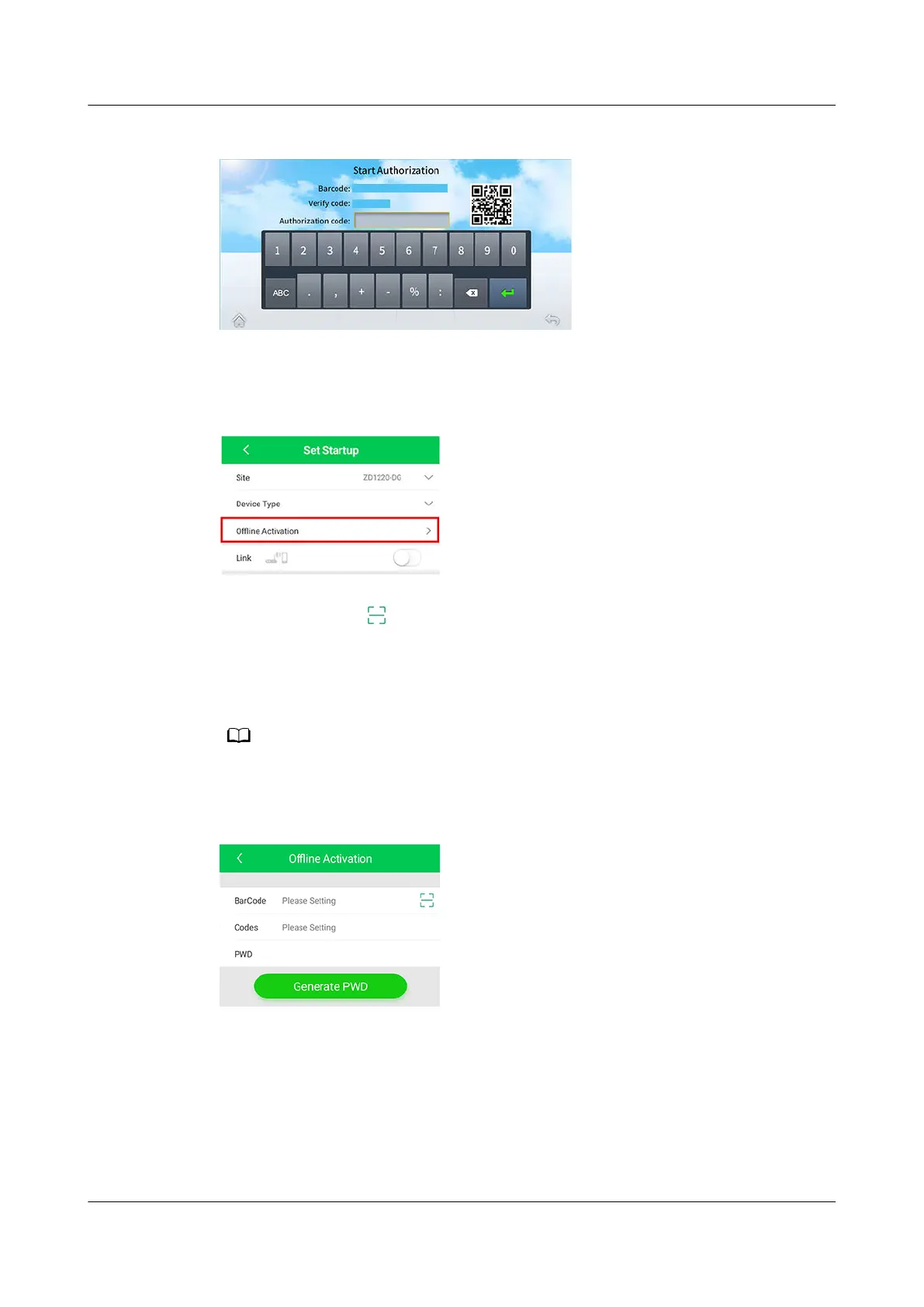
Figure 5-18 Startup authorization
Step 2 Open the Service Expert app, tap Startup Commissioning > Oine Activation
on the home screen to generate a startup password.
Figure 5-19
Oine activation
● Method 1: Tap to scan the QR code on the startup authorization screen.
The barcode and
verication code are automatically entered. Tap Generate
PWD.
● Method 2: Enter the bar code and
verication code on the startup
authorization screen, and tap Generate PWD.
To ensure security, the original password becomes invalid and the initial startup
authentication fails if the startup verication fails.
Figure 5-20 Generating a startup password
Step 3 Enter the startup password generated by the app in Authorization code on the
startup authorization screen to start the device. The home screen is displayed.
----End
FusionModule2000-S Smart Modular Data Center
User Manual 5 Power-On Commissioning
Issue 07 (2022-09-30) Copyright © Huawei Technologies Co., Ltd. 171





 To Next Page