4
RECEIVING AND TRANSMITTING
4-18
Operating CW (Continued)
D Sending from the Memory keyer (KEYER)
You can send preset characters using the Memory
keyer function.
Sending
1. Open the KEYER screen in the CW mode.
» KEYER
2. Push
.
• The TX status indicator lights red.
L If you want to automatically switch between transmit
and receive, turn the Break-in function ON. (p. 4-15)
3. Touch a desired memory keyer between [M1] and
[M4].
• The touched keyer contents are sent.
4. To stop sending, push
.
KEYER screen while sending
(Example: sending M1)
Sending
contents
KEYER screen while sending
(Example: Repeatedly sending M1)
Displayed
Key Action
M1~M8
Touch Sends the Memory keyer contents
Touch for
1 second
is displayed and repeatedly
sends the Memory keyer contents.
L You can change the repeat
interval setting in “Keyer Repeat
Time” in the CW-KEY SET menu.
(p. 4-21)
–1
001
Reduces the contest number counter by 1 (001).
L You can change or reset the number in
“Present Number” in the KEYER 001 menu.
(p. 4-21)
EDIT/SET
Touch to display the EDIT/SET screen.
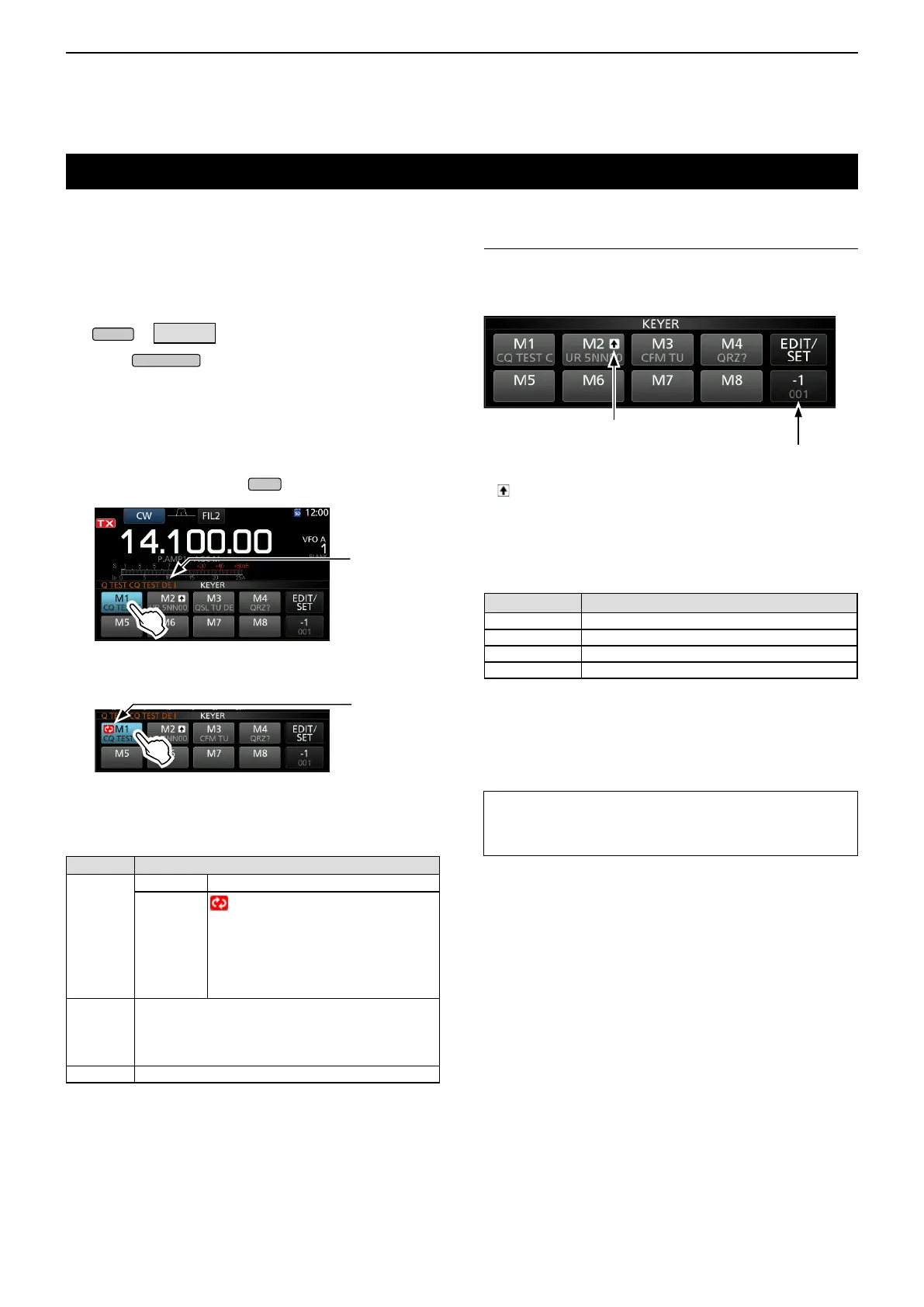
Count up trigger
The count up trigger enables the serial number to be
automatically increased after each complete serial
number exchange is sent. (Default: M2)
Present number counter
Count up trigger icon
L is displayed on the Memory keyer set to the count up
trigger.
L You can change the count up trigger setting in the KEYER
001 menu. (Default: M2) (p. 4-20)
Preset Memory keyer contents
Memory keyer
Contents
M1 CQ TEST CQ TEST DE ICOM ICOM TEST
M2 UR 5NN 001 BK
M3 CFM TU
M4 QRZ?
L “001” is the CW contest number.
L If you want to set the Count up trigger to different keyer,
delete “*” (asterisk) from the Memory keyer M2. See
“Keyer memory edit menu (EDIT)” (p. 4-19) for details.
TIP: When you are using an external keypad, you can
send the preset contents without opening the KEYER
screen. See page 18-3 for details.



 To Next Page