Saving the setting data onto an
SD card or USB ash drive
Memory channels and transceiver’s settings can be
saved on a card or flash drive.
Saving data settings on a card or flash drive allows
you to easily restore the transceiver to its previous set-
tings, even if an All reset is performed.
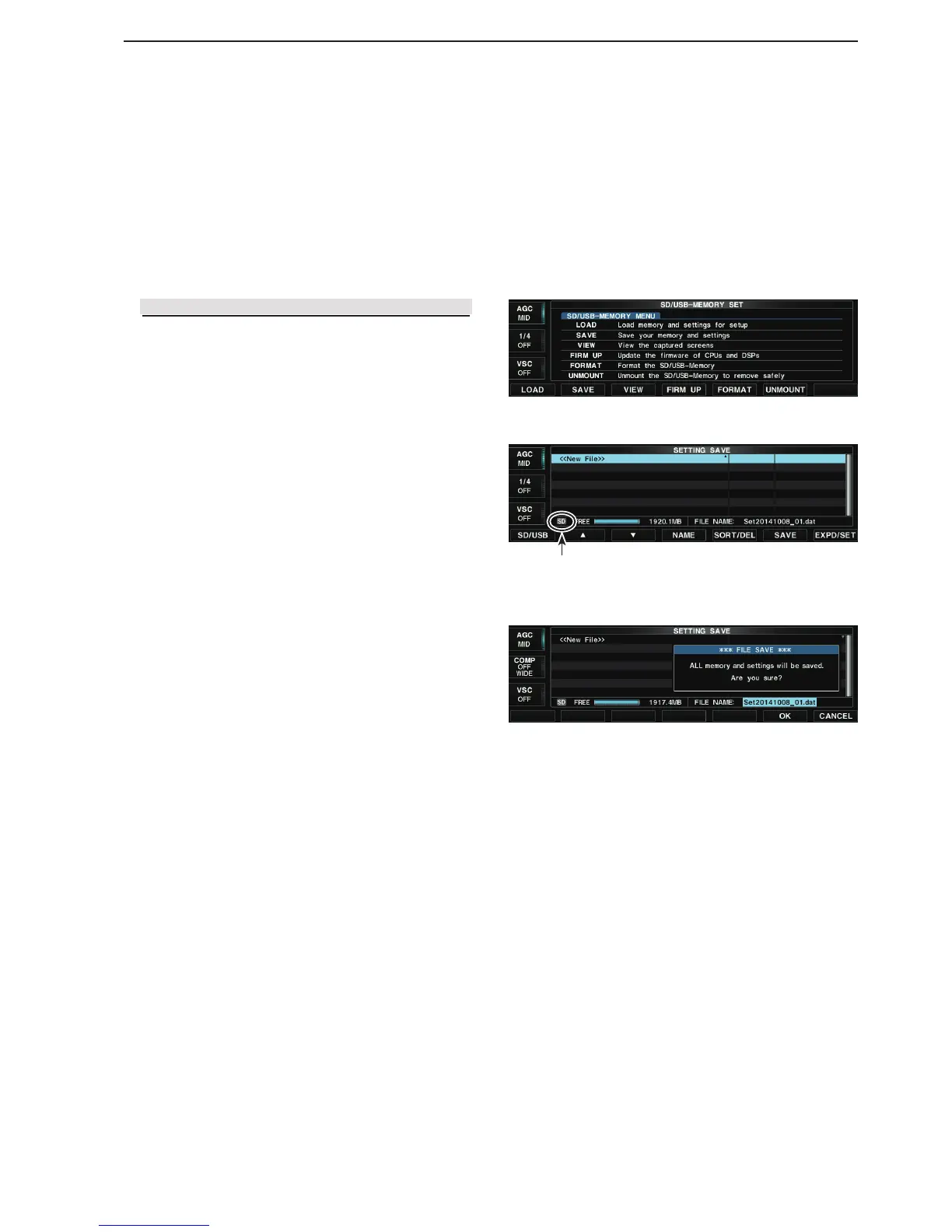
Displays the q Setting save screen.
SET [F-7] SD/USB [F-7] SAVE [F-2]
Push [SD/USB](F). w
• Pushing [SD/USB](F) toggles the le save destination
between the card and flash drive.
Push [SAVE](F). e
• Opens the conrmation window.
• To cancel saving, push [CANCEL](F).
Push [OK](F). r
• Saves the data settings to the selected destination.
• While saving to the card, the indicator to the left of the
[SD CARD] slot blinks.
• While saving to the ash drive, the indicator to the right
of the [SD CARD] slot blinks.
• You can change the content to be saved in the Save set
screen. (p. 10-4)
( SET [F-7] > SD/USB [F-7] > SAVE [F-2] >
SAVE Contents)
• After saving, returns to the SD/USB-Memory set
screen.
• SD/USB-Memory set screen
• Setting save screen
Destination is an SD card
• Conrmation window



 To Next Page