11
4
BASIC OPERATION
■ FSK operation
The transceiver has F1B (FSK) and J2B (AFSK)
modes for FSK operation. Select “F1B” when using
the built-in oscillator, and select “J2B” when using an
AFSK terminal unit.
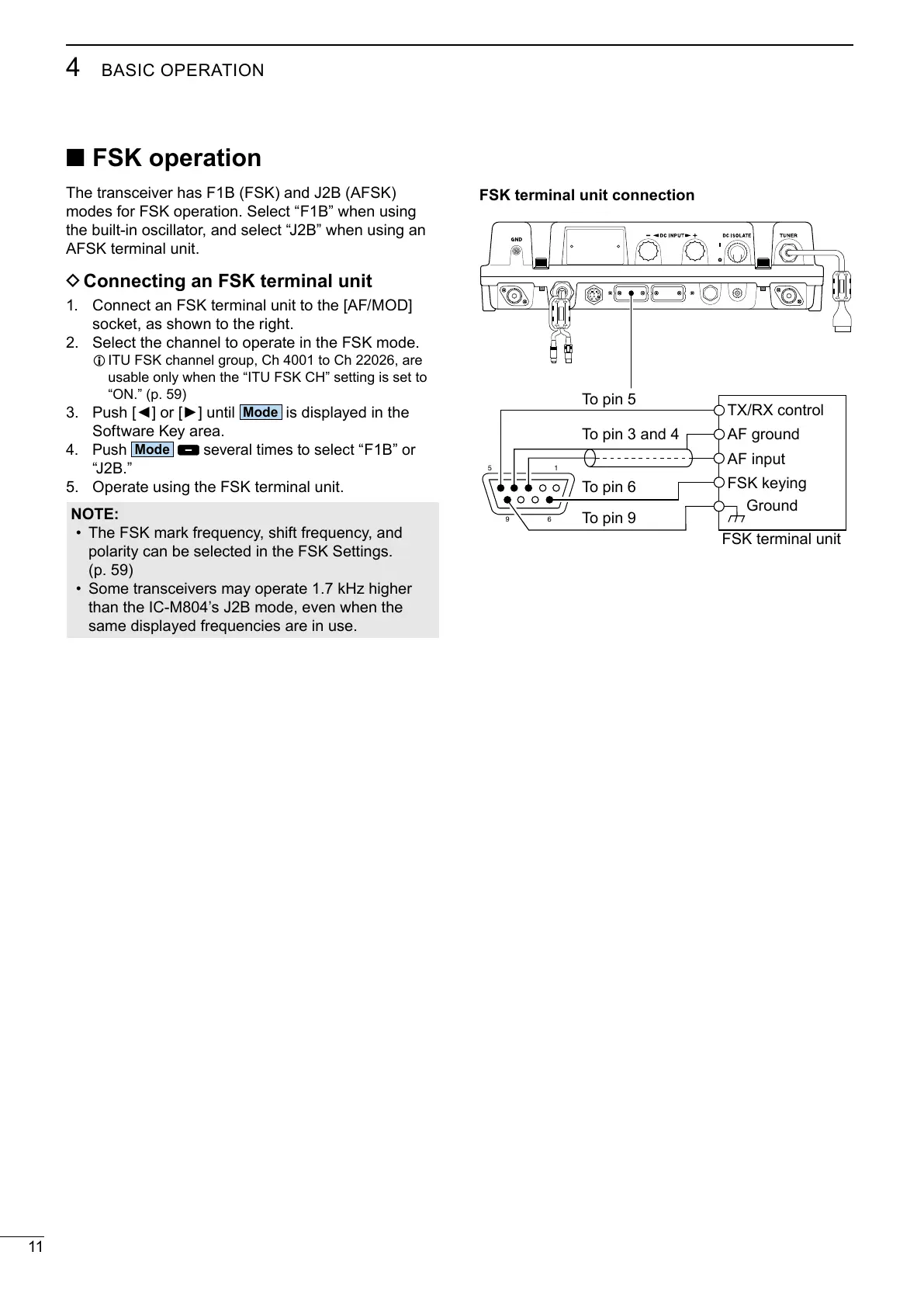
D Connecting an FSK terminal unit
1. Connect an FSK terminal unit to the [AF/MOD]
socket, as shown to the right.
2. Select the channel to operate in the FSK mode.
L ITU FSK channel group, Ch 4001 to Ch 22026, are
usable only when the “ITU FSK CH” setting is set to
“ON.” (p. 59)
3.
is displayed in the
Software Key area.
4. Push
several times to select
“F1B”
or
“J2B.”
5. Operate using the FSK terminal unit.
NOTE:
• The FSK mark frequency, shift frequency, and
polarity can be selected in the FSK Settings.
(p. 59)
• Some transceivers may operate 1.7 kHz higher
than the IC-M804’s J2B mode, even when the
same displayed frequencies are in use.
15
6
9
Ground
TX/RX control
FSK keying
AF ground
AF input
FSK terminal unit
To pin 6
To pin 5
To pin 3 and 4
To pin 9
FSK terminal unit connection



 To Next Page