52
DSC OPERATION
6
6
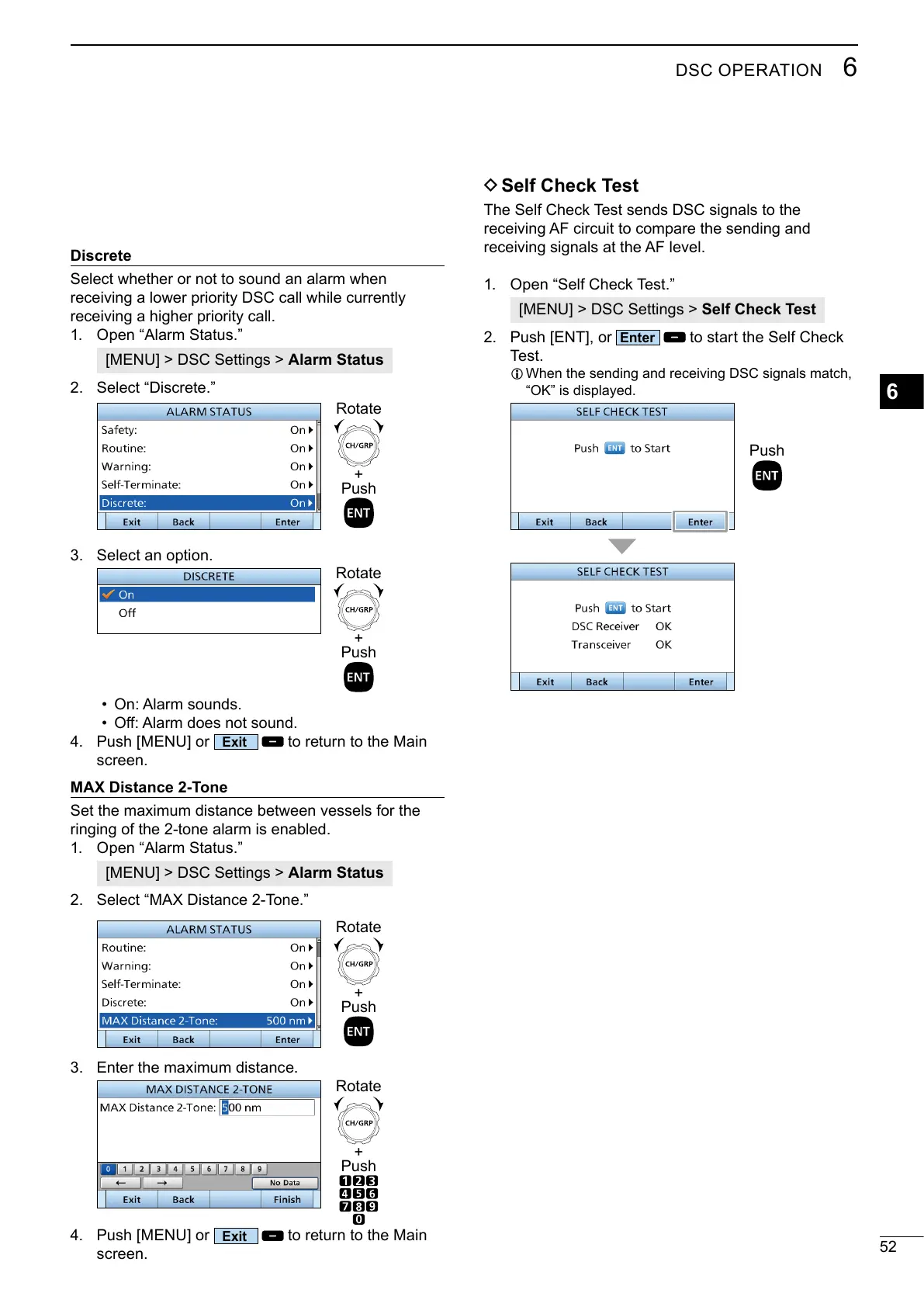
Discrete
receiving a higher priority call.
1. Open “Alarm Status.”
[MENU] > DSC Settings > Alarm Status
2. Select “Discrete.”
+
Push
Rotate
3. Select an option.
• On: Alarm sounds.
•
4. Push [MENU] or
to return to the Main
screen.
MAX Distance 2-Tone
1. Open “Alarm Status.”
[MENU] > DSC Settings > Alarm Status
2.
3. Enter the maximum distance.
4. Push [MENU] or
to return to the Main
screen.
+
Push
Rotate
+
Push
Rotate
+
Push
Rotate
D Self Check Test
The Self Check Test sends DSC signals to the
receiving AF circuit to compare the sending and
receiving signals at the AF level.
1. Open “Self Check Test.”
[MENU] > DSC Settings > Self Check Test
2. Push [ENT], or
to start the Self Check
Test.
L
“OK” is displayed.
Push



 To Next Page