EasyManua.ls Logo

Icom IC-M804 - D Advanced Connections; D Connecting the Microphone

Icom IC-M804
88 pages
Print Icon
To Next Page IconTo Next Page
To Previous Page IconTo Previous Page
Loading...
63
8
CONNECTIONS AND INSTALLATION
CAUTION: When an external unit is connected, such

Connections
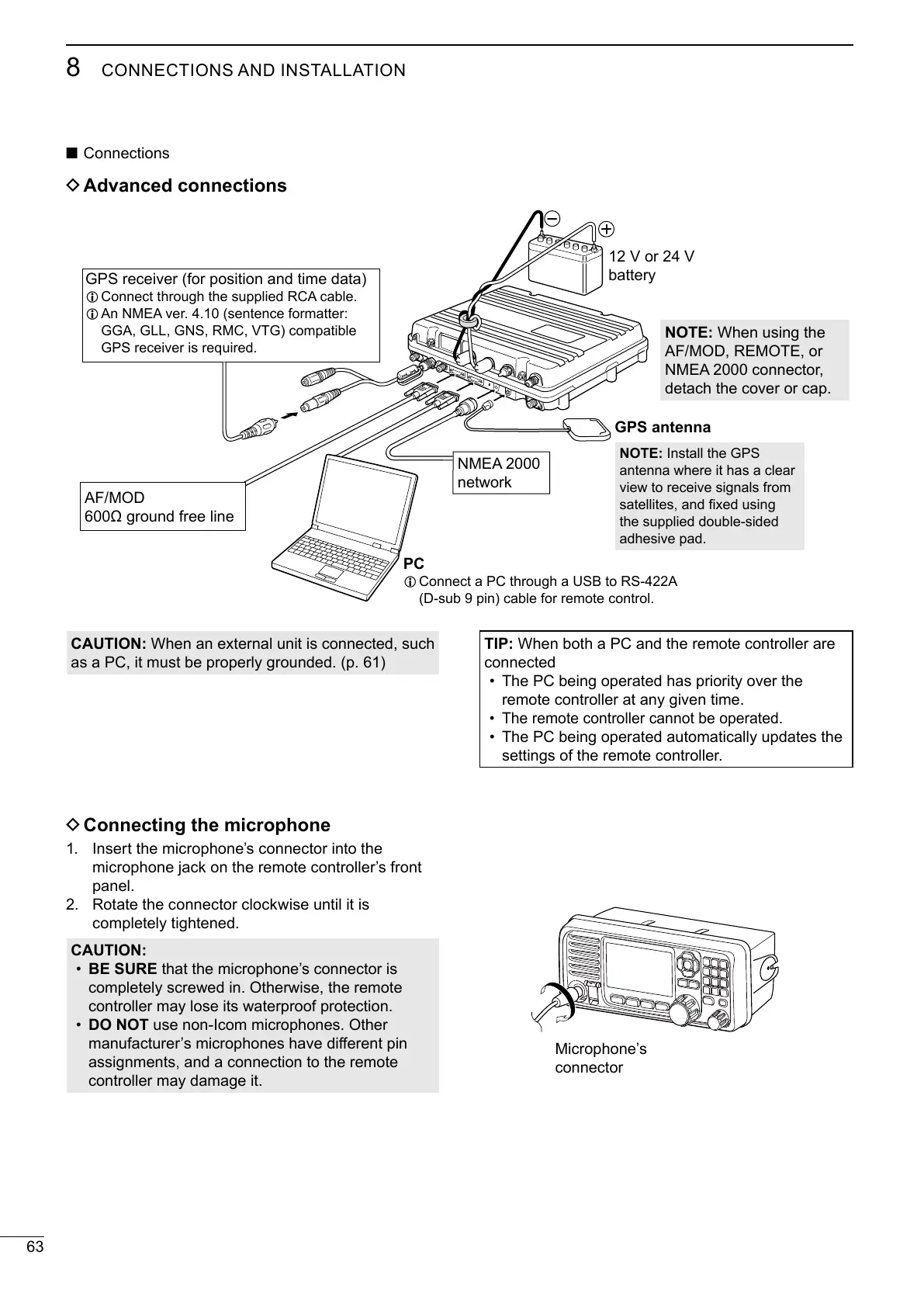
D Advanced connections
Microphone’s
connector

L 
L 
GGA, GLL, GNS, RMC, VTG) compatible

AF/MOD

PC
L Connect a PC through a USB to RS-422A

12 V or 24 V
battery
GPS antenna
NMEA 2000
network
D Connecting the microphone
 Insert the microphones connector into the
microphone jack on the remote controllers front

 Rotate the connector clockwise until it is

CAUTION:
BE SURE that the microphone’s connector is


DO NOT
󰀨
assignments, and a connection to the remote

TIP: When both a PC and the remote controller are
connected



The PC being operated automatically updates the

NOTE: Install the GPS
antenna where it has a clear


the supplied double-sided

NOTE: When using the
AF/MOD, REMOTE, or
NMEA 2000 connector,



Table of Contents

Related product manuals