21
6
DSC OPERATION
■ DSC address ID
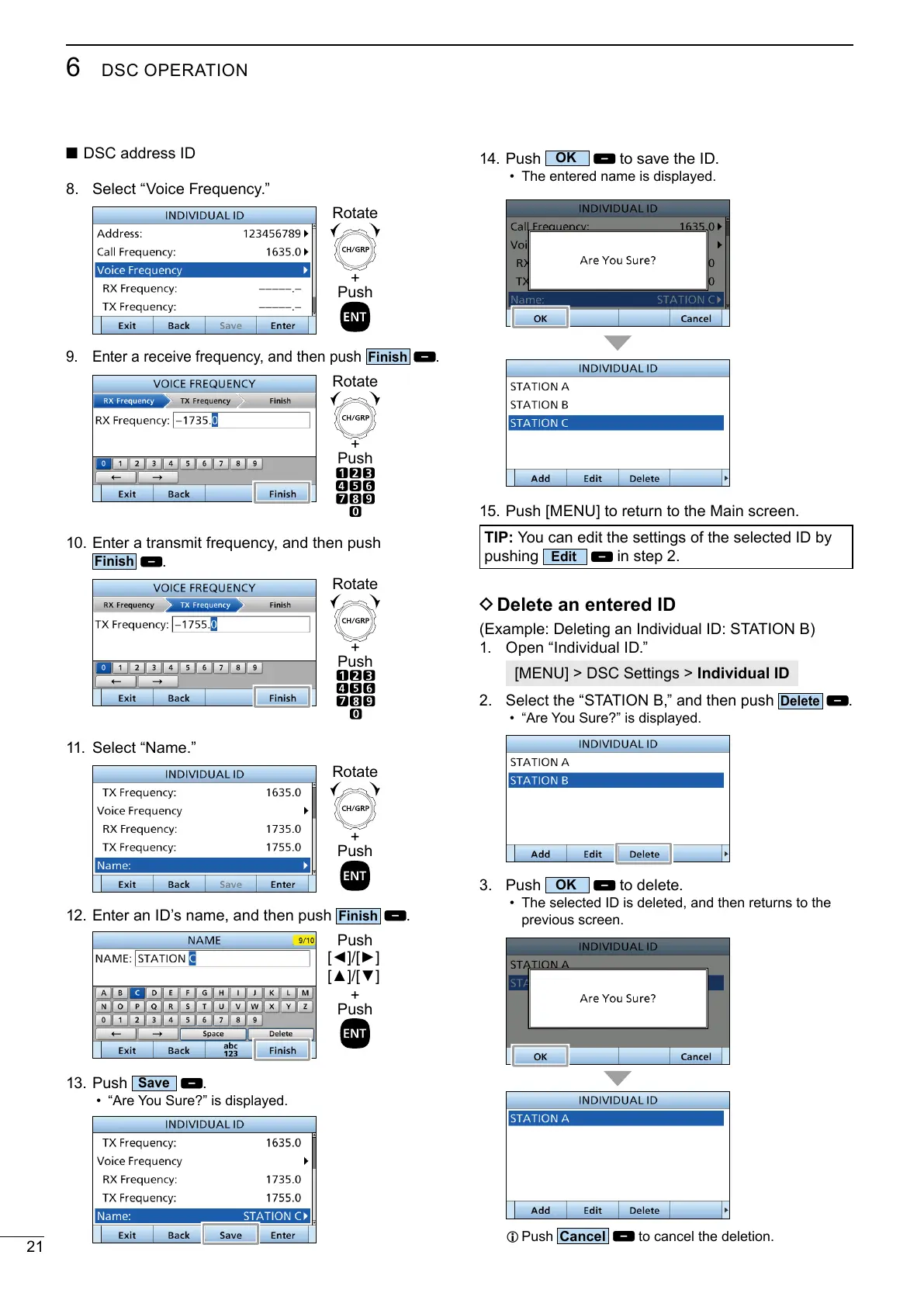
8. Select “Voice Frequency.”
+
Push
Rotate
Enter a receive frequency, and then push
.
+
Push
Rotate
10. Enter a transmit frequency, and then push
.
+
Push
Rotate
11. Select “Name.”
+
Push
Rotate
12. Enter an ID’s name, and then push
.
+
Push
Push
13. Push
.
• “Are You Sure?” is displayed.
14. Push
to save the ID.
• The entered name is displayed.
15. Push [MENU] to return to the Main screen.
TIP:
pushing
in step 2.
D Delete an entered ID
(Example: Deleting an Individual ID: STATION B)
1. Open “Individual ID.”
[MENU] > DSC Settings > Individual ID
2. Select the “STATION B,” and then push
.
• “Are You Sure?” is displayed.
3. Push
to delete.
• The selected ID is deleted, and then returns to the
previous screen.
L Push
to cancel the deletion.



 To Next Page