69
8
CONNECTIONS AND INSTALLATION
■ MB-108 installation
The optional MB-108 is for
mm thick and can support more than 15 kg), such as
CAUTION: KEEP
CAUTION:
The edges of the MB-108 may be sharp and may cut
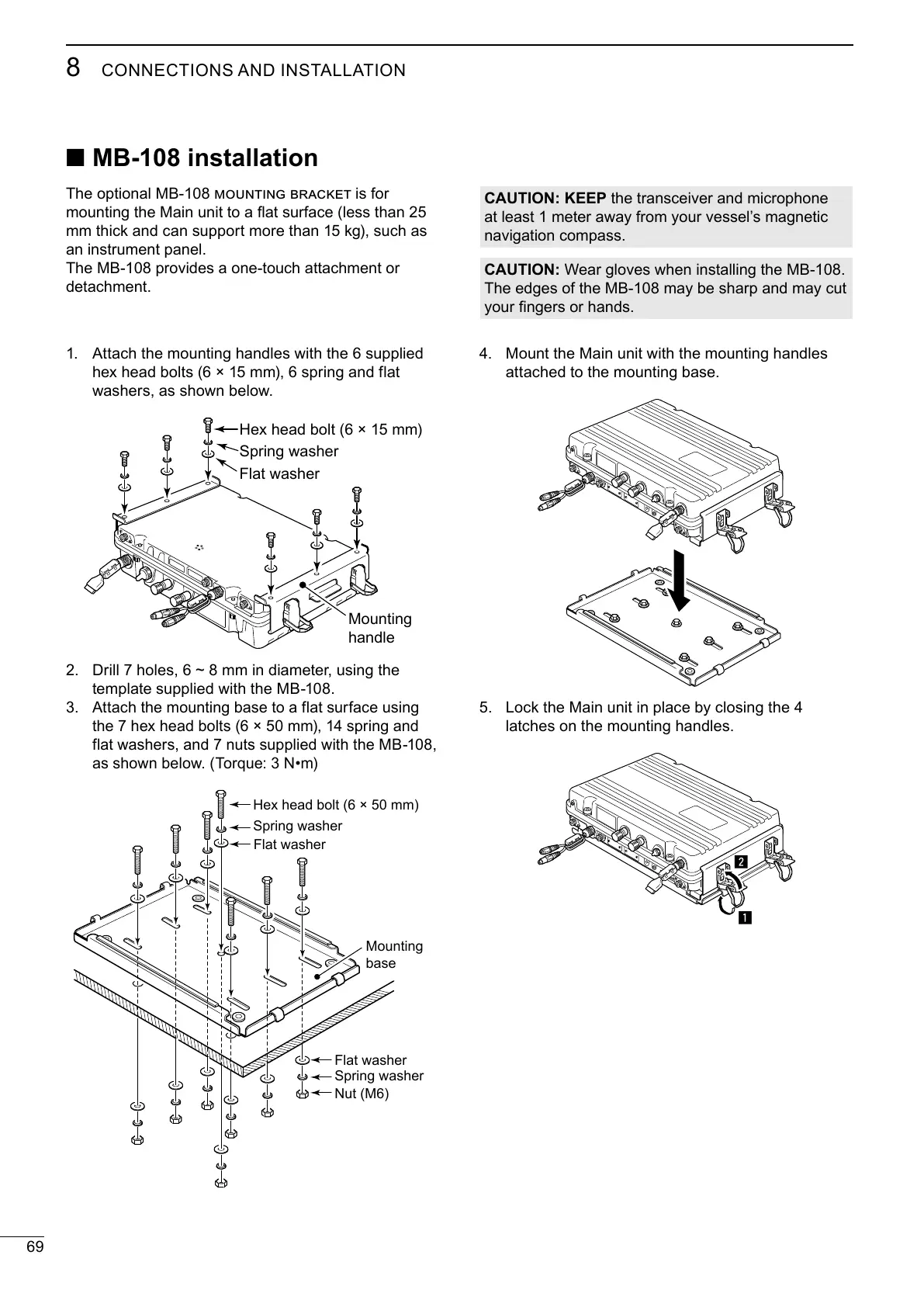
Mount the Main unit with the mounting handles
Lock the Main unit in place by closing the 4
z
x
Attach the mounting handles with the 6 supplied
hex head bolts (6 × 15 mm), 6 spring and flat
Hex head bolt (6 × 15 mm)
Spring washer
Flat washer
Mounting
handle
Drill 7 holes, 6 ~ 8 mm in diameter, using the
Attach the mounting base to a flat surface using
the 7 hex head bolts (6 × 50 mm), 14 spring and
flat washers, and 7 nuts supplied with the MB-108,
Hex head bolt (6 × 50 mm)
Spring washer
Flat washer
Mounting
base
Spring washer
Flat washer
Nut (M6)



 To Next Page