20
5
6
6
DSC OPERATION
■ DSC address ID
D Entering an Individual or Group ID
You can enter a total of 75 Individual IDs and 25 Group
IDs, and assign names of up to 10 characters.
(Example: Entering an Individual ID)
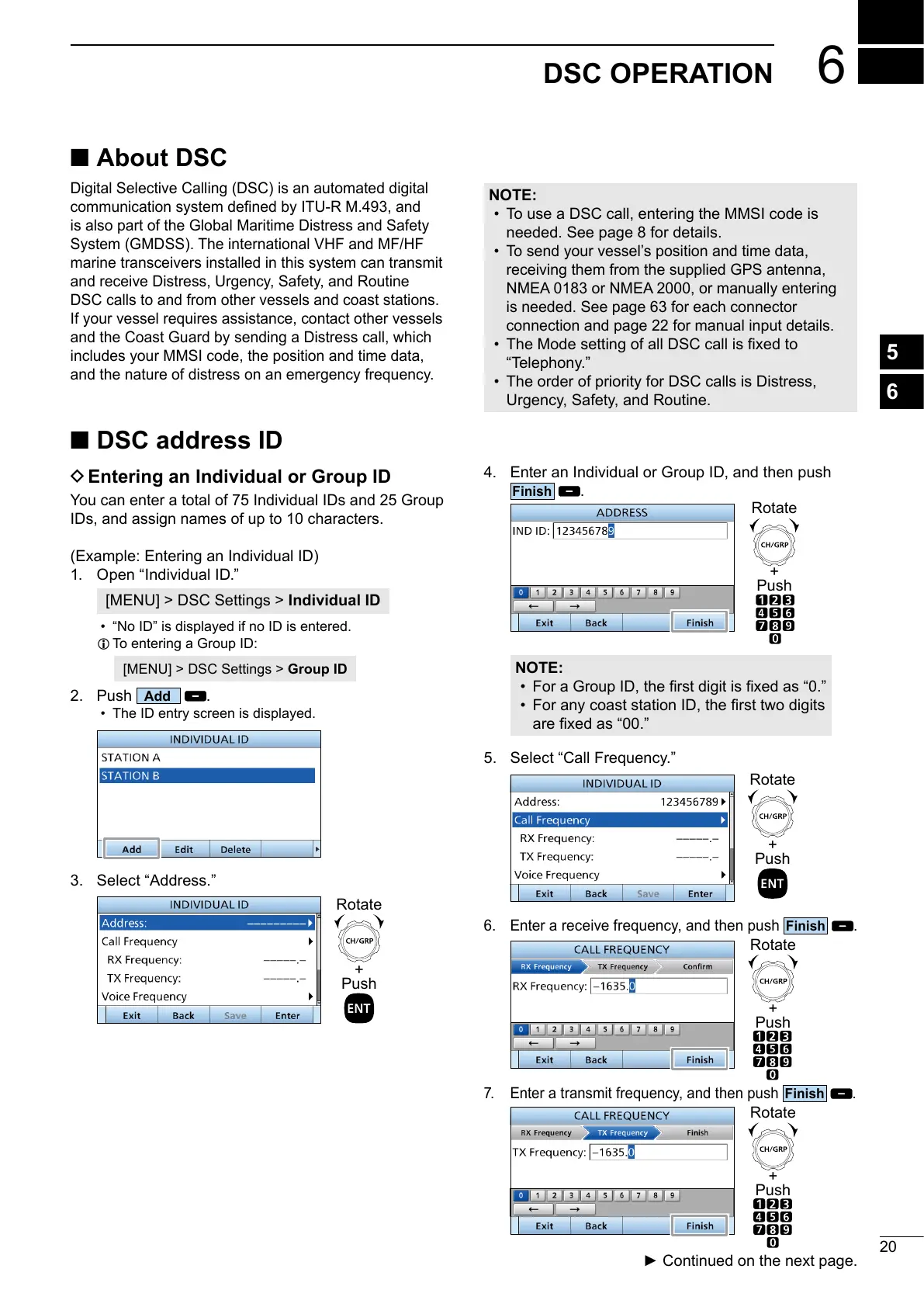
1. Open “Individual ID.”
[MENU] > DSC Settings > Individual ID
• “No ID” is displayed if no ID is entered.
L To entering a Group ID:
[MENU] > DSC Settings > Group ID
2. Push
.
• The ID entry screen is displayed.
3. Select “Address.”
+
Push
Rotate
4. Enter an Individual or Group ID, and then push
.
+
Push
Rotate
NOTE:
•
•
5. Select “Call Frequency.”
+
Push
Rotate
6. Enter a receive frequency, and then push
.
+
Push
Rotate
7. Enter a transmit frequency, and then push
.
+
Push
Rotate
■ About DSC
Digital Selective Calling (DSC) is an automated digital
System (GMDSS). The international VHF and MF/HF
marine transceivers installed in this system can transmit
and receive Distress, Urgency, Safety, and Routine
DSC calls to and from other vessels and coast stations.
If your vessel requires assistance, contact other vessels
includes your MMSI code, the position and time data,
and the nature of distress on an emergency frequency.
NOTE:
• To use a DSC call, entering the MMSI code is
needed. See page 8 for details.
• To send your vessel’s position and time data,
receiving them from the supplied GPS antenna,
NMEA 0183 or NMEA 2000, or manually entering
is needed. See page 63 for each connector
connection and page 22 for manual input details.
•
“Telephony.”
• The order of priority for DSC calls is Distress,
Urgency, Safety, and Routine.



 To Next Page