47
6
DSC OPERATION
■ DSC Settings
D Position Input (p. 22)
D Individual ID (p. 20)
D Group ID (p. 20)
D DSC Frequency
Individual call, Group call, and Geographical Area call.
Usually, your dealer has set all the DSC frequencies
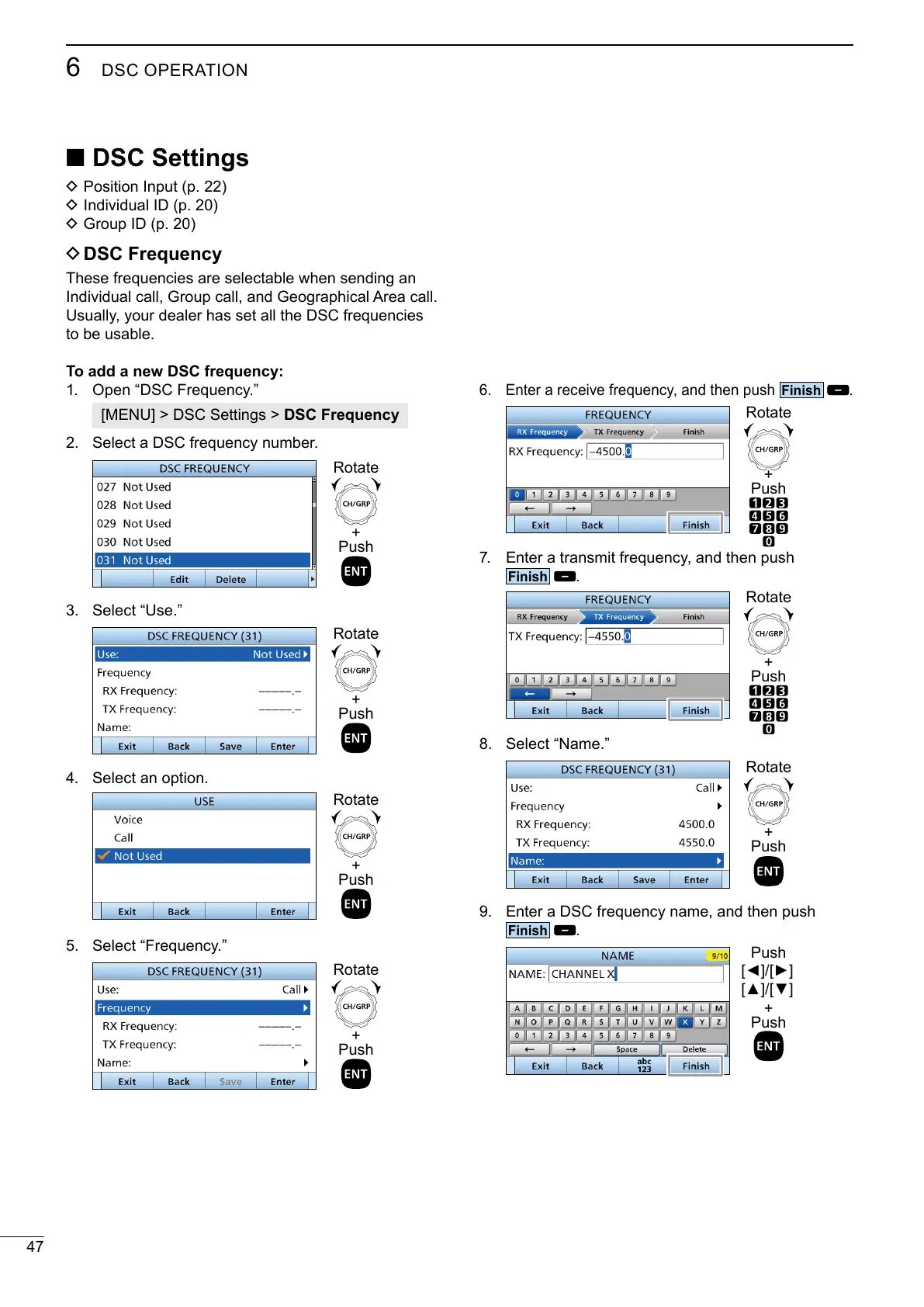
To add a new DSC frequency:
1. Open “DSC Frequency.”
[MENU] > DSC Settings > DSC Frequency
2.
3. Select “Use.”
4. Select an option.
5. Select “Frequency.”
6. Enter a receive frequency, and then push
.
7. Enter a transmit frequency, and then push
.
8. Select “Name.”
Enter a DSC frequency name, and then push
.
+
Push
Rotate
+
Push
Rotate
+
Push
Rotate
+
Push
Rotate
+
Push
Rotate
+
Push
Rotate
+
Push
Rotate
+
Push
Push



 To Next Page