51
6
DSC OPERATION
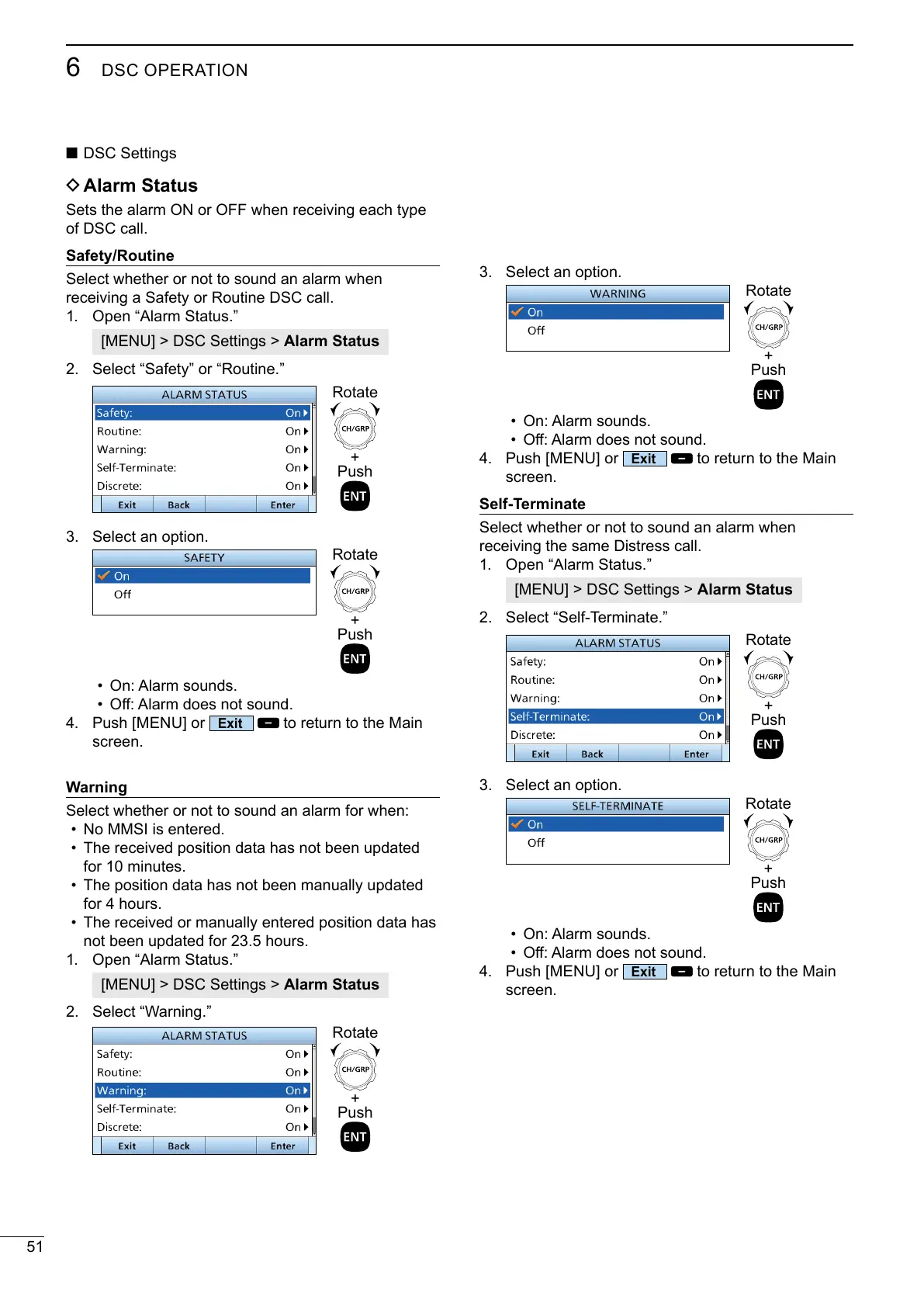
3. Select an option.
• On: Alarm sounds.
•
4. Push [MENU] or
to return to the Main
screen.
Self-Terminate
receiving the same Distress call.
1. Open “Alarm Status.”
[MENU] > DSC Settings > Alarm Status
2.
+
Push
Rotate
3. Select an option.
• On: Alarm sounds.
•
4. Push [MENU] or
to return to the Main
screen.
+
Push
Rotate
+
Push
Rotate
■ DSC Settings
D Alarm Status
of DSC call.
Safety/Routine
receiving a Safety or Routine DSC call.
1. Open “Alarm Status.”
[MENU] > DSC Settings > Alarm Status
2. Select “Safety” or “Routine.”
3. Select an option.
• On: Alarm sounds.
•
4. Push [MENU] or
to return to the Main
screen.
Warning
• No MMSI is entered.
•
for 10 minutes.
•
for 4 hours.
• The received or manually entered position data has
1. Open “Alarm Status.”
[MENU] > DSC Settings > Alarm Status
2.
+
Push
Rotate
+
Push
Rotate
+
Push
Rotate



 To Next Page