6
DSC OPERATION
■ Sending DSC calls (other)
D Sending an Individual call
You can communicate normally after receiving the
L
(p. 20)
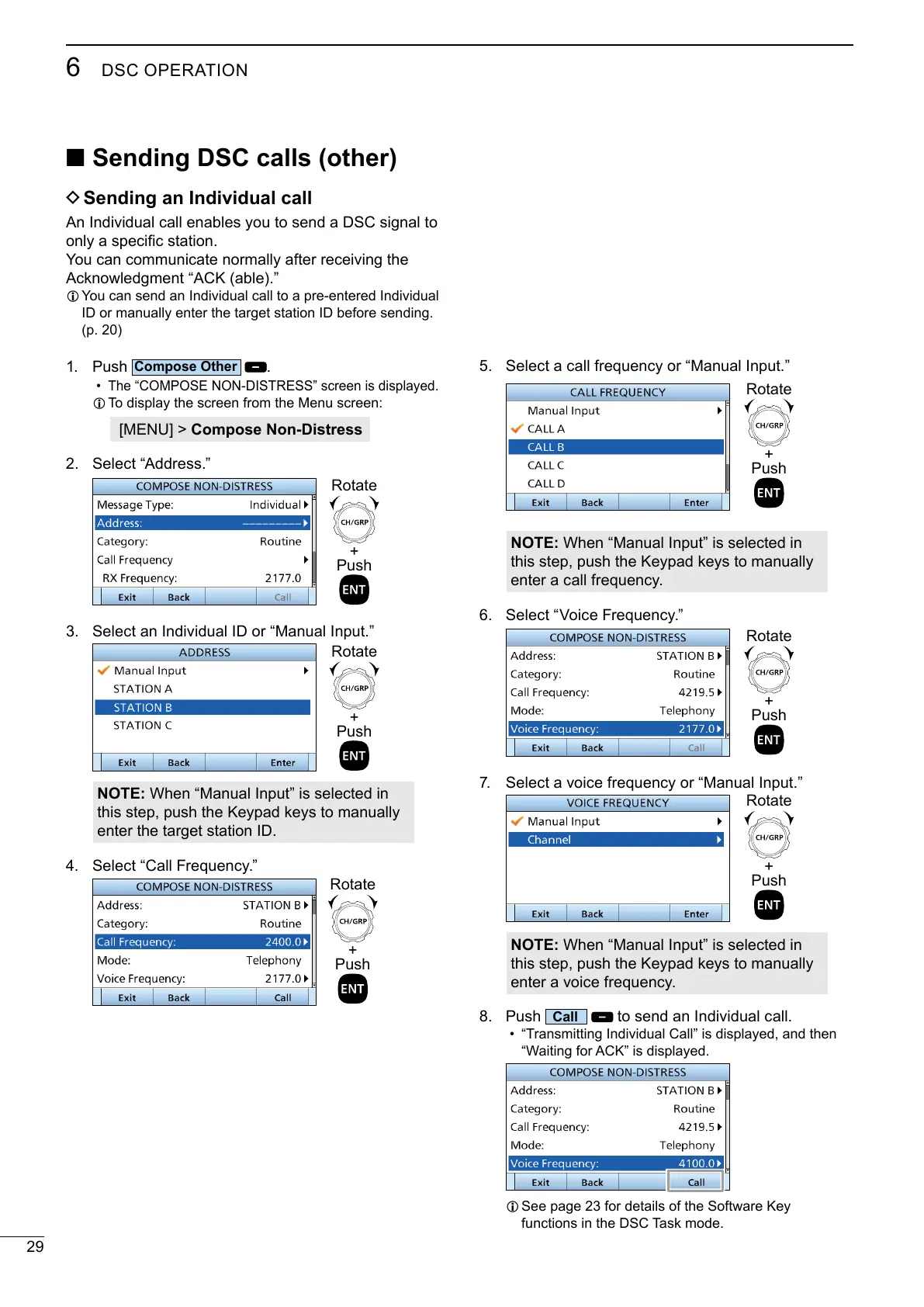
1. Push
.
•
L To display the screen from the Menu screen:
[MENU] > Compose Non-Distress
2. Select “Address.”
+
Push
Rotate
3. Select an Individual ID or “Manual Input.”
+
Push
Rotate
NOTE:
this step, push the Keypad keys to manually
enter the target station ID.
4. Select “Call Frequency.”
+
Push
Rotate
5. Select a call frequency or “Manual Input.”
+
Push
Rotate
NOTE:
this step, push the Keypad keys to manually
enter a call frequency.
6. Select “Voice Frequency.”
+
Push
Rotate
7. Select a voice frequency or “Manual Input.”
+
Push
Rotate
NOTE:
this step, push the Keypad keys to manually
enter a voice frequency.
8. Push
to send an Individual call.
• “Transmitting Individual Call” is displayed, and then
L
functions in the DSC Task mode.



 To Next Page