48
DSC OPERATION
6
6
D Scanning Receiver
You can turn the Scanning Receiver function ON or
OFF on each Emergency Frequency.
When selecting “ Distress frequency”
NOTE: You cannot turn OFF the function on
2187.5 kHz and 8414.5 kHz, and 1 of the remaining
4 frequencies.
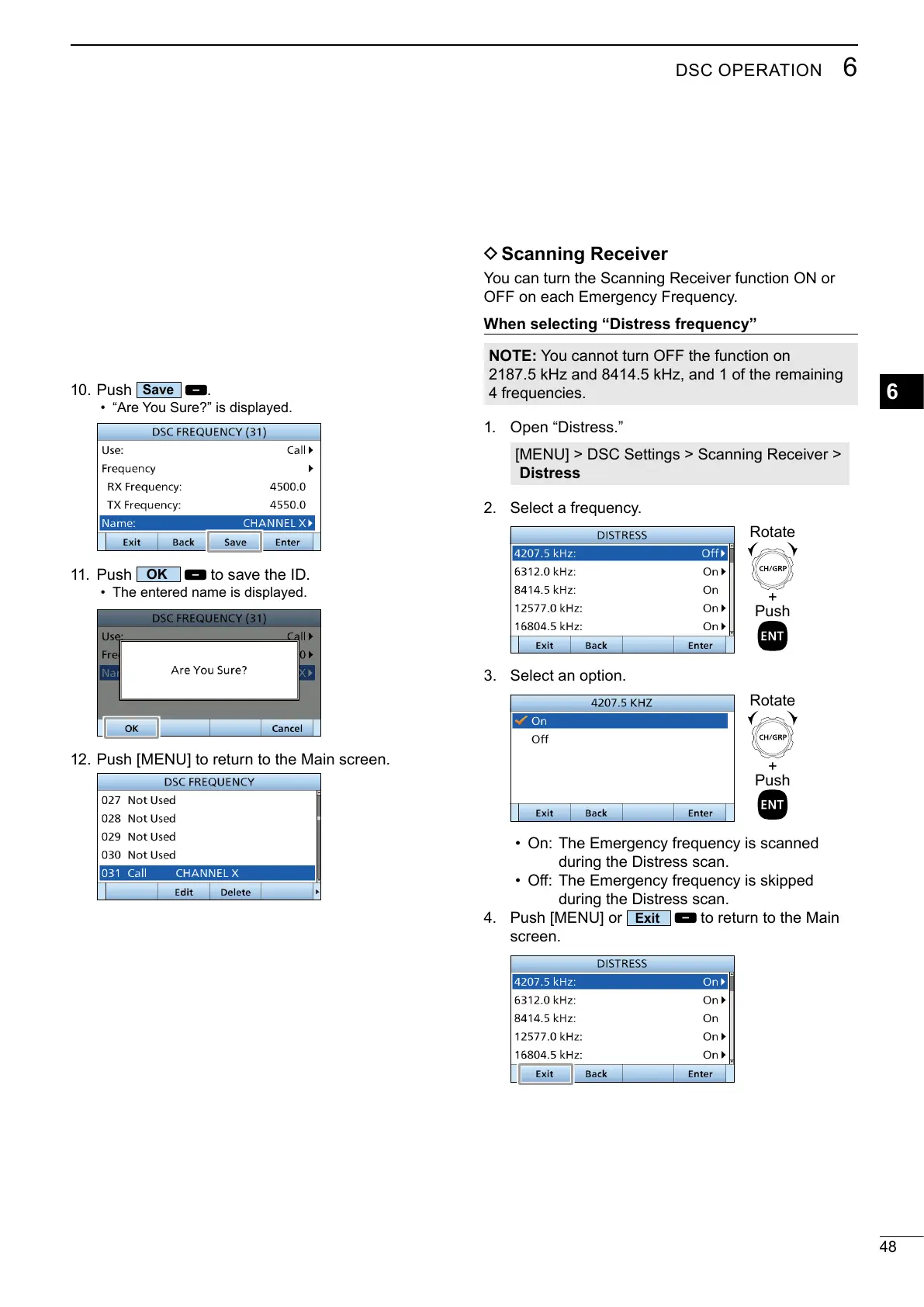
1. Open “Distress.”
[MENU] > DSC Settings > Scanning Receiver >
Distress
2. Select a frequency.
3. Select an option.
• On: The Emergency frequency is scanned
during the Distress scan.
•
during the Distress scan.
4. Push [MENU] or
to return to the Main
screen.
+
Push
Rotate
+
Push
Rotate
10. Push
.
• “Are You Sure?” is displayed.
11. Push
to save the ID.
• The entered name is displayed.
12. Push [MENU] to return to the Main screen.



 To Next Page