16
5
5
■ Setting a temporary operating frequency
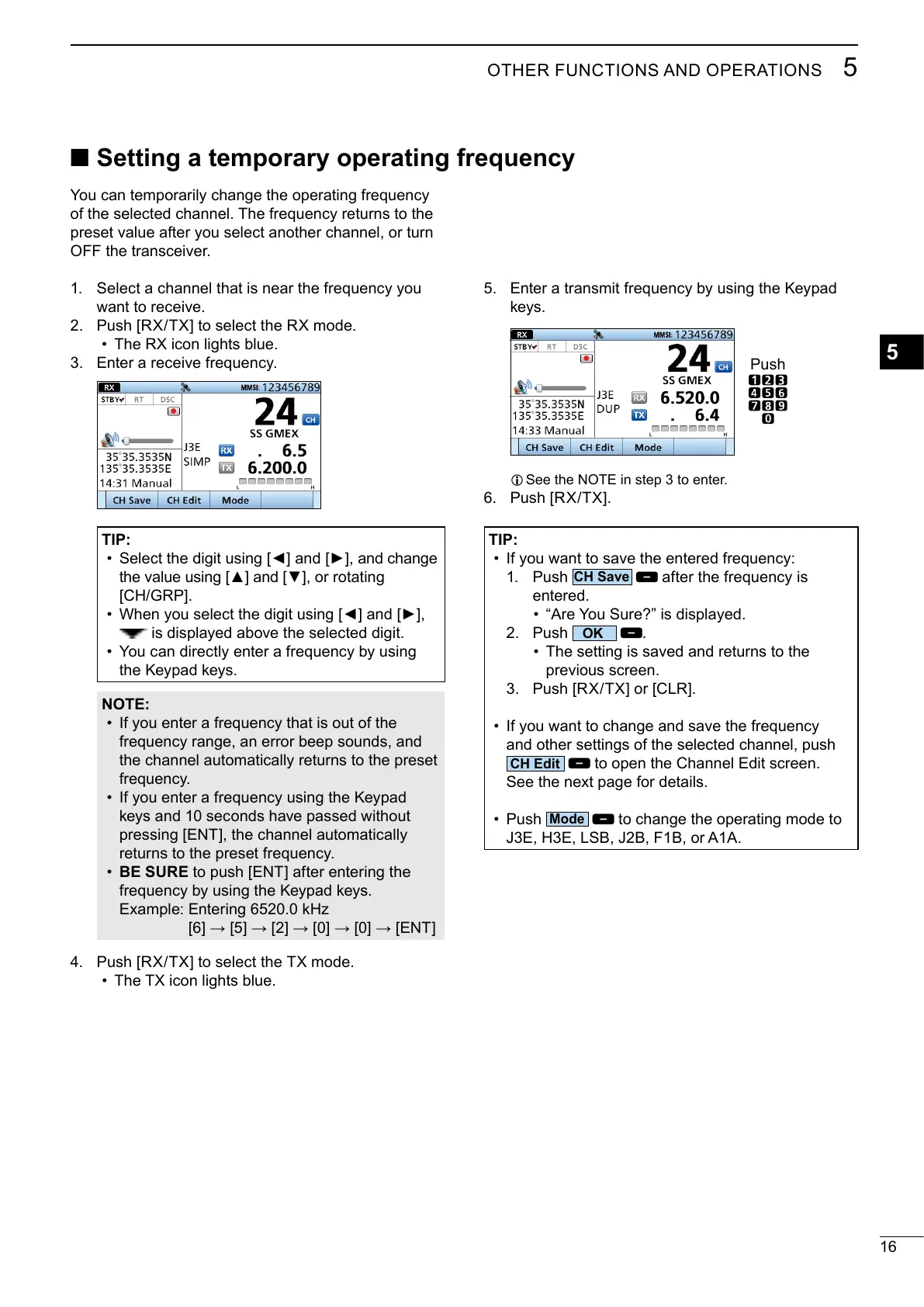
5.
keys.
L
6.
You can temporarily change the operating frequency
of the selected channel. The frequency returns to the
preset value after you select another channel, or turn
1. Select a channel that is near the frequency you
want to receive.
2.
• The RX icon lights blue.
3.
TIP:
• and change
, or rotating
•
is displayed above the selected digit.
• You can directly enter a frequency by using
the Keypad keys.
NOTE:
• If you enter a frequency that is out of the
frequency range, an error beep sounds, and
the channel automatically returns to the preset
frequency.
• If you enter a frequency using the Keypad
keys and 10 seconds have passed without
returns to the preset frequency.
• BE SURE
frequency by using the Keypad keys.
4.
• The TX icon lights blue.
TIP:
•
1. Push
after the frequency is
entered.
•
2. Push
.
• The setting is saved and returns to the
previous screen.
3.
• If you want to change and save the frequency
and other settings of the selected channel, push
• Push
to change the operating mode to
Push



 To Next Page