33
6
DSC OPERATION
■ Sending DSC calls (other)
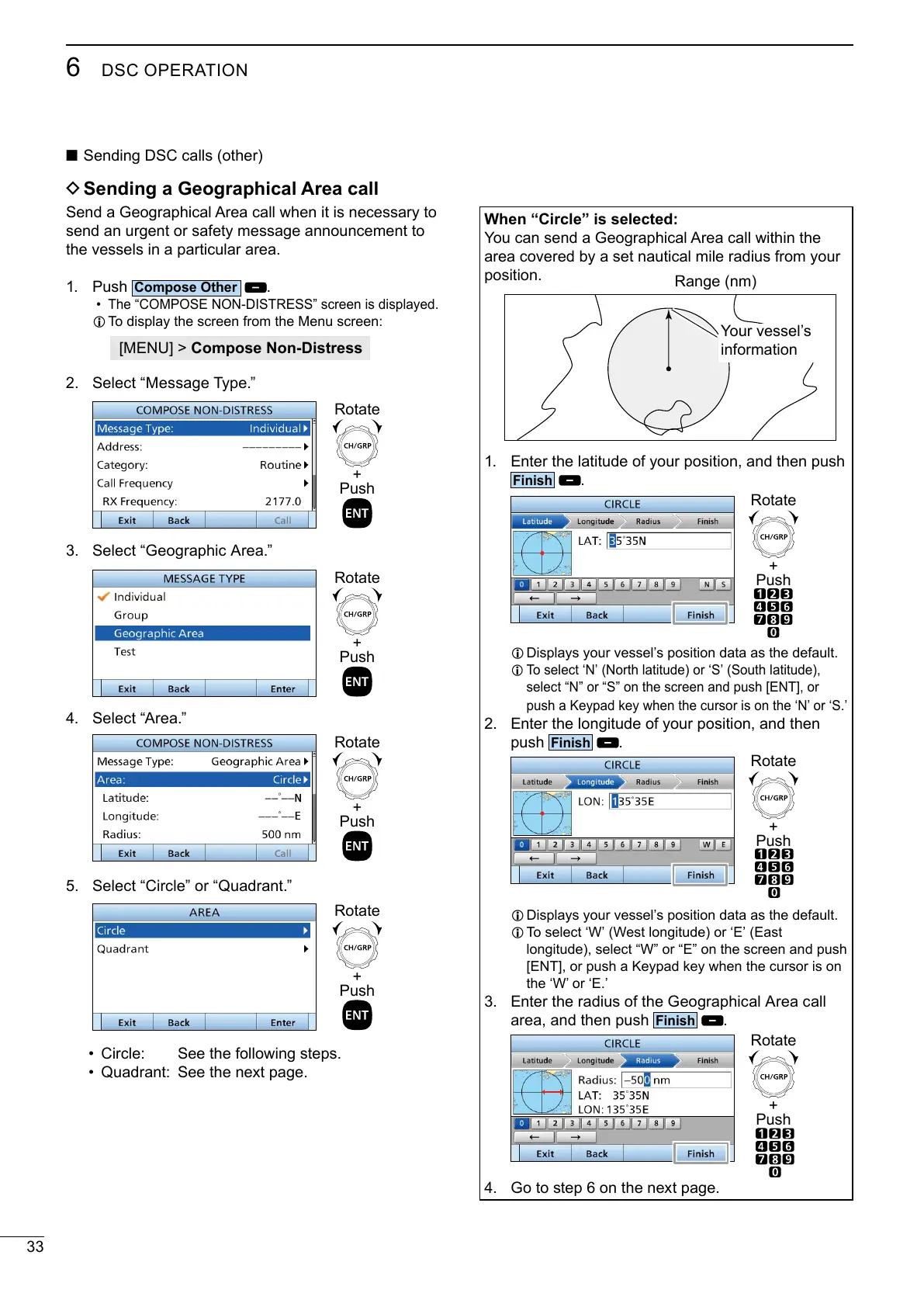
D Sending a Geographical Area call
send an urgent or safety message announcement to
the vessels in a particular area.
1. Push
.
•
L To display the screen from the Menu screen:
[MENU] > Compose Non-Distress
2. Select “Message Type.”
+
Push
Rotate
3. Select “Geographic Area.”
+
Push
Rotate
4. Select “Area.”
+
Push
Rotate
5. Select “Circle” or “Quadrant.”
+
Push
Rotate
•
• Quadrant: See the next page.
When “Circle” is selected:
position.
1. Enter the latitude of your position, and then push
.
+
Push
Rotate
L Displays your vessel’s position data as the default.
L
select “N” or “S” on the screen and push [ENT], or
2. Enter the longitude of your position, and then
push
.
+
Push
Rotate
L Displays your vessel’s position data as the default.
L
3. Enter the radius of the Geographical Area call
area, and then push
.
+
Push
Rotate
4. Go to step 6 on the next page.
Range (nm)
Your vessel’s
information



 To Next Page