EasyManua.ls Logo

Icom IC-M804 - Page 39

Icom IC-M804
88 pages
Print Icon
To Next Page IconTo Next Page
To Previous Page IconTo Previous Page
Loading...
34
DSC OPERATION
6
6
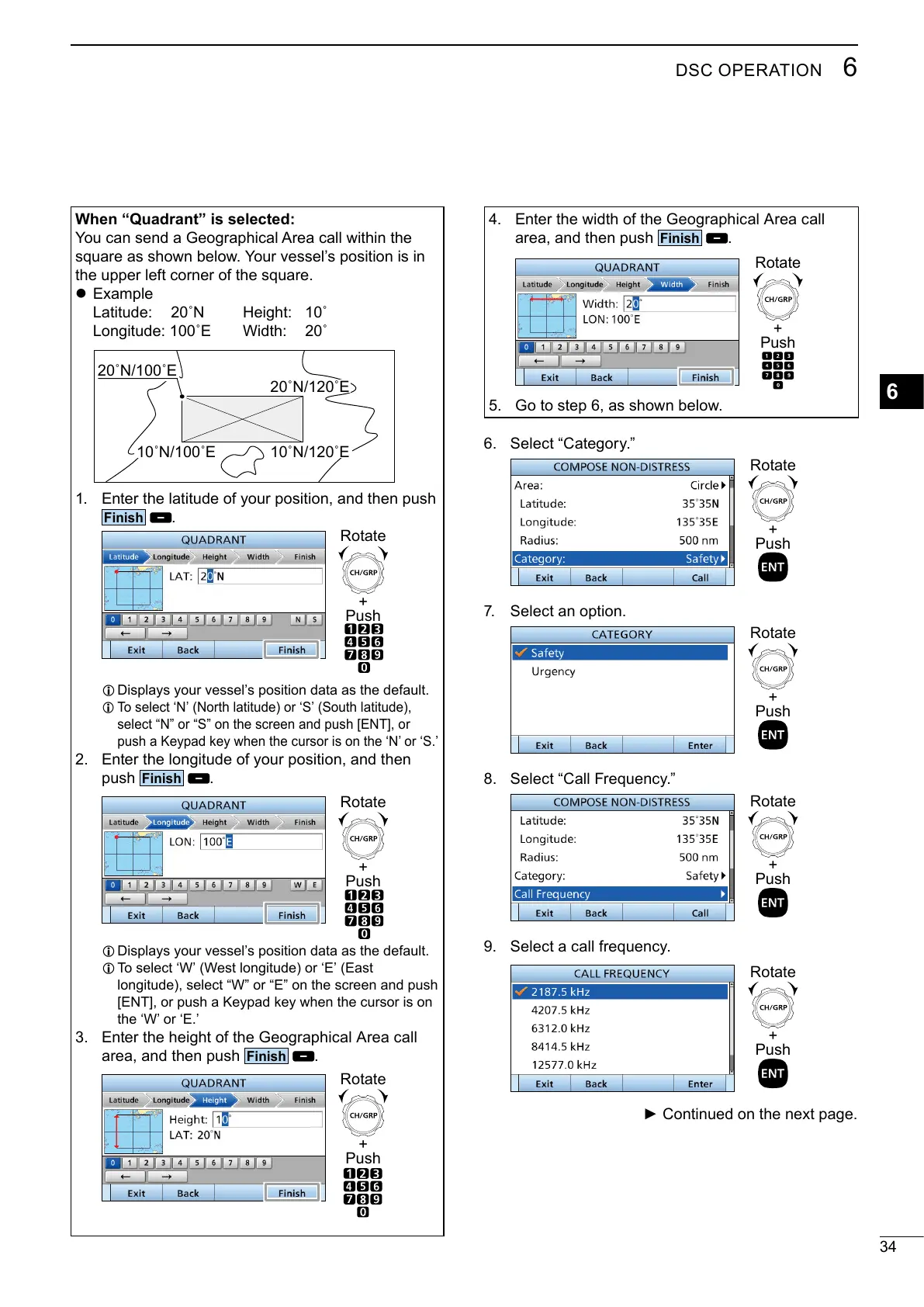
When “Quadrant” is selected:


the upper left corner of the square.
z Example
Latitude:
 
 




1. Enter the latitude of your position, and then push
Finish
.
+
Push
Rotate
L Displays your vessel’s position data as the default.
L 
select “N” or “S” on the screen and push [ENT], or

2. Enter the longitude of your position, and then
push
Finish
.
+
Push
Rotate
L Displays your vessel’s position data as the default.
L 



3. Enter the height of the Geographical Area call
area, and then push
Finish
.
+
Push
Rotate
4. 
area, and then push
Finish
.
+
Push
Rotate
5. 
6. Select Category.
7. Select an option.
8. SelectCall Frequency.
 Select a call frequency.

+
Push
Rotate
+
Push
Rotate
+
Push
Rotate

+
Push
Rotate

Table of Contents

Related product manuals