40
DSC OPERATION
6
6
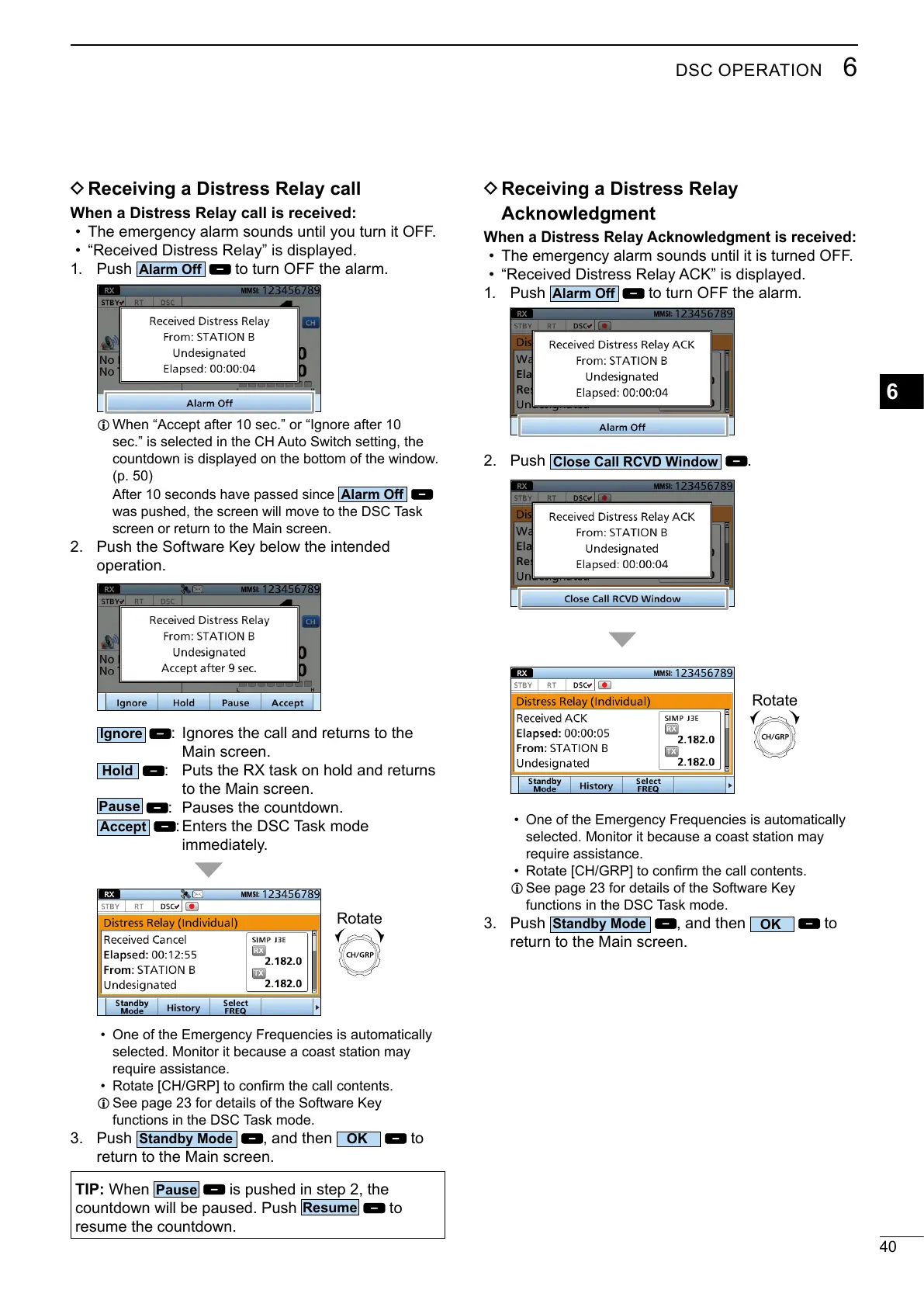
D Receiving a Distress Relay call
When a Distress Relay call is received:
• The emergency alarm sounds until you turn it OFF.
• “Received Distress Relay” is displayed.
1. Push
to turn OFF the alarm.
L
(p. 50)
After 10 seconds have passed since
screen or return to the Main screen.
2.
operation.
: Ignores the call and returns to the
Main screen.
: Puts the RX task on hold and returns
to the Main screen.
: Enters the DSC Task mode
immediately.
Rotate
• One of the Emergency Frequencies is automatically
require assistance.
•
L
functions in the DSC Task mode.
3. Push
, and then
to
return to the Main screen.
TIP:
is pushed in step 2, the
to
D Receiving a Distress Relay
Acknowledgment
When a Distress Relay Acknowledgment is received:
• The emergency alarm sounds until it is turned OFF.
• “Received Distress Relay ACK” is displayed.
1. Push
to turn OFF the alarm.
2. Push
.
• One of the Emergency Frequencies is automatically
require assistance.
•
L
functions in the DSC Task mode.
3. Push
, and then
to
return to the Main screen.
Rotate



 To Next Page