12
4
5
5
OTHER FUNCTIONS AND OPERATIONS
■ Backlight function
The function display and keys can be backlit for better
visibility under low light conditions.
You can set the LCD backlight mode to Day mode
or Night mode. The Day mode is for the daytime
operation, and the screen items are in color. The Night
mode is for nighttime operation, and the screen items
are displayed in black and red.
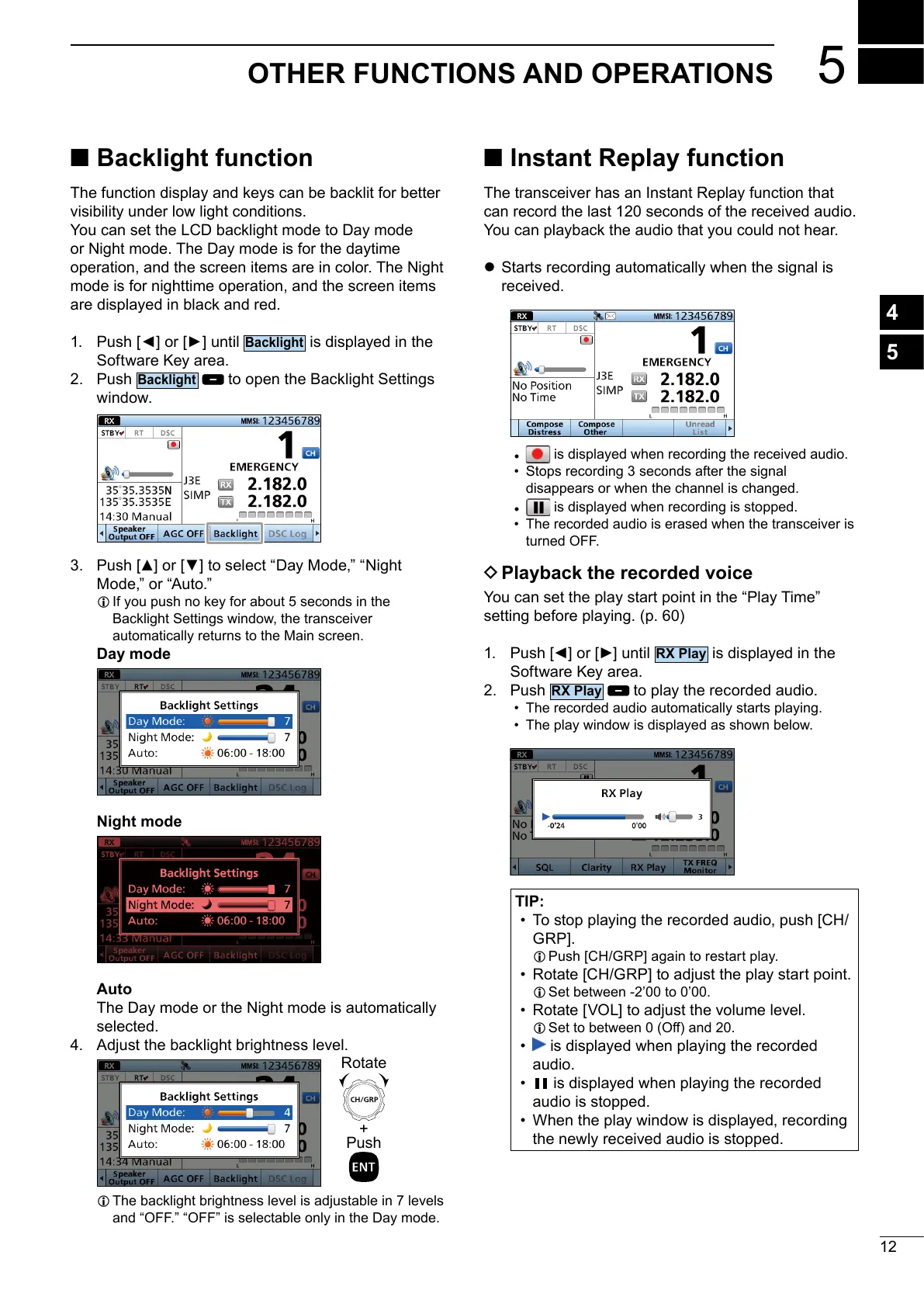
1.
is displayed in the
Software Key area.
2. Push
to open the Backlight Settings
window.
3.
L If you push no key for about 5 seconds in the
Backlight Settings window, the transceiver
Day mode
Night mode
Auto
The Day mode or the Night mode is automatically
selected.
4.
L
+
Push
Rotate
■ Instant Replay function
The transceiver has an Instant Replay function that
can record the last 120 seconds of the received audio.
You can playback the audio that you could not hear.
z Starts recording automatically when the signal is
received.
•
is displayed when recording the received audio.
• Stops recording 3 seconds after the signal
disappears or when the channel is changed.
•
is displayed when recording is stopped.
• The recorded audio is erased when the transceiver is
D Playback the recorded voice
setting before playing. (p. 60)
1.
is displayed in the
Software Key area.
2. Push
to play the recorded audio.
• The recorded audio automatically starts playing.
• The play window is displayed as shown below.
TIP:
• To stop playing the recorded audio, push [CH/
L
•
L Set between -2’00 to 0’00.
•
L
• is displayed when playing the recorded
audio.
• is displayed when playing the recorded
audio is stopped.
• When the play window is displayed, recording
the newly received audio is stopped.



 To Next Page