100 - Inepro Back Office Suite
Steps
Budgets
Prerequisites:
§
Products or Product Groups defined
or
§
Users, User Groups or Departments defined
Where
§
Main Menu\Advanced\Site Types
Budgets
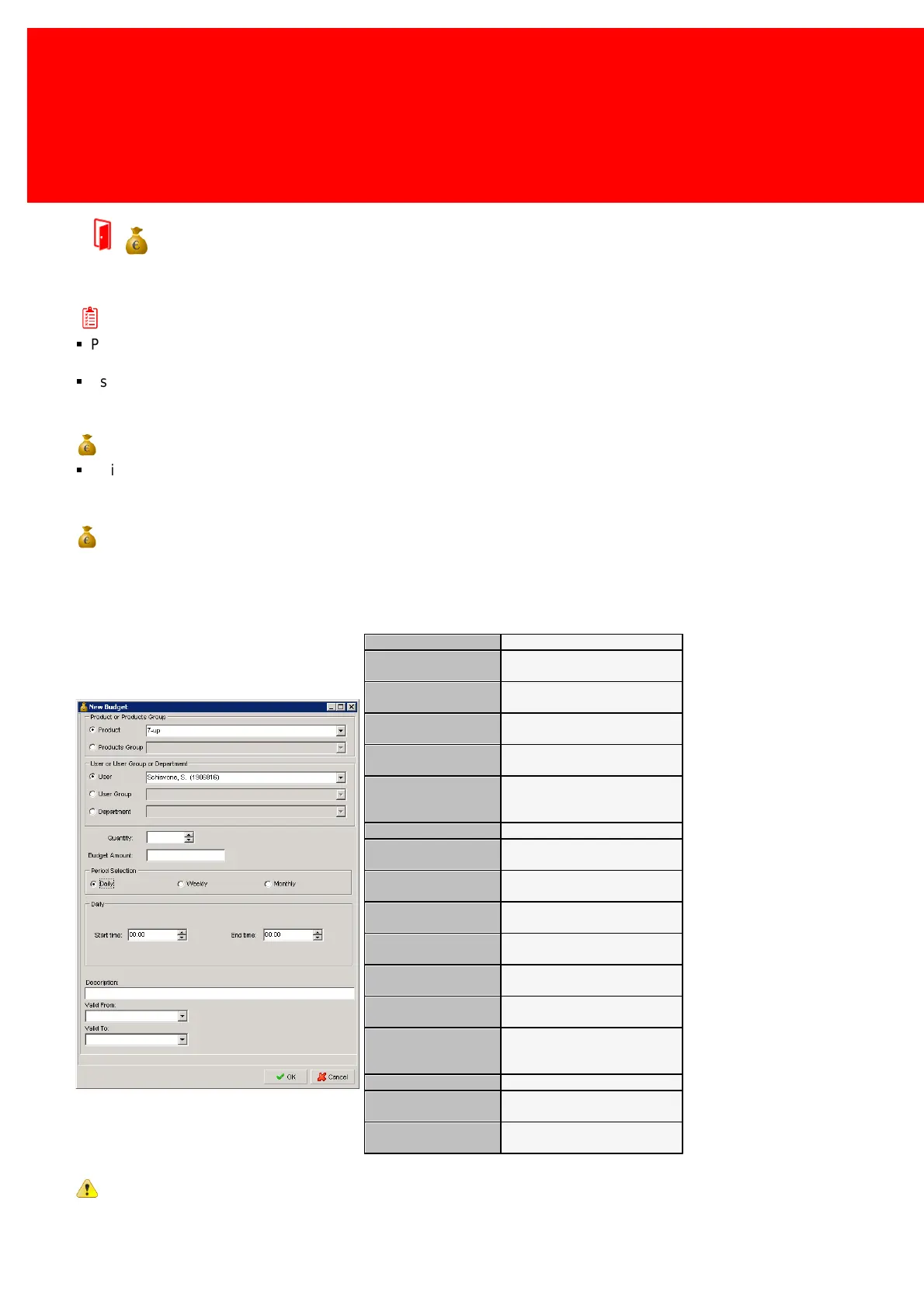
Budgets in the Inepro Back Office Suite are used to define limitations to how many items of a Product or Product Group can
be used or what amount might be spend on that Product or Product Group by a User, User Group or Department.
The Product that is restricted.
The Product Group that is
restricted.
The User to which the budget
applies.
The User Group to which the
budget applies.
The Department to which the
budget applies.
How many products may be
bought by the department,
group or user.
The amount that may be spent.
The period that the budget
applies to, after which it resets.
The time at which the budget is
valid.
The time at which the budget is
no longer valid.
The weekday the budget is
valid from.
The weekday the budget is
valid through.
The day number of the month
that the budget is valid from.
The day number of the month
that the budget is valid
through.
A description of the budget.
The start date the budget is
valid from.
The end date the budget is
valid through.
Warning: Budgets can only be used for the PosPRO till and it's products.


 To Next Page