180 - Inepro Back Office Suite
Configuration
Import from LDAP (like MS Active Directory)
Prerequisites:
§
Existing server
Where
§
Main Menu\Tools\Import Users from LDAP...
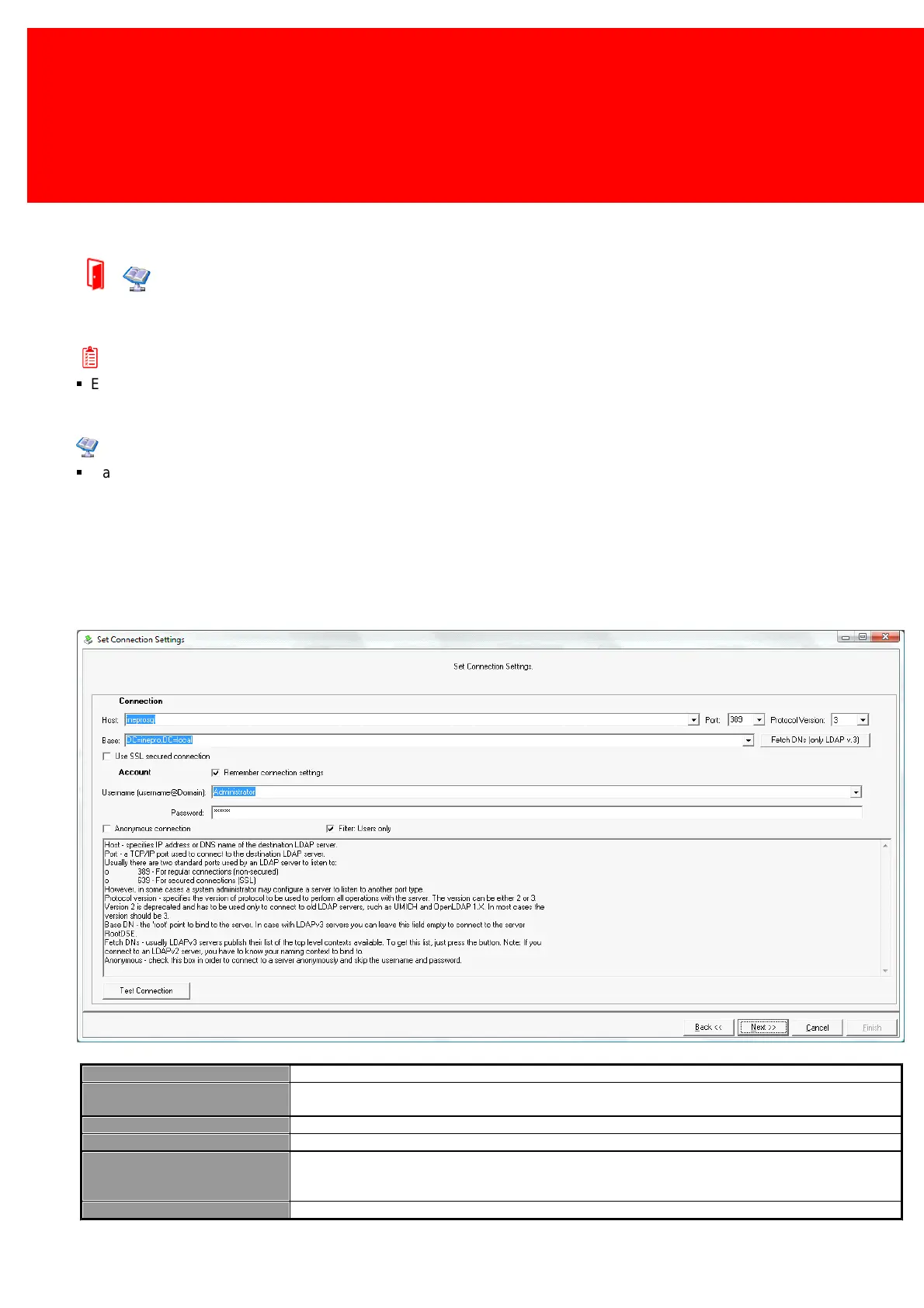
Import User data from Active Directory or rather LDAP by using 'Active Directory import', we will go by the different settings
below:
IP address or DNS name of the destination LDAP server.
The root to link to the server. In case of using LDAP v3 servers, leave this field empty to connect w ith the
root DSE.
A TCP/IP port used to connect to the destination LDAP server
Which protocol is used voor all the communication w ith the server. Can be set to version 2 or 3.
Fetch DN's (only for LDAP v. 3)
Normally LDAP v3 servers publish their lists w ith top level contexts. To receive this list, press this button.
Note: if setting up a connection to a LDAP v2 server, know the naming context to which a connection is
made.
Use SSL secured connection
Use a Secure Sockets Layer connection.


 To Next Page