156 - Inepro Back Office Suite
Configuration
20.He is a 'male'.
21.He wishes to be addressed with 'Mr.'.
22.The birth date is :'9-11-1995'.
23.The default Cost Centre is the Cost Centre that the costs will be booked to, chosen if no other choice has been made. It
will be read-only, and should be set to:'Cost Centre code B' in the Cost Centre menu.
24.He doesn't mind being approached for marketing purposes. (Mailing is checked).
25.His user number is on the card as a barcode.
26.This user is valid from 1-1-1900
27.This user is valid trough 1-1-2100
28.His default tender is his User card, if he had an account with a tag, it could have also been that tag.
29.His Personal balance is '0'.
30.His card has not been printed yet.
Windows Login
When using the 'Secure Release' accounting template in the DocuPRO module, the system will link a print job to a user by
windows login name.
In this field the user's log-in-name must be entered. Go to the 'Windows login' tab and press the Add button to open the
new / insert menu. Enter 'Bob' as Windows login name.
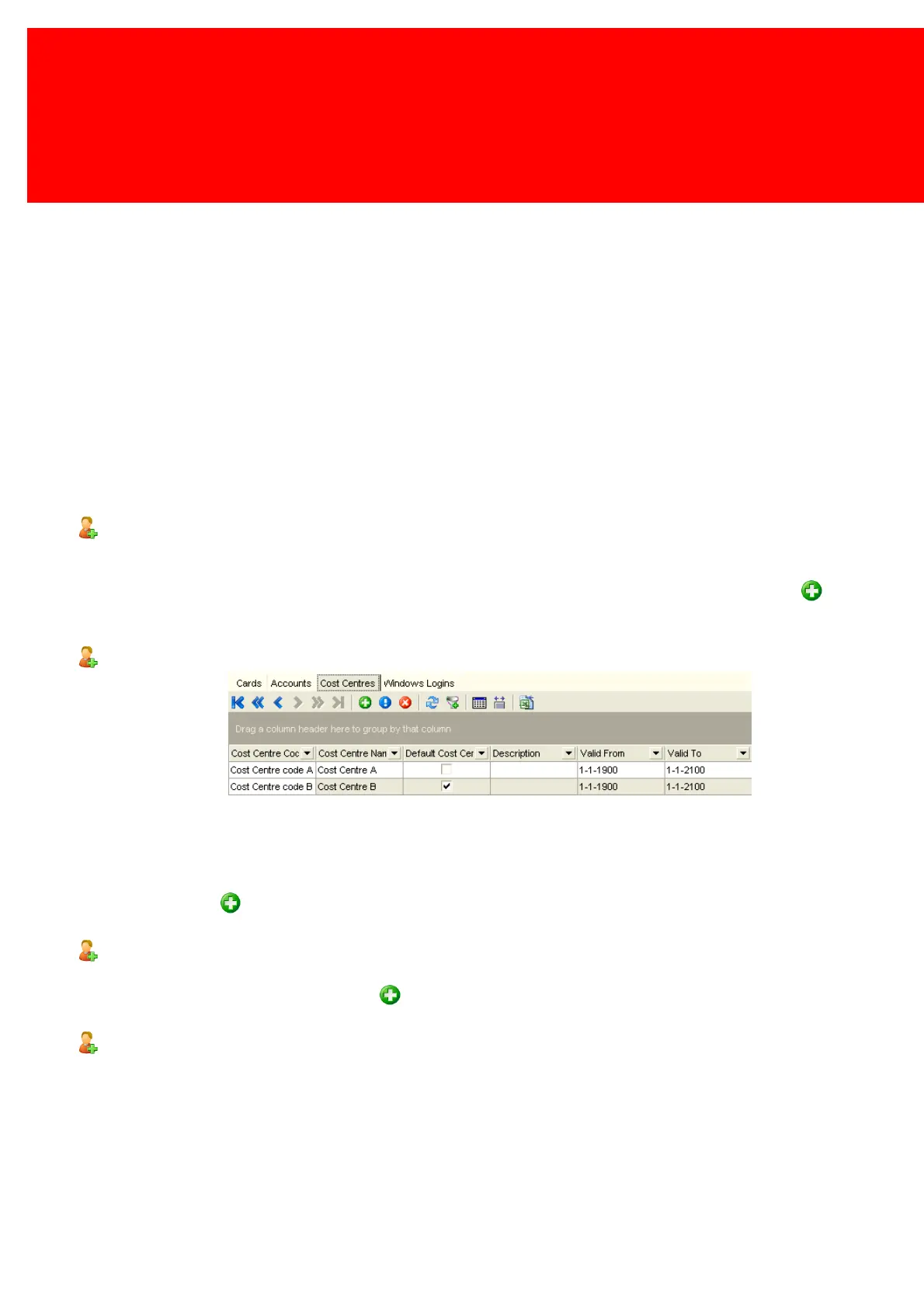
Cost Centres
A Cost Centre is the location where, in bookkeeping, the costs of a product are being made. Users can book their costs on
this Cost Centre. They can either do this directly or via their department.
Go to the Cost Centres tab .
Press the Add button to assign a Cost Centre to this user. Enter Cost Centres A and B, make B the default.
Accounts
This will show all the Accounts linked to the User.
Go to the Accounts tab. Press the Add button to create an Account for this user.
Cards
This will show all the Cards linked to the User.
Go to the Cards tab. Present a card to the PayCon to add a new card.


 To Next Page