Up/Down Controller User Info/Support Blood Glucose Records
Appendices
129
Cleaning
You can clean the outside of the PDM with a clean, damp cloth.
If the battery compartment becomes soiled, gently shake out
the debris or use a dry, lint-free cloth to remove it.
Replacing batteries
The PDM uses two (2) AAA alkaline batteries. You can purchase
them at any grocery, hardware, or convenience store.
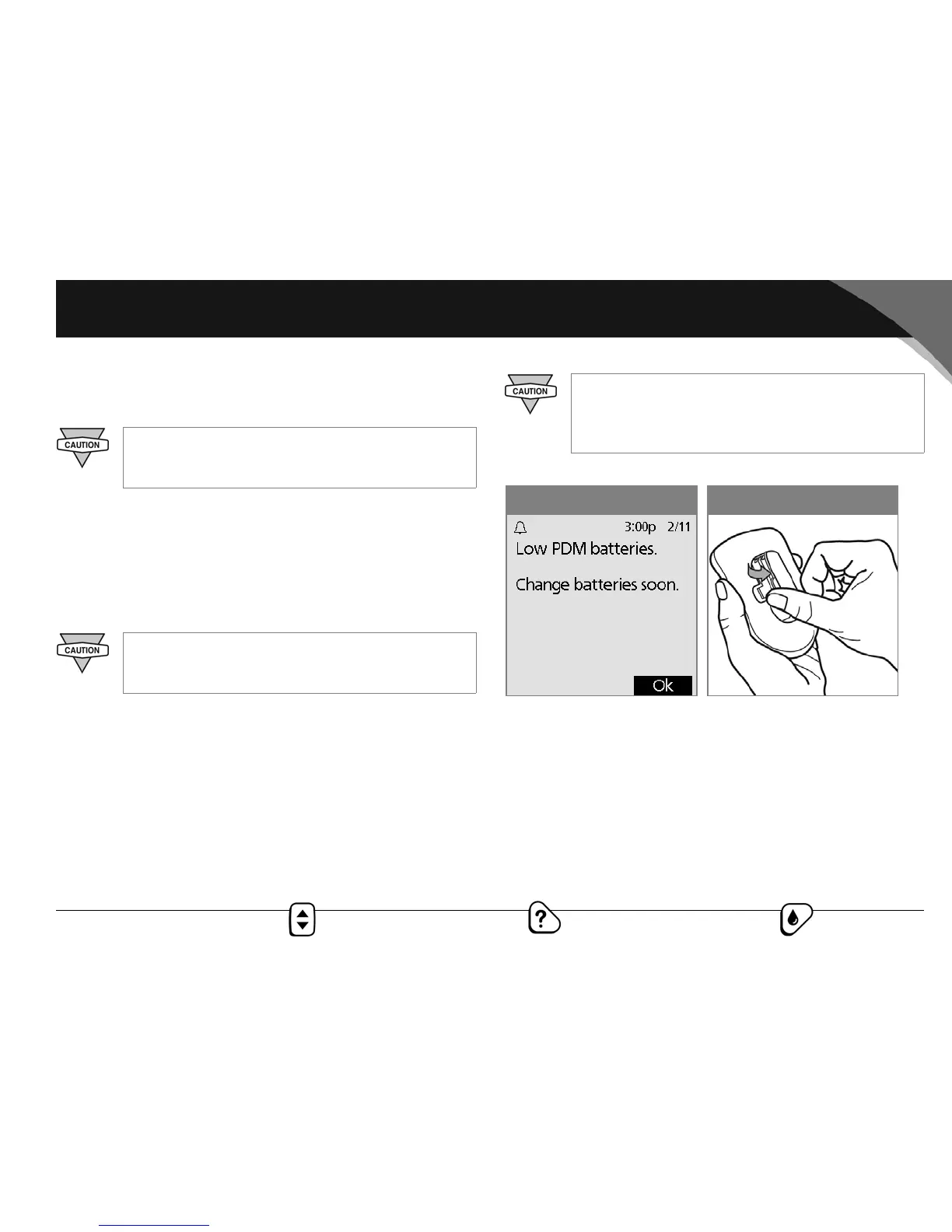
On average, a pair of batteries powers the PDM for 4 weeks. The
PDM automatically alerts you when its battery power gets low
(see Figure A-1). When you see the “Low PDM battery” alert,
press OK to turn off the alert. Replace the batteries as soon as you
can.
To replace batteries
1. Open the battery compartment on the back of the PDM by
pushing the compartment latch inward and then upward
(Figure A-2). No special tools are necessary.
Do NOT use IV Prep wipes, soap, detergent, or
solvents. Never put any liquid into the battery com-
partment.
Use only new AAA alkaline batteries to power the
PDM. Never use old or used batteries; the PDM may
not work properly.
If the batteries run out, data in the memory is at risk.
DO NOT remove the old batteries until you have
new ones at hand. The longer the batteries are
removed, the more the memory is at risk.
Figure A-2Figure A-1



 To Next Page