Home Food Library Power/Backlight
4
Understanding and Delivering Bolus Doses
32
■ Deliver an Extended Bolus
The extended bolus feature lets the OmniPod System deliver
some (or no) insulin now and the remainder over a period of
time you choose.
Deliver an extended bolus instead of a normal bolus
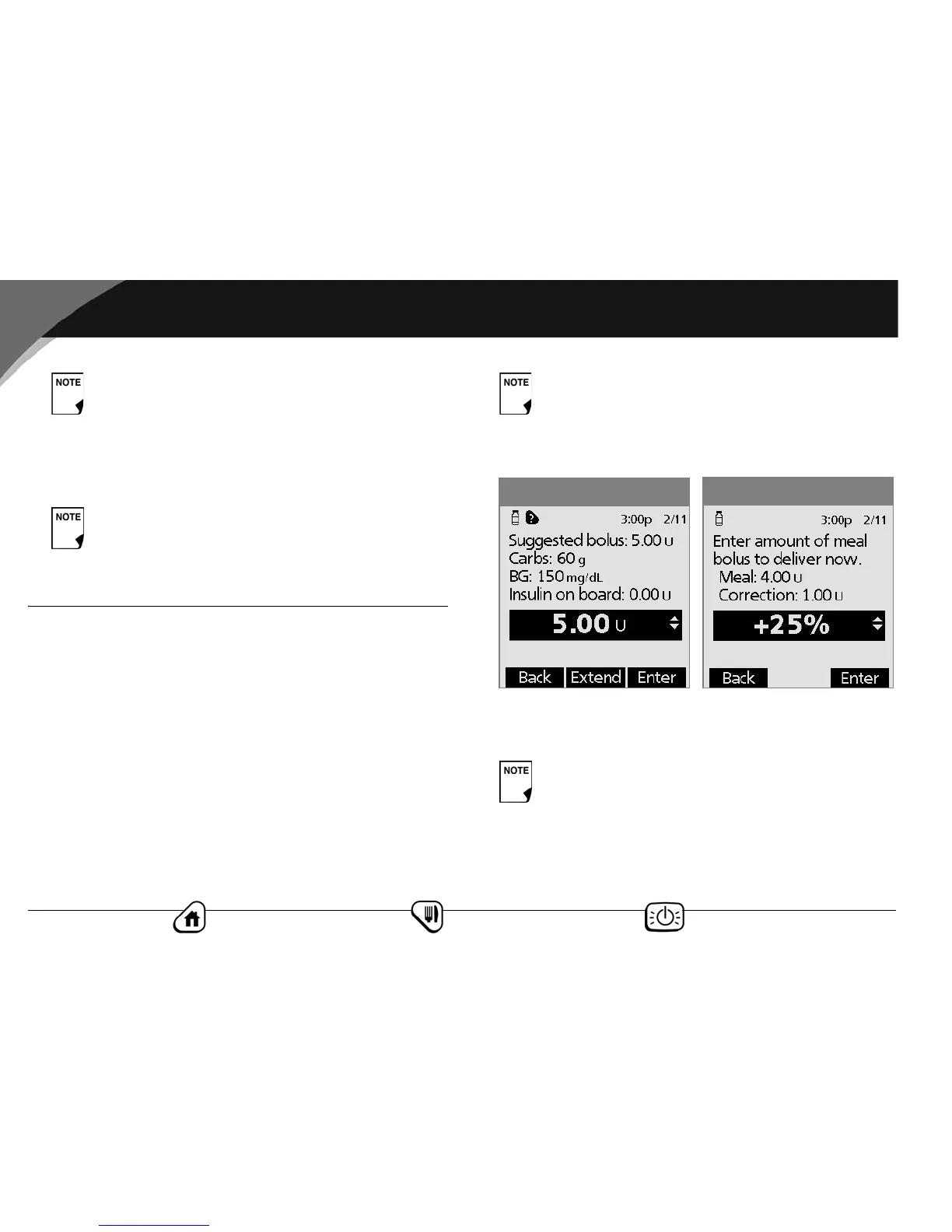
1. After you get your suggested bolus, press Extend instead of
Enter (see Figure 4-5).
2. Enter the units of insulin or percentage of the bolus that you
want to take immediately (Figure 4-6), then press Enter.
As a safety feature, the OmniPod System only allows
you to give a bolus at or below the maximum bolus
dose you have set. See Chapter 6, Using the Personal
Diabetes Manager, for information on resetting your
maximum bolus dose. Consult your healthcare pro-
vider before changing this setting.
Once a pod is activated and communicates with the
PDM, it can only receive commands from that PDM,
not from any other.
If you have set the Extended bolus option to Off,
the PDM will not display the Extend soft key. For
information on turning this feature on and off, see
Chapter 6, Using the Personal Diabetes Manager.
To learn how to set extended boluses in percentages
or units, see Chapter 6, Using the Personal Diabetes
Manager.
Figure 4-6
Figure 4-5



 To Next Page