Home Food Library Power/Backlight
Appendices
138
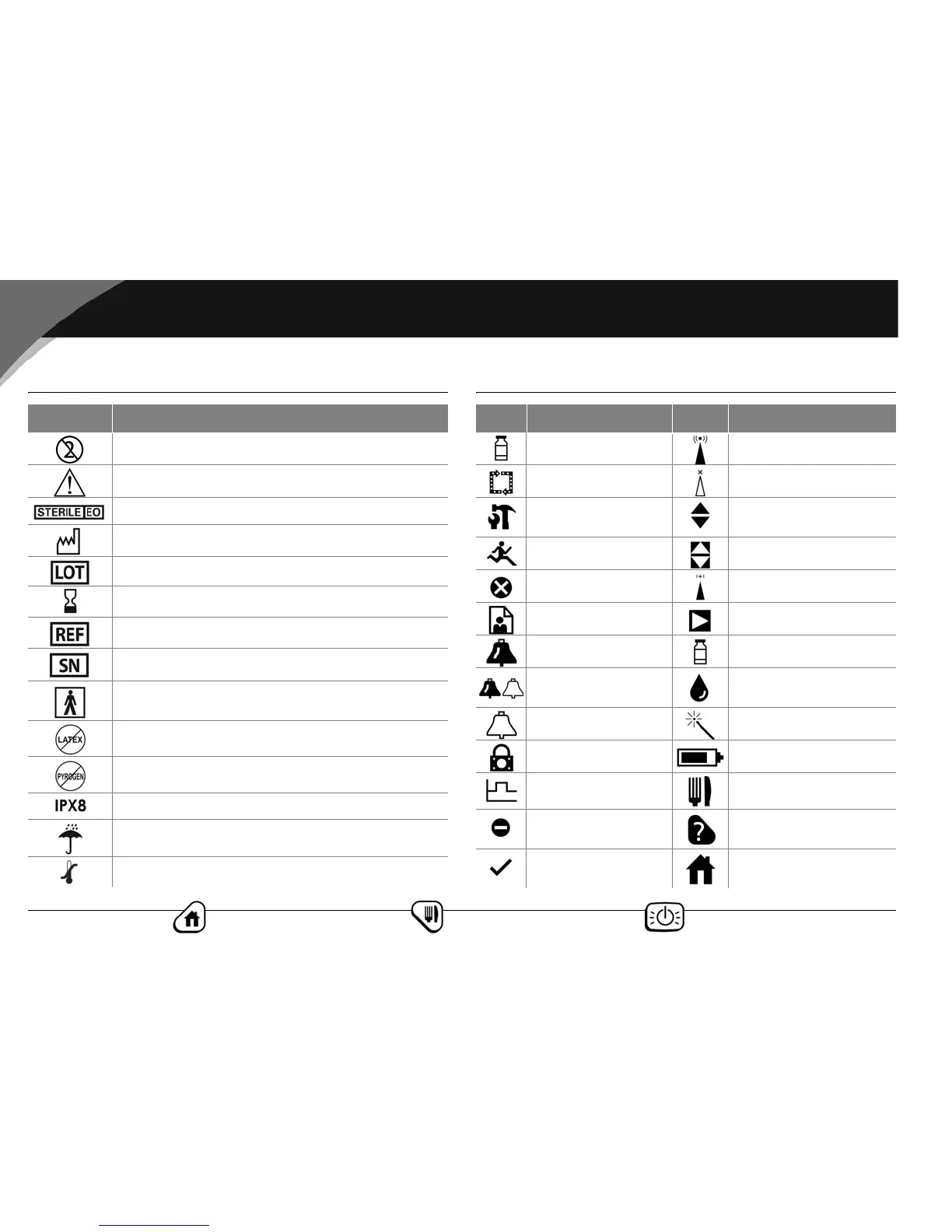
■ OmniPod System Label Symbols ■ Personal Diabetes Manager Icons
Symbol Meaning
Do not reuse this device. Single-use only.
Please read instructions for use (see User Guide).
Sterilized by ethylene oxide
Manufacture date: (year–month)
Lot number
Expiration date (use-by date): (year–month)
Reference/model number: (reorder number)
Device serial number
Type BF medical device
(protection from electrical shock)
Latex free
Non-pyrogenic
Watertight to 8 feet for 30 minutes
Keep dry
Storage temperature
Icon Meaning Icon Meaning
Bolus Communication
Pod change Communication failure
Diagnostics/
settings
Up/Down
Temp basal Up/Down reverse
Suspend/cancel Status
My Records Text entry right
Advisory alarm Insulin gauge
(alternating)
Hazard alarm
Apply blood sample/
Blood glucose records
Alert Setup Wizard
PDM lock Battery
Basal program Food library
“Lost” history
record
User Information/
Support
“Unconfirmed”
history record
Home screen



 To Next Page