Home Food Library Power/Backlight
8
Record Keeping
90
■ Blood Glucose History Records
The PDM stores blood glucose records for the past 90 days. You
can choose to view individual readings, single-day trends and
individual readings, or trends for the previous 7, 14, 30, 60, or 90
days.
View single-day trends
1. On the Home screen, use the Up/Down Controller button
to choose My records, then press Select.
2. Choose BG history, then press Select.
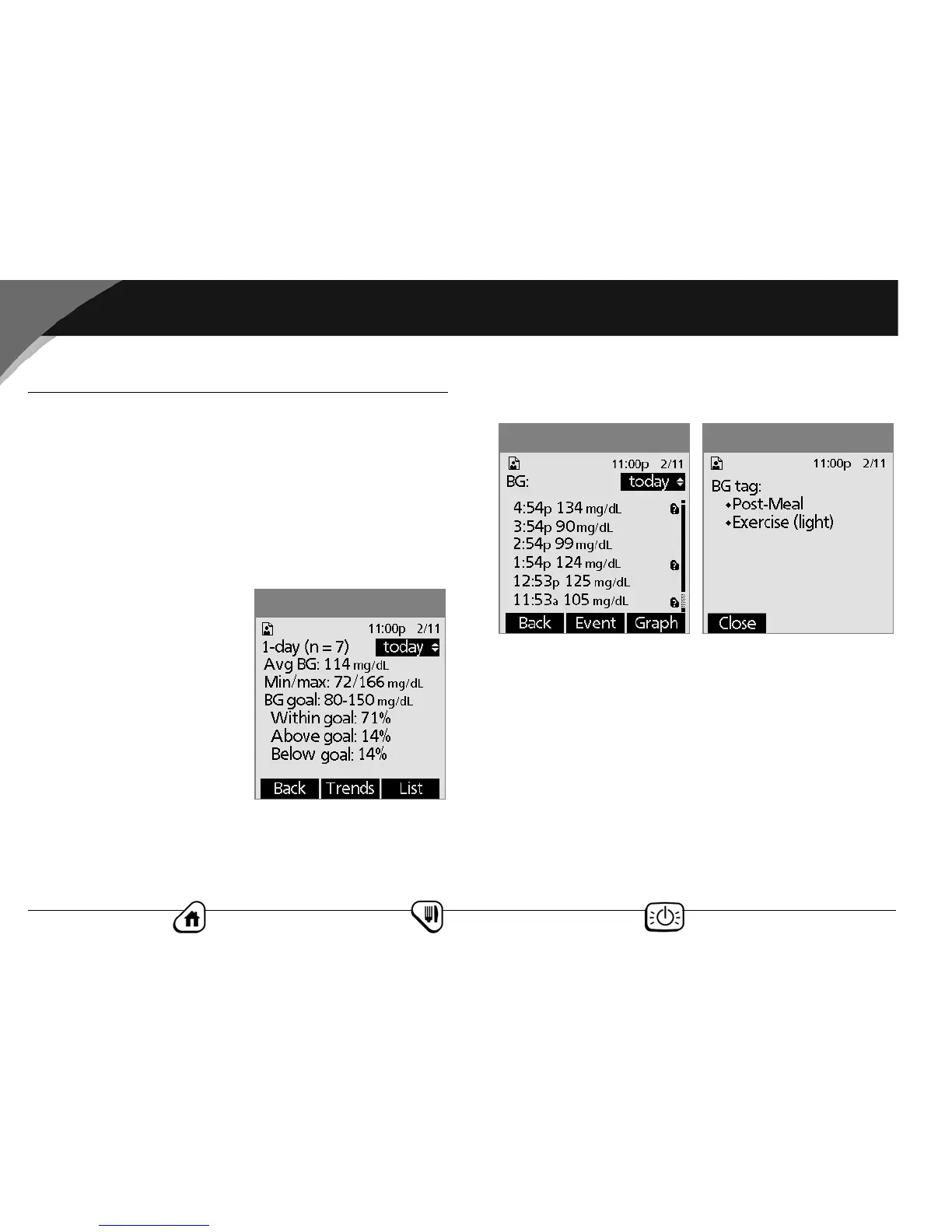
The PDM displays the
current-day trends first
(Figure 8-5), including:
• Number of days and
number of blood glucose
readings (n)
• Average blood glucose
(Avg BG)
• Lowest and highest blood
glucose (Min/max)
•The BG goal you have set
• Percentage of readings within the BG goal
• Percentage of readings above the BG goal
• Percentage of readings below the BG goal
3. Press List to see a list of the current day’s readings
(Figure 8-6).
In the List view, press Event to select individual readings.
Readings containing additional information have a question
mark icon next to them. To see this additional information,
use the Up/Down Controller button to choose a reading.
Then press the User Info/Support button to view details
about that reading (Figure 8-7). Details include any icons for
that reading, such as the “out of temperature range” icon or
the “tag” icon. See the Appendices for a list of icons and their
meanings.
Press Close to return to the List view.
4. Press Graph to see a graph of the data.
Figure 8-5
Figure 8-7Figure 8-6



 To Next Page