Home Food Library Power/Backlight
7
Checking Your Blood Glucose
82
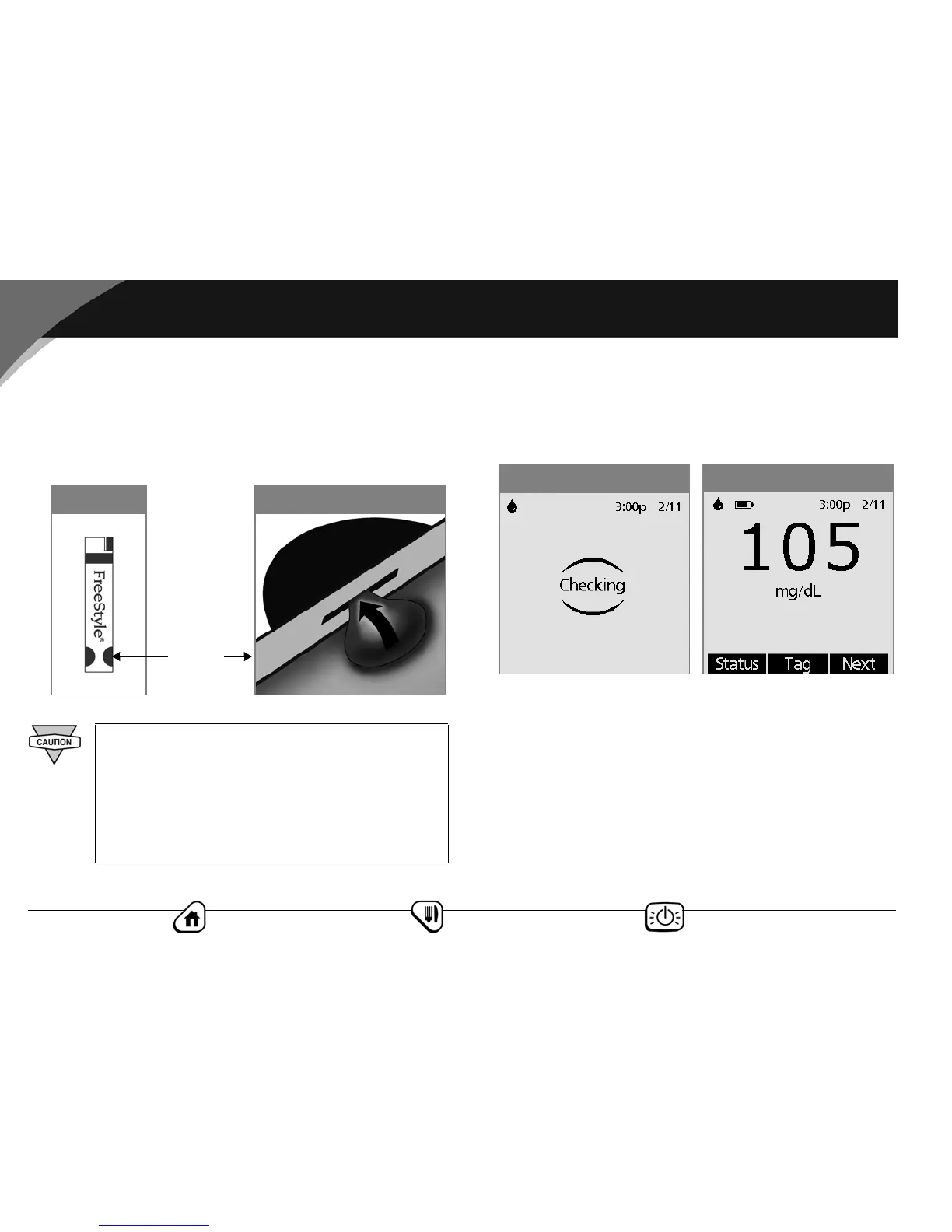
Use only one edge of the blood glucose test strip per test. Do
not apply blood to both edges (Figure 7-28). Only use strips
once. Discard used strips.
The strip acts like a sponge and pulls the blood into the strip
through the edge (Figure 7-29).
Wait for the reading
1. Do not lift up the strip until you hear 1 beep or see the word
“Checking” on the screen (Figure 7-30). This means you
applied enough blood and the meter is reading your glucose.
2. If after 5 seconds the PDM does not display “Checking,” the
sample may be too small. If needed, add more blood to the
same edge of the strip for up to 60 seconds from the time of
the first application.
3. The reading is complete when you hear 2 beeps (if BG sound
is turned On) and the PDM shows your reading on the screen
(Figure 7-31).
Do not:
• Press the strip against the test site
• Scrape the blood onto the strip
• Apply blood to the flat side of the strip
• Apply blood to the strip when it is out of the meter
• Put blood or foreign objects into the test strip port
Figure 7-29Figure 7-28
Edge of
test strip
Figure 7-31
Figure 7-30



 To Next Page