Up/Down Controller User Info/Support Blood Glucose Records
Using the OmniPod
5
47
Apply the new OmniPod
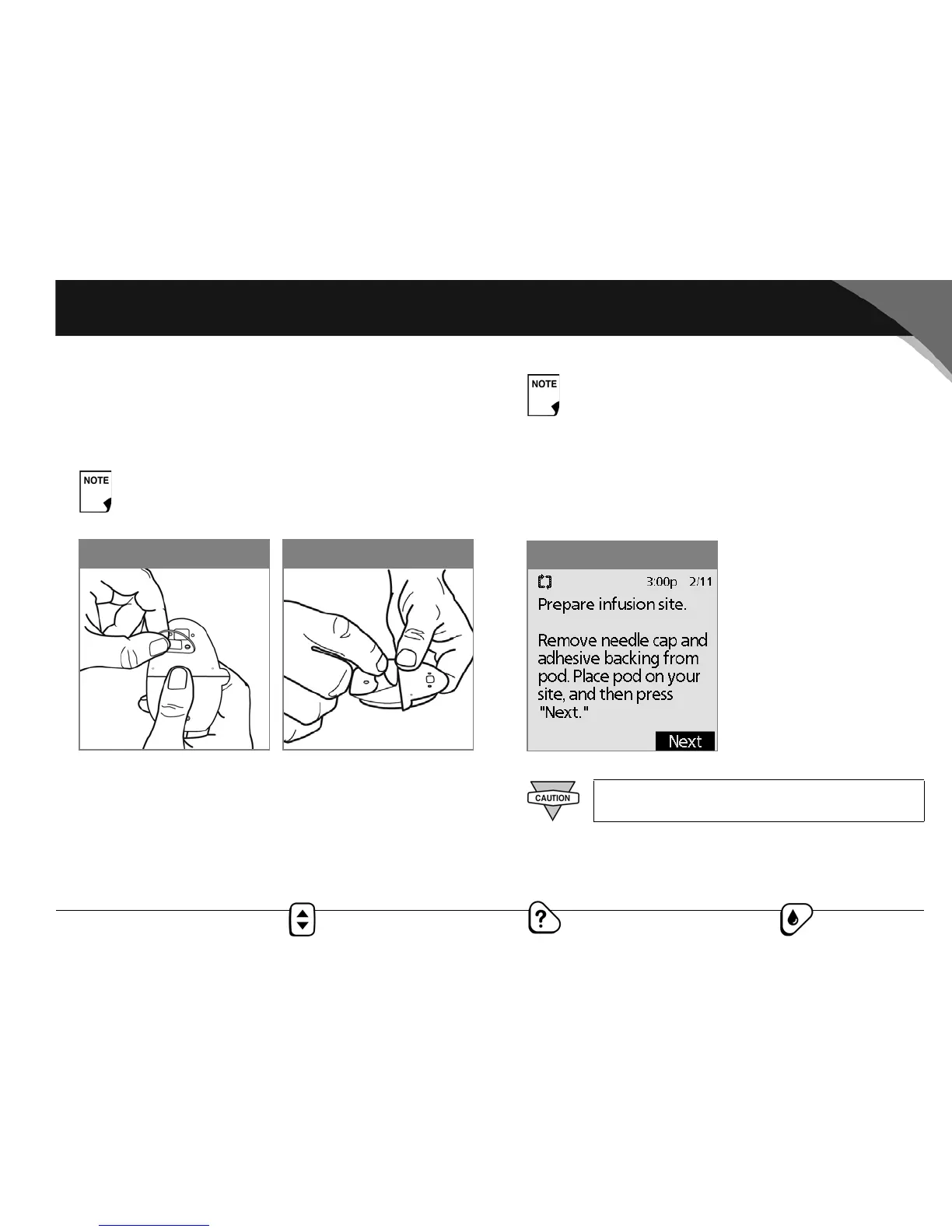
Prepare the pod for applying to your infusion site:
1. To remove the needle cap on the underside of the pod, pull it
upward (Figure 5-12).
2. Using the pull tabs, remove and discard the white paper
backing from the adhesive tape (Figure 5-13).
3. Apply the pod to the prepared infusion site. Press firmly to
secure it to your skin.
4. After you securely apply the pod, press Next (Figure 5-14).
When you remove the needle cap, a few drops of
insulin should be visible at the end of the needle.
Figure 5-13Figure 5-12
The OmniPod’s adhesive keeps it securely in place for
up to 3 days. However, if necessary, several products
are available to enhance adhesion. Ask your health-
care provider about these products. Avoid getting
body lotion, creams, or oils near the infusion site;
these products may loosen the adhesive.
The adhesive is designed for one-time use. Once
removed, a pod cannot be reapplied.
Figure 5-14



 To Next Page