Chapter 5 — Network Support
138 CK60 Mobile Computer with Windows Mobile User’s Manual
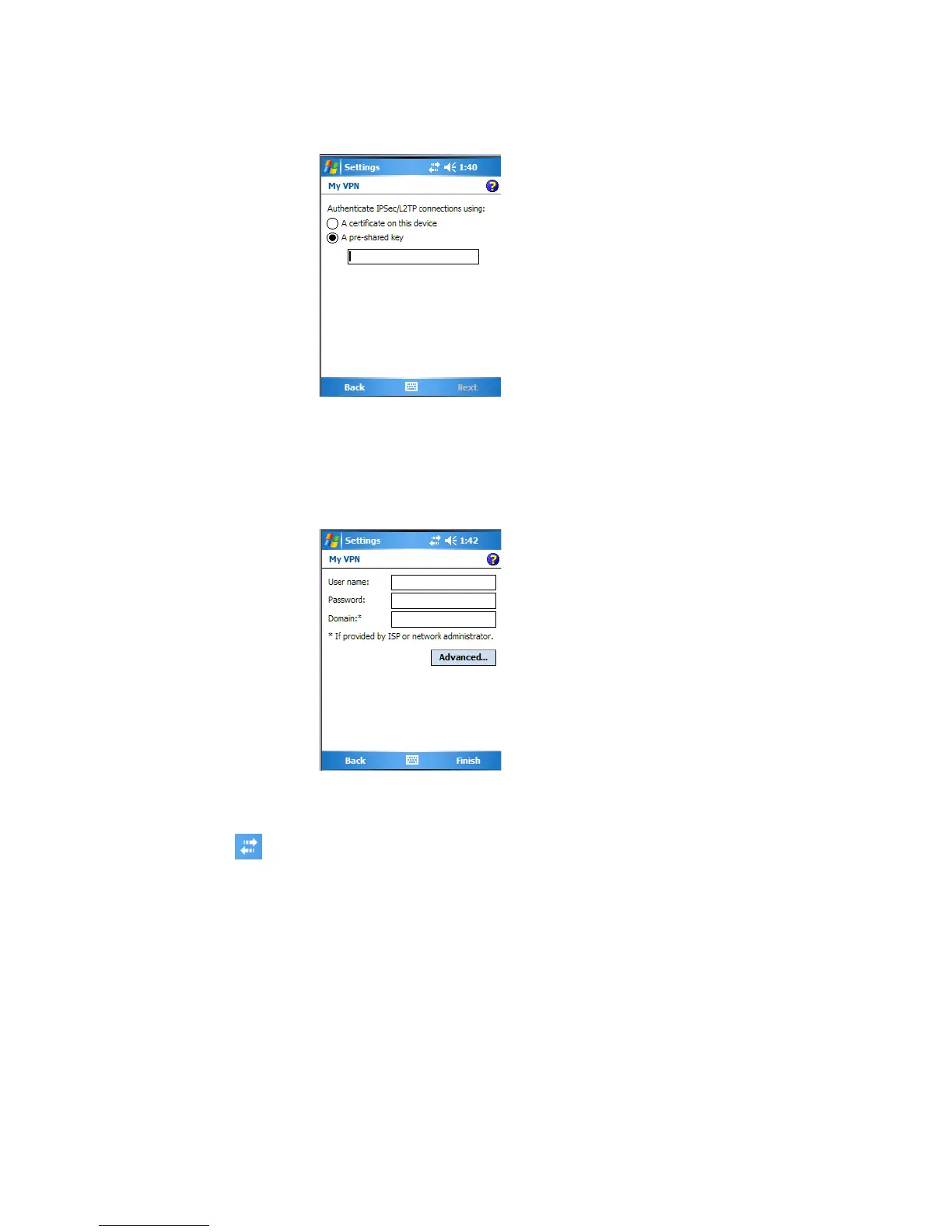
6 Select the type of authentication. If you select A pre-shared key, enter
the key provided by your network administrator.
7 Enter your user name, password, and domain name as provided by your
ISP or network administrator, then tap Finish. If a domain name was
not provided, try the connection without entering a domain name.
8 Insert necessary equipment, such as a network (Ethernet) card, into the
CK60, and use a desired program to begin connecting.
Ending a Connection
• When connected via cable or cradle, detach your CK60.
• When connected via Infrared, move the CK60 away from the other
computer or device.
• When connected via a wireless network, switch off the connection.
• When connected via modem or VPN, tap the Connectivity icon on the
top, then tap Disconnect.



 To Next Page