97
11.1.6 UPnP Configuration
By UPnP you can access the DVR through the web client which is in WAN via router without
port mapping.
① Click StartSettingsNetworkUPnP to go to the following interface.
② Make sure the router supports UPnP function and the UPnP is enabled in the router.
③ Set the DVR’s IP address, subnet mask and gateway and so on corresponding to the router.
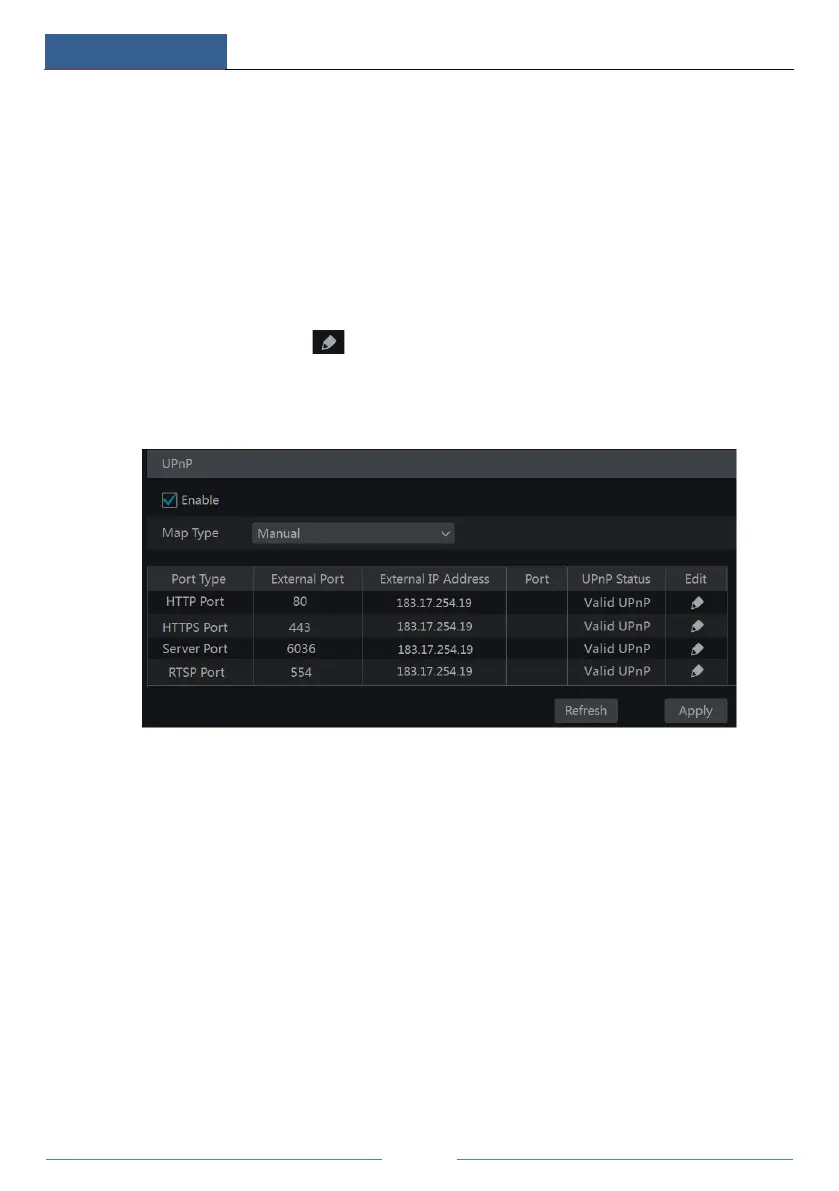
④ Check “Enable” in the interface as shown below and then click “Apply”.
Click “Refresh” to refresh the UPnP status. If the UPnP status were still “Invalid UPnP” after
refreshing it for many times, the port number would be wrong. Please change the mapping type
to “Manual” and then click to modify the port until the UPnP status turns to “Valid
UPnP”. Refer to the following picture. You can view the external IP address of the DVR. Enter
the external IP address plus port in the address bar to access the DVR such as
http://183.17.254.19:81.
11.1.7 NAT Configuration
Click StartSettingsNetworkNAT to go to the interface for NAT configuration. Check
“Enable” and then select the NAT server address. Click “Apply” to save the settings.



 To Next Page