65
the intelligence detection record.
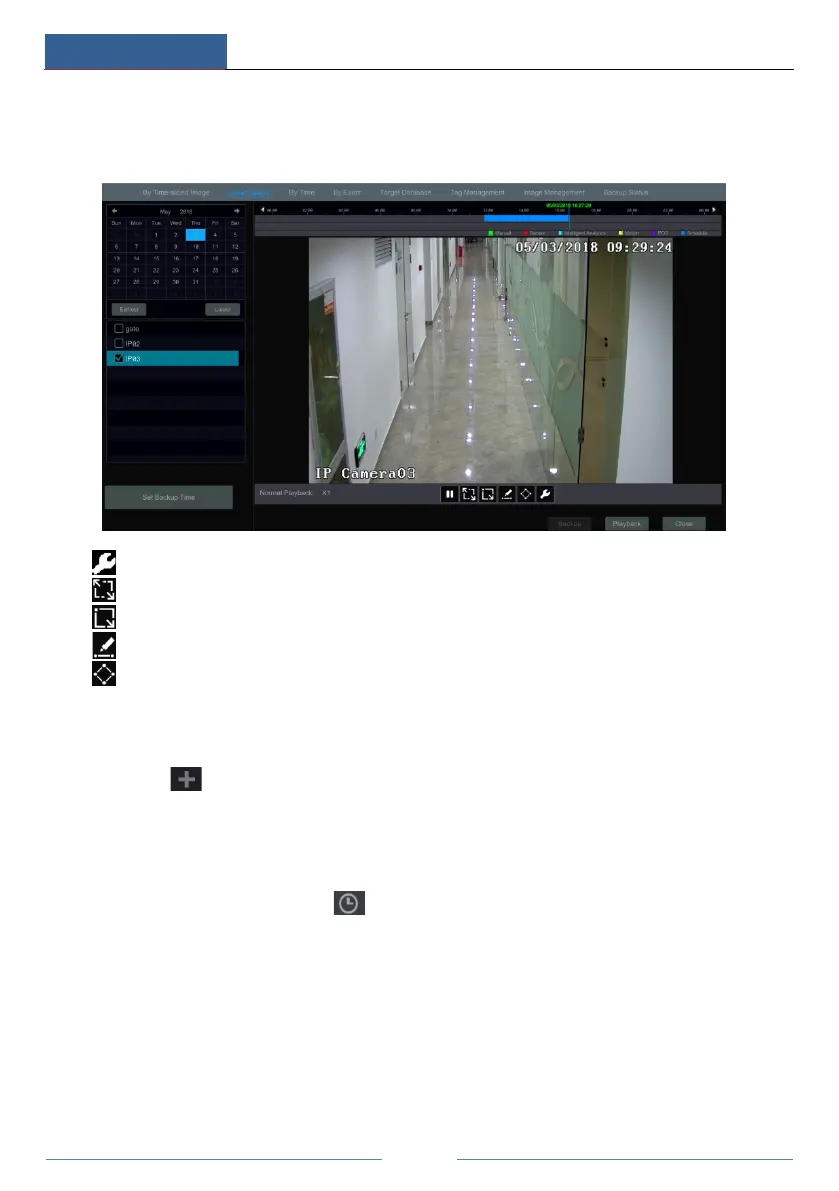
③ Check the channel and select the smart playback.
④ Set the backup time and select the channel to backup.
: Smart playback settings button. Click it to set intrusion percentage.
: Full screen motion button.
: Motion button.
: Draw line button. You can search the record of crossing the line after drawing the line.
: Draw quadrilateral. You can search the record in this quadrilateral after drawing it.
8.4.3 Search, Playback & Backup by Time
① Click StartSearch and BackupBy Time to go to “By Time” tab as shown below.
② Click on the bottom of the interface to add playback camera. Click “Modify” on the
top right corner of the camera window to change the camera and click “Clear” to remove the
camera.
③ Click the camera window to play the record in the small playback box on the left side of the
interface. You can set the date on the top left of the interface, check the event type as required
and click the time scale or click under the time scale to set the time. The camera window
will play the record according to the time and event type you set.
④ Drag the color blocks on the time scale to select the record data (or click the “Set Backup
Time” button on the bottom left corner of the interface to set the backup start time and end time)
and then click the “Backup” button for record backup. Click the “Playback” button to play the
record in the playback interface.



 To Next Page