46
motion/sensor/intelligence alarm happens.
Always(24
ⅹ
7) Record+Motion Record+Sensor Record+Analytics Record+POS Record:
Normal record is enabled all the time; motion/sensor/Analytics/POS alarm record will be
enabled when motion/sensor/ Analytics /POS alarm happens.
Some models may not support POS recording.
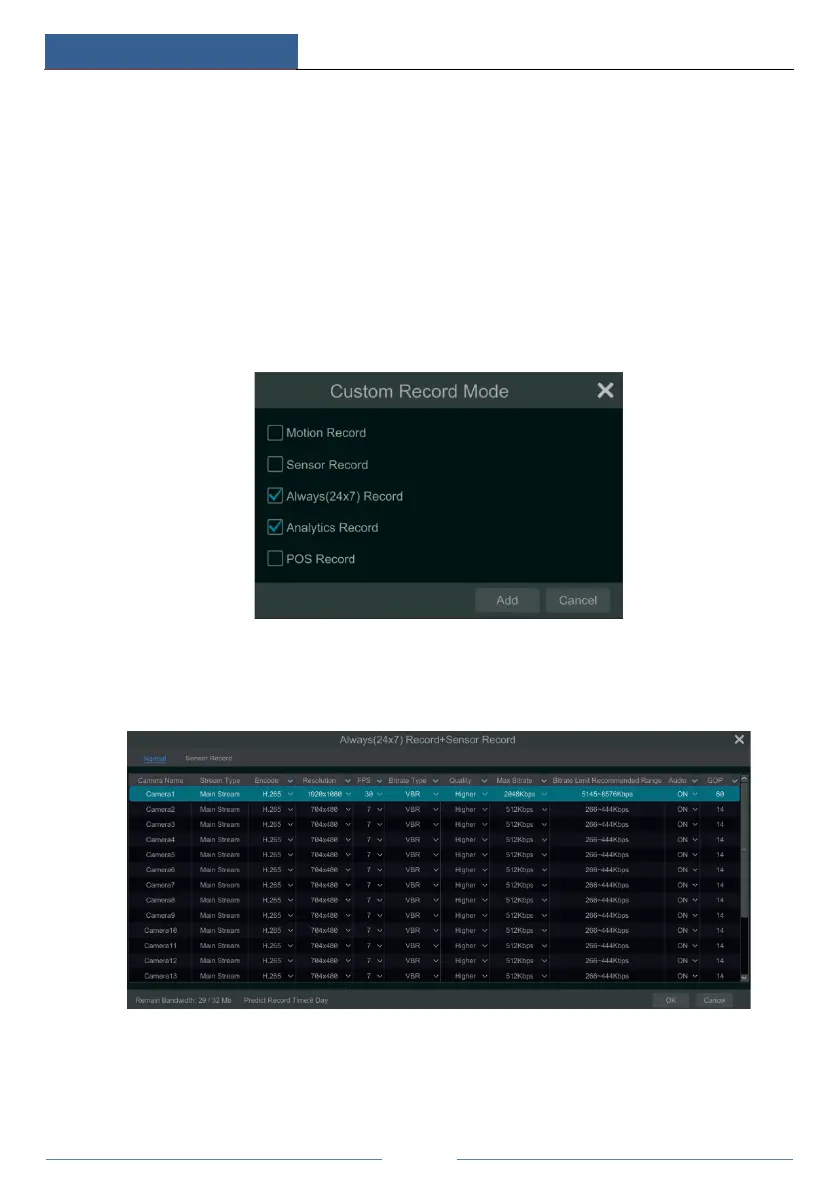
You can add more auto modes on intelligence record. Click “Advanced” button to pop up a
window as shown below. Check the modes in the window and then click “Add” button to show
the modes in the record mode list (in the window, the checked modes can be shown in the
record mode list while the unchecked modes cannot; you cannot only check “Always(24
ⅹ
7)
Record”).
Select one auto mode to pop up the corresponding window. Set the encode, GOP, resolution,
FPS, bitrate type, quality, max bitrate and audio of each camera and then click “OK” to save
the settings. Please adjust the parameters according to the actual condition.
Video Encode: the video encode format of the camera.
GOP: group of pictures.
Resolution: the higher the resolution is, the clearer the image is.
FPS: the higher the frame rate is, the more fluency the video is. However, more storage room



 To Next Page