38
5 Supplementary Equipment/Accessories
5.1 Air Knife Configurations and Mounting
Whether marking, cleaning, or welding, an air knife should always be utilized with the scanner in order
to help protect the coverslide from debris.
An Air Knife is recommended to protect the cover slide window from contamination. It uses compressed
air for dust blow off and cooling through the use of an airflow that covers the entire welding surface.
5.1.1 Mid-Power Scanner Mounting
To mount an air knife to the Mid-Power Scanner, please refer to the following procedure.
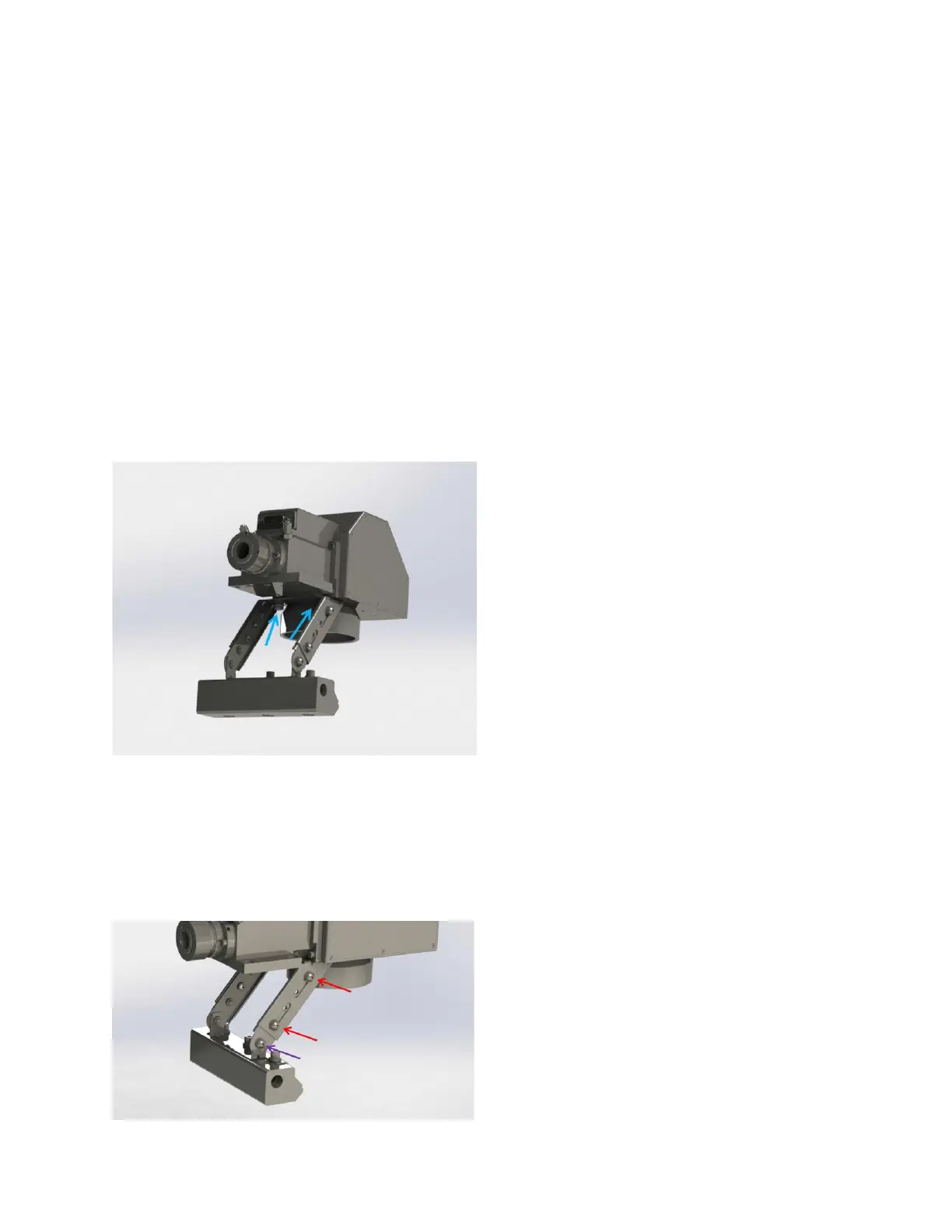
1. Mount the air knife assembly to the mounting holes located on the bottom of the scan head
using two bolts (blue arrows in Figure 5-1). The air knife assembly can be mounted to face any
direction in the field of view.
Figure 5-1 Mid-Power Scanner Air Knife Mount
2. Adjust the angle of the air knife by loosening bolts outlined in Figure 5-2 (purple arrow).
3. Adjust the slide assembly by loosening bolts outlined in Figure 5-2 (red arrows)
a. For optimal protection. The air knife should be positioned well below the coverslide.
Figure 5-2 Mid-Power Scanner Air Knife Adjustment



 To Next Page