64
7.3.2 Scan Controller to YLS Series Laser (with Fieldbus Interface) Connections
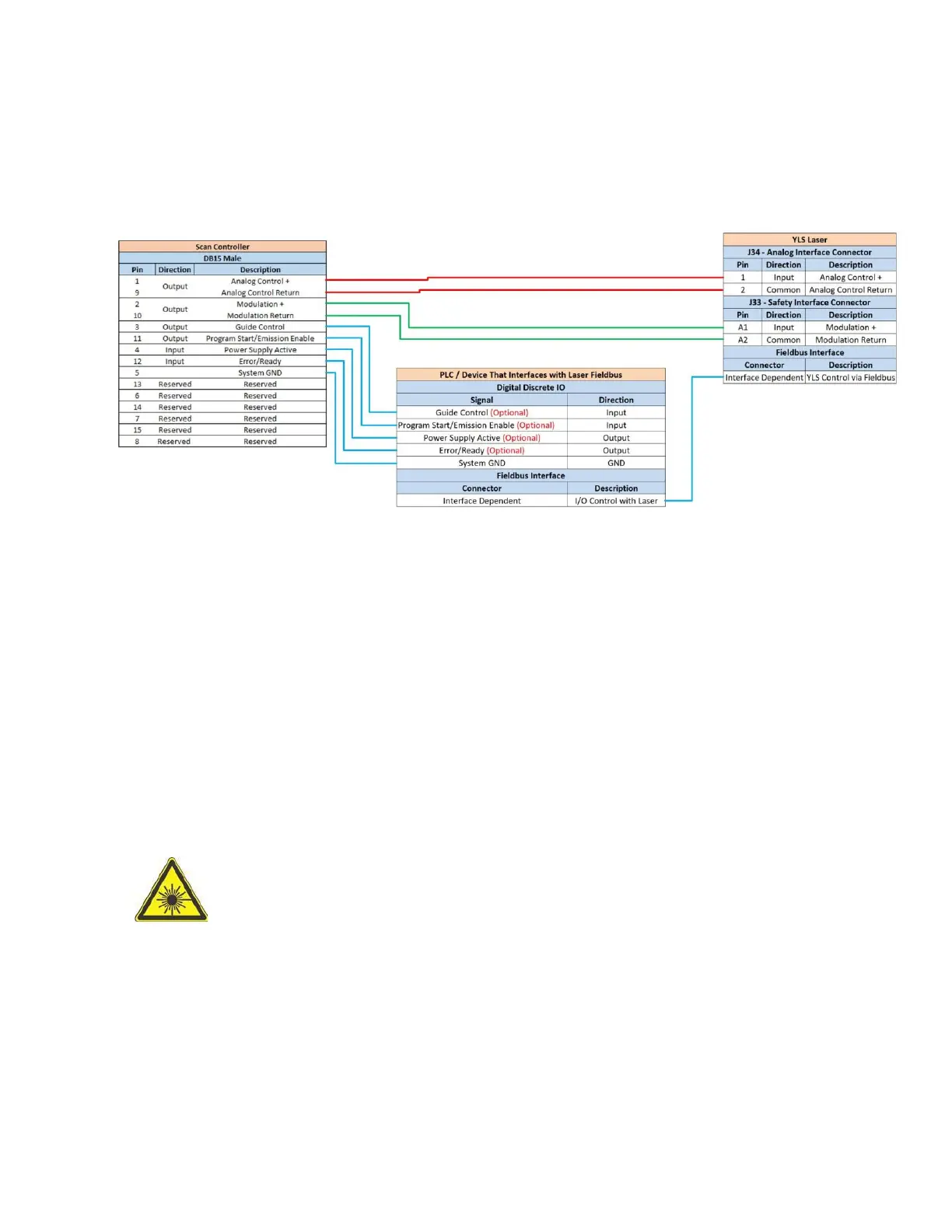
Figure 7-3 outlines an example setup between an IPG Scan Controller (with 24V Laser Interface) and YLS-
Series Laser utilizing a Fieldbus Interface.
Figure 7-3 Scan Controller to YLS Laser (Fieldbus Interface) Connections
The following is important to note concerning system operation:
The PLC acts as a pass-through in the above example and simply converts Scan Controller/Laser
signals accordingly.
None of the signals that are passed through the PLC from the scanner are actually required. It is
possible to operate the system without these signals but the following should be noted:
o Guide Control – The scanner/IPGScan will no longer control the guide laser ON/OFF.
This means that the user will need to enable the guide laser on the Laser instead of the
scanner controlling it when previewing process objects.
o Program Start/Emission Enable – Program Start is commonly required to be set active
prior to the YLS laser firing. The scanner can control this (and does by setting Program
Start Active at the start of every process object) via the hardwire interface but it is
recommended that the users set this active at the start of their process when using the
Fieldbus interface on a YLS series laser (and leave it active throughout the process).
Note that if External Control is not set to ON and the laser is armed, the laser will
fire if a commanded power is sent to the laser and Program Start is set active.
ALWAYS EXERCISE SAFE LASER PRACTICES WHEN ATTEMPTING TO ARM AND/OR
FIRE THE LASER.
o Power Supply Active & Error/Ready – Both signals are used to set laser status messages
in IPGScan. Although these signals are not required in order to operate the scanner, the
user will have error/interlock messages in IPGScan even when the laser is properly
armed and ready for processing if these signals are not connected.



 To Next Page