− 123 −
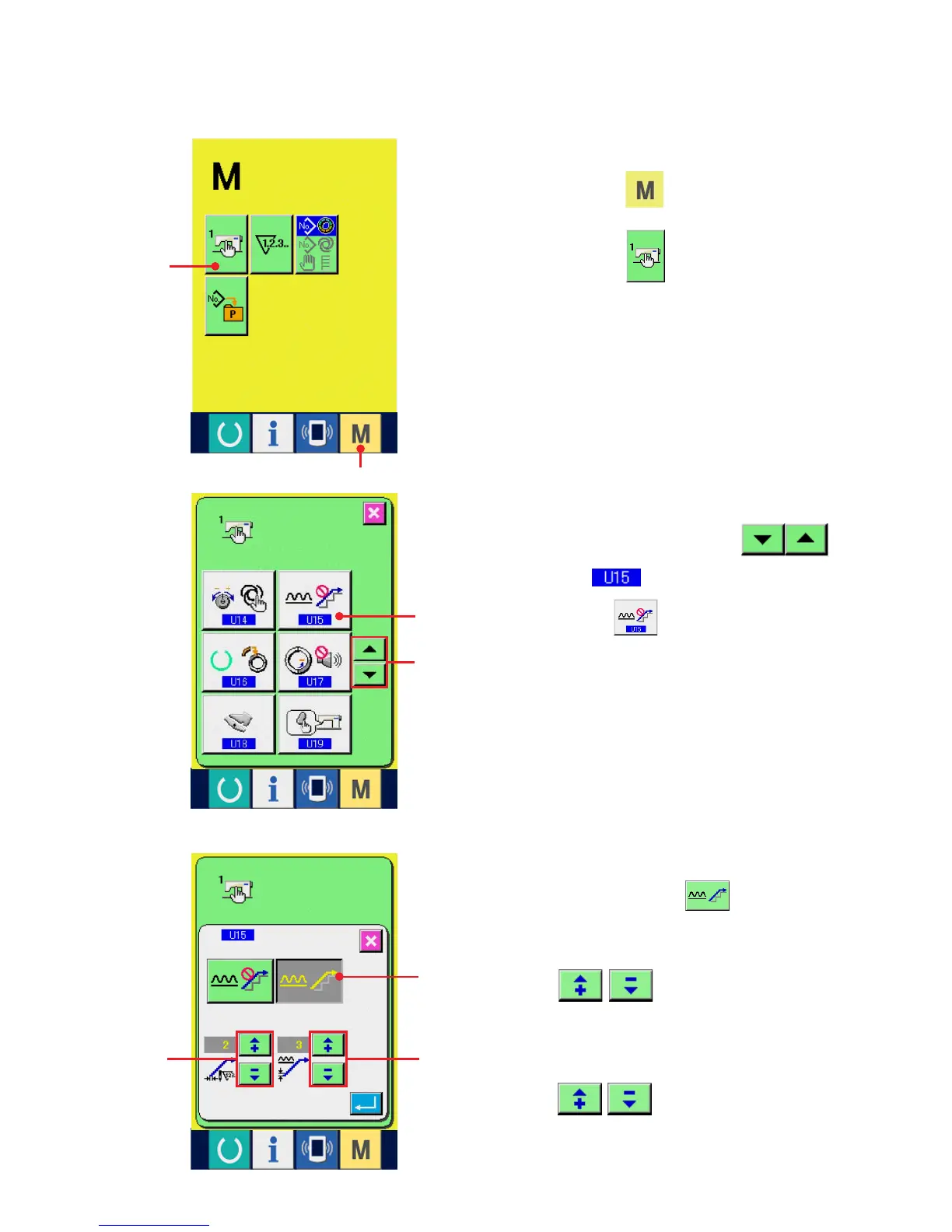
Setting procedure of the shirring smoothing function is explained.
1) Display the memory switch list screen.
When MODE key 1 is pressed, MEMORY
SWITCH button
2 is displayed on the
screen. When this button is pressed, the memory
switch list screen is displayed.
4
(2) Setting of the shirring smoothing function
2
3
5
76
1
3) Make the shirring smoothing function effective.
Select EFFECTIVE button 5.
4) Set the number of stitches of shirring
smoothing function.
Press 6 buttons to input the
number of stitches of shirring smoothing function.
5) Set the shirring amount of shirring smoothing
function.
Press 7 buttons to input the
shirring amount of shirring smoothing function.
2) Select the shirring smoothing function.
Press UP/DOWN SCROLL button
3 to select Shirring smoothing function
selection button 4. The shirring smoothing
function selection screen is displayed.



 To Next Page