− 69 −
4
A
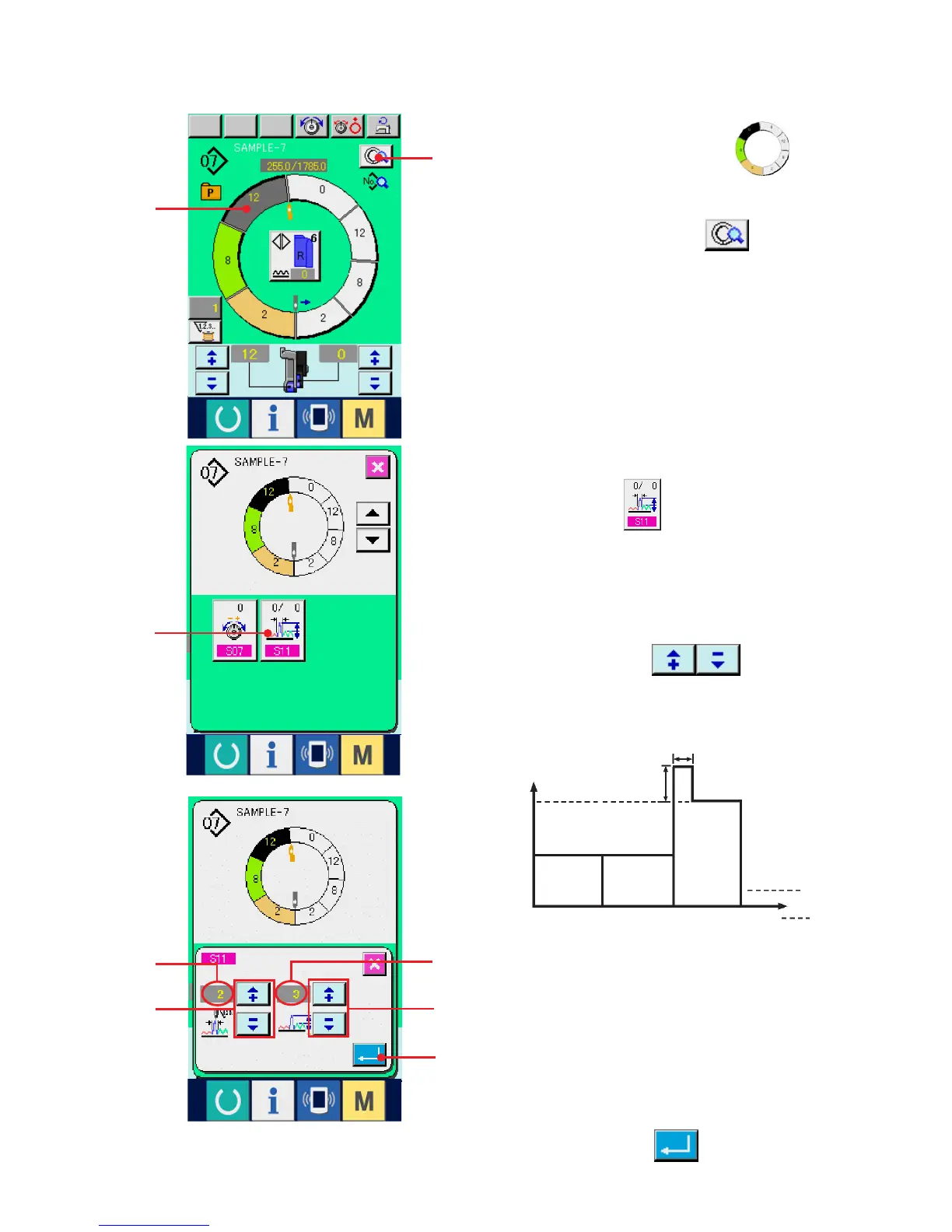
4) Press "+"/ "–" buttons 4 to change
compensation shirring amount set value A and
number of stitches of compensation shirring
amount B.
4
5
3) Press COMPENSATION SHIRRING AMOUNT
SETTING button 3.
1
(5) Increasing/decreasing the shirring amount immediately after changeover of step
<Compensation shirring amount setting>
1) Press STEP SELECTION button 1 to
select the step.
2) Press STEP DETAILS button 2.
2
3
Shirring amount
6
3
1
2
3
4
A
B
Step
¡ Compensation shirring amount is the shirring
amount to add to the shirring amount of the step
after changeover at the time of step changeover.
¡ Number of stitches of shirring amount
compensation is the number of stitches of the
section of number of stitches to add the
compensation shirring amount from the step
changeover.
5) Press ENTER button 5.
B



 To Next Page