− 54 −
1
2
3
3
4
(1) Prepare the materials.
1) Prepare left and right sleeves, and garment body.
(2) Turn the power ON.
1) Turn the power switch ON.
2) Data input screen is displayed after the display of
the initial screen.
Auto-lifter does not move until the
screen moves to the sewing screen or
the new creation screen. After it has
worked, it works in all screens. So, be
careful.
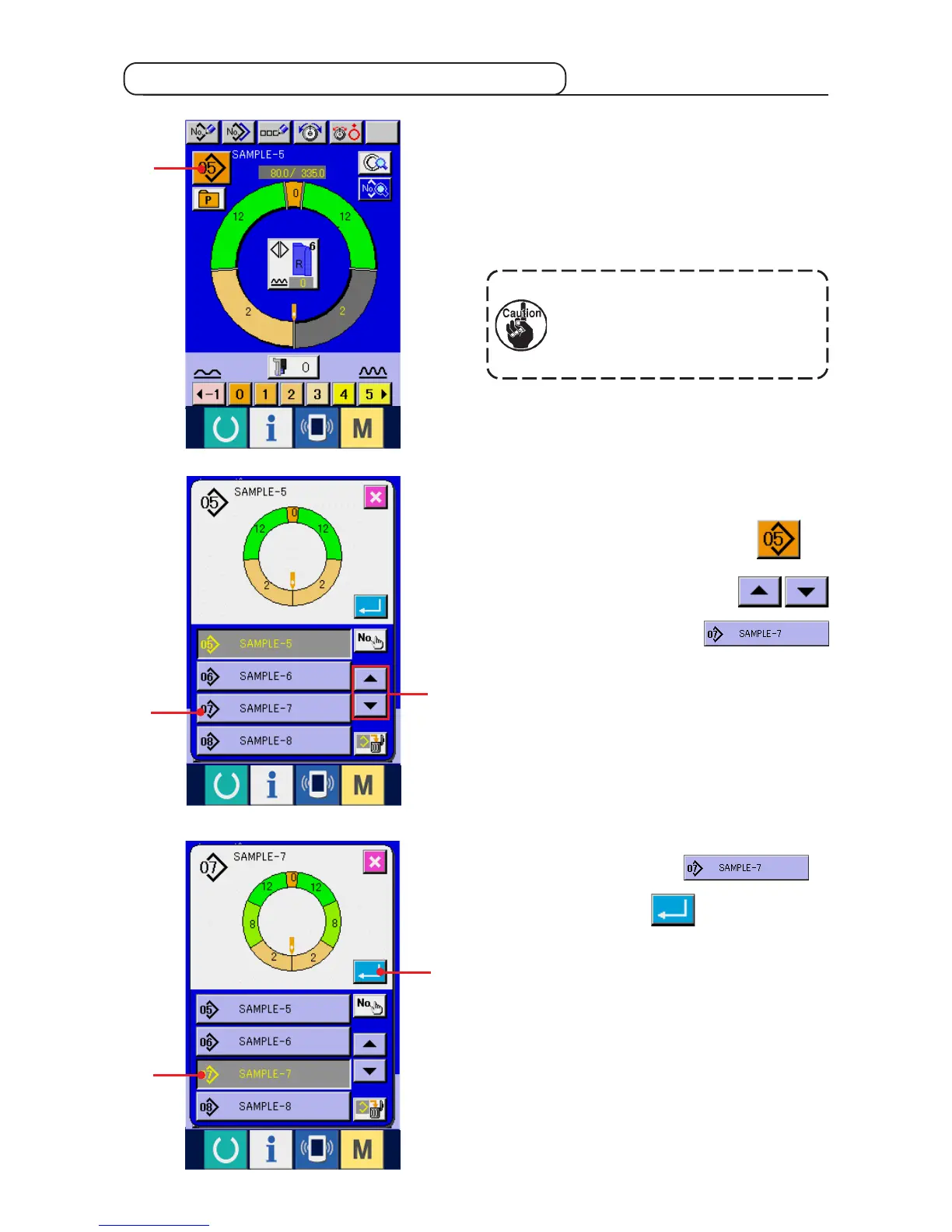
(3) Calling the pattern <Pattern No. selection>
Two programs (for right sleeve and left sleeve) are
entered in one pattern. Further, the respective
programs consist of single or plural steps (sewing
data between the respective notches are stored).
1) Press PATTERN SELECTION button 1.
2) Press UP/DOWN SCROLL buttons
2
to display PATTERN No.
button
3
of the pattern to be called.
3) Press PATTERN No. button
3
.
4) Press ENTER button 4.
7-5 Basic operation of the sewing machine



 To Next Page