− 142 −
3
4
5
1
2
2
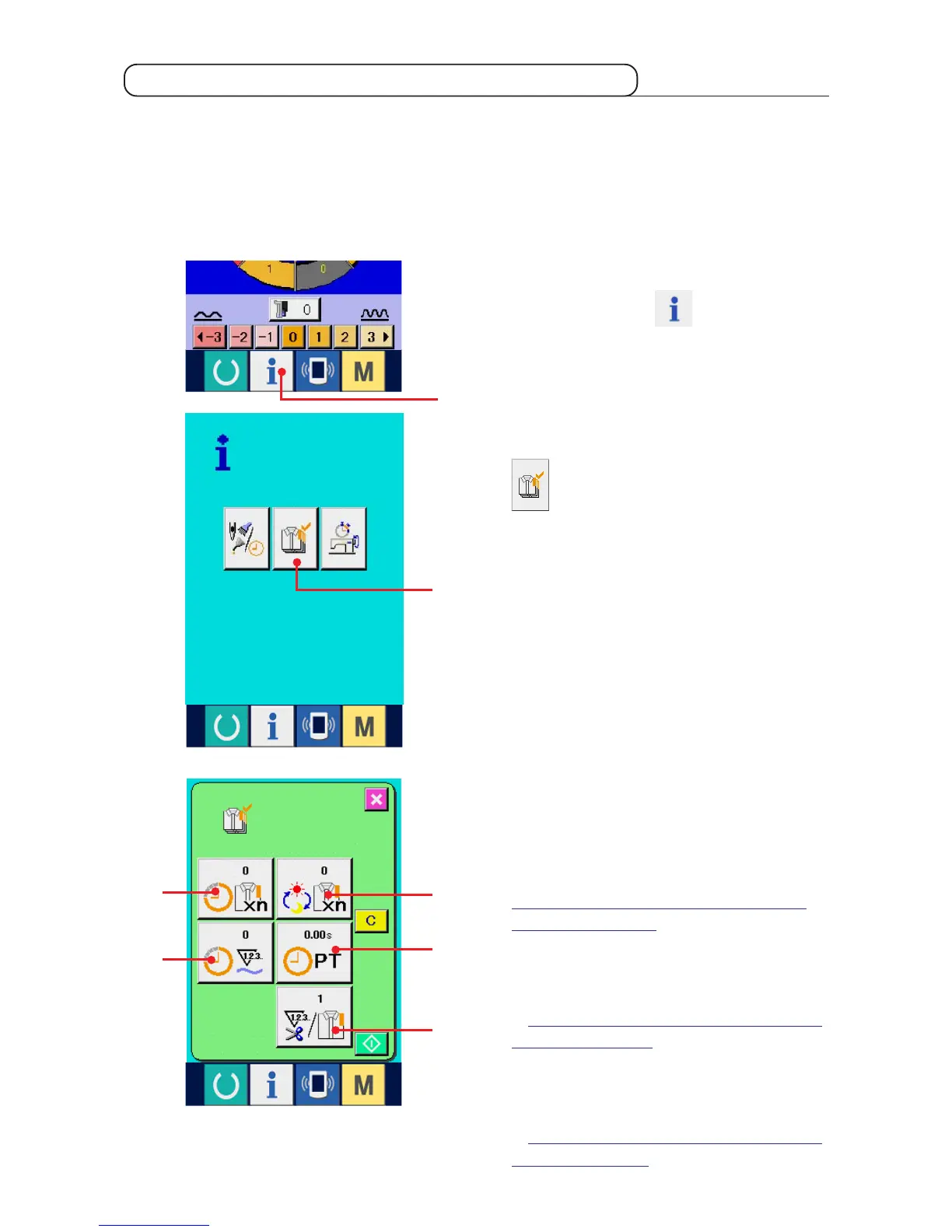
1) Display the information screen.
When information key 1 of the switch seat
section is pressed in the data input screen, the
information screen is displayed.
2) Display the production control screen.
Press production control screen display button
2 in the information screen. The production
control screen is displayed.
17-4 Observing the production control information
It is possible to designate the start, display the number of pieces of production from the start to the existing
time, display the number of pieces of production target, etc. in the production control screen.
There are two kinds of display ways for the production control screen.
(1) When displaying from the information screen
Information on the following 5 items is displayed
in the production control screen.
1 : Existing target value
Number of pieces of the target of products at the
present time is automatically displayed.
2 : FActual results value
Number of pieces of the sewn products is
automatically displayed.
3 : Final target value
Number of pieces of the final target of products is
displayed.Input the number of pieces referring to
"17-5 Performing setting of the production
control information".
4 : Pitch time
Time (second) required for one process is
displayed.Input the time (unit : second) referring
to "17-5 Performing setting of the production
control information".
5 : Number of times of thread trimming
Number of times of thread trimming per process
is displayed. Input the number of times referring
to "17-5 Performing setting of the production
controlinformation".
1



 To Next Page