− 156 −
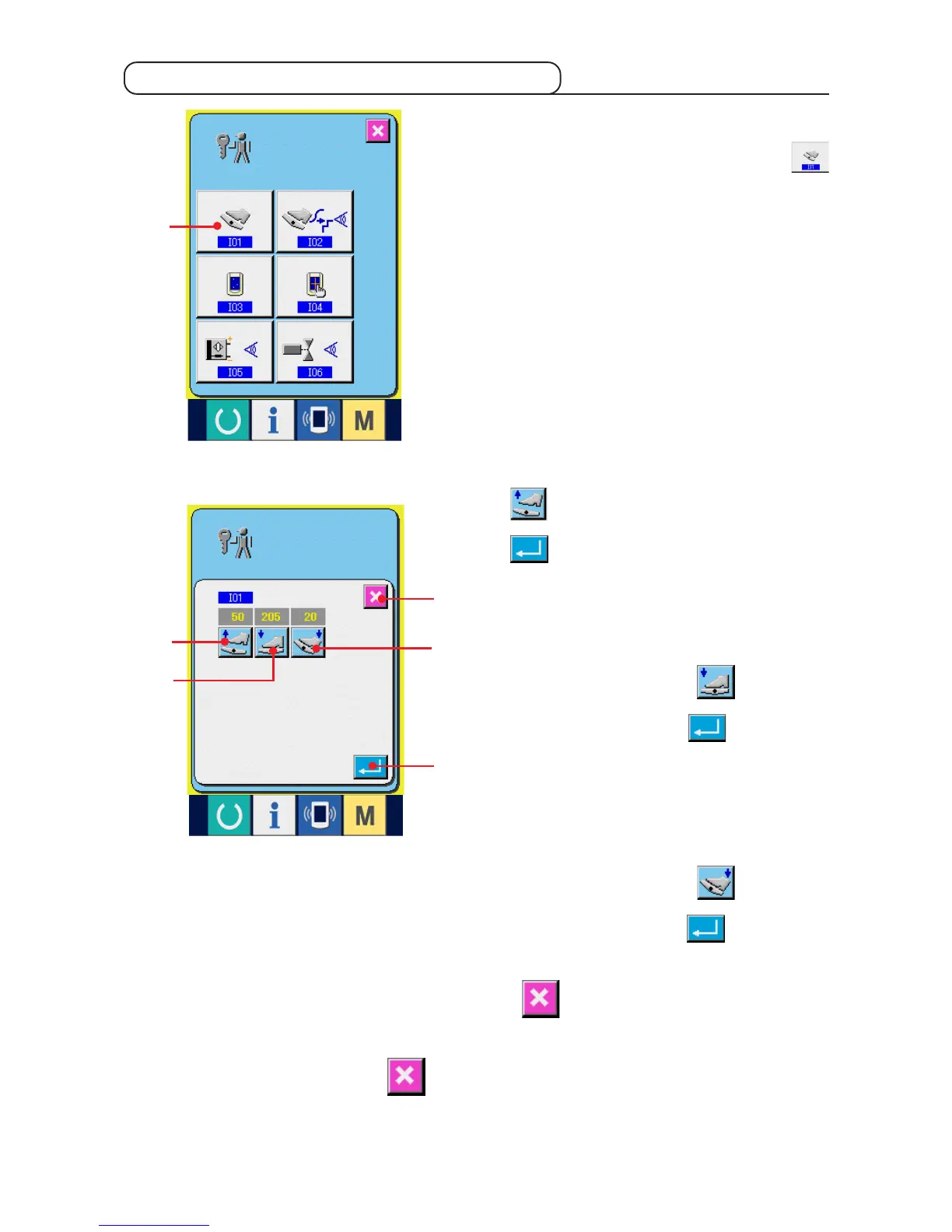
1) Display the auxiliary pedal setting screen.
When AUXILIARY PEDAL SETTING button
1 in the check program screen is pressed, the
auxiliary pedal setting screen is displayed.
1
2
3
4
5
6
21-2 Performing the auxiliary pedal setting
2) Perform the auxiliary pedal setting.
™ Auxiliary pedal release position setting :
Release the auxiliary pedal and press AUXILIARY
PEDAL RELEASE POSITION SETTING button
2 When the display is determined, press
6 to determine the data.
™ Auxiliary pedal front-part depressing position
setting :
Depress the front-part of auxiliary pedal and press
AUXILIARY PEDAL FRONT-PART DEPRESSING
POSITION SETTING button 3. When the
display is determined, press 6 to determine
the data.
™ Auxiliary pedal back-part depressing position
setting :
Depress the back-part of auxiliary pedal and press
AUXILIARY PEDAL BACK-PART DEPRESSING
POSITION SETTING button 4. When the
display is determined, press 6 to determine
the data.
• When all settings are completed, press CANCEL button 5 to complete the setting. The screen
returns to the check program screen.
* Error occurs when CANCEL button
55
55
5 is pressed unless the difference of each setting item is
5 or more,



 To Next Page